
An architecture and decision guide for Azure architects whose workloads run in nonpaired regions or regions with restricted-access pairs, based on Microsoft Learn documentation and region and capability tables counted on October 10, 2026. It classifies the three region situations, maps the 18 pair-only capabilities to alternatives that work between any regions, and covers keys, backups, access requests, recovery region choice and drills.
At a glance
Key findings
- In Microsoft's region pairs table retrieved October 10, 2026, 13 of the 49 regions open to every customer have no pair and 8 more are paired with a restricted-access region; in Europe only 4 of 15 have an openly accessible pair. [1]
- 18 of the 58 built-in multiregion capability rows work only between paired regions, mostly storage GRS, platform backup copies such as Azure Backup cross-region restore and SQL automated backups, and Microsoft-managed failover for services including Key Vault. [2]
- Replication you configure, including object replication, SQL failover groups, Cosmos DB multi-region accounts and Site Recovery, works between any regions, but object replication excludes hierarchical namespace accounts and customer-managed account failover. [2][9]
- Key Vault backups restore only within the same subscription and geography, and each nonpaired region is alone in its geography, so regional vaults filled by a pipeline or Managed HSM replication take their place. [4][7][11]
- Site Recovery reserves restricted-access regions for in-country recovery and needs both subscriptions allow-listed, so access requests belong in the design phase. [3][15]
Name the region situation first
An Azure region is in one of three situations for disaster recovery, and each needs a different plan. In Microsoft's region pairs table, retrieved on October 10, 2026, 28 of the 49 regions open to every customer have a pair you can also deploy into, 8 are paired with a restricted-access region, and 13 have no pair at all: Austria East, Belgium Central, Chile Central, Denmark East, Indonesia Central, Israel Central, Italy North, Malaysia West, Mexico Central, New Zealand North, Poland Central, Qatar Central and Spain Central. [1]
In a region with no pair, 18 of the 58 built-in multiregion capabilities in Microsoft's service table are unavailable, because they operate only between paired regions. Almost all are copies and failovers that Azure runs on your behalf: geo-redundant storage (GRS) for blobs, Data Lake Storage, files, queues and tables, Azure Backup's cross-region restore, the geo-replicated automated backups of SQL Database and SQL Managed Instance, Cosmos DB periodic backups, and Microsoft-managed failover for Key Vault and four other services. The other 40 rows, mostly replication you configure yourself, work between any two regions, including blob object replication, SQL failover groups, Cosmos DB multi-region accounts and Site Recovery. [2]
The work is therefore to pick a recovery region yourself, on residency, latency and capacity, configure replication service by service, and get backup copies out of the region with tools that do not depend on a pair. With a restricted-access pair the built-in features stay, but anything you deploy into the pair region needs an approved access request first. [1][2][3]
This is less of a departure than it sounds. Microsoft tells paired-region customers not to treat Microsoft-managed failover as their primary recovery approach, and says GRS accounts fail over that way only in catastrophic situations after repeated failed recovery attempts. A nonpaired region removes that last-resort copy. It does not change what a tested recovery plan has to contain. [1]
How the regions were counted
The counting rule is mechanical so that anyone can repeat it. The All tab of the pairs list has 57 rows. A row is a restricted-access region when its own region cell carries Microsoft's restricted icon; 8 do, from Australia Central 2 to UAE Central. Of the other 49, a row showing N/A has no pair, a row whose partner carries the icon has a restricted-access pair, and the rest have an open pair. Pairing is read in each row's direction, so Brazil South counts as openly paired with South Central US although that pair is not reciprocal. Sweden South has no row of its own and is not counted. The pairs page was last updated June 26, 2026, and the regions list, updated September 23, 2026, carries the same 57 rows and icons. [1][4]
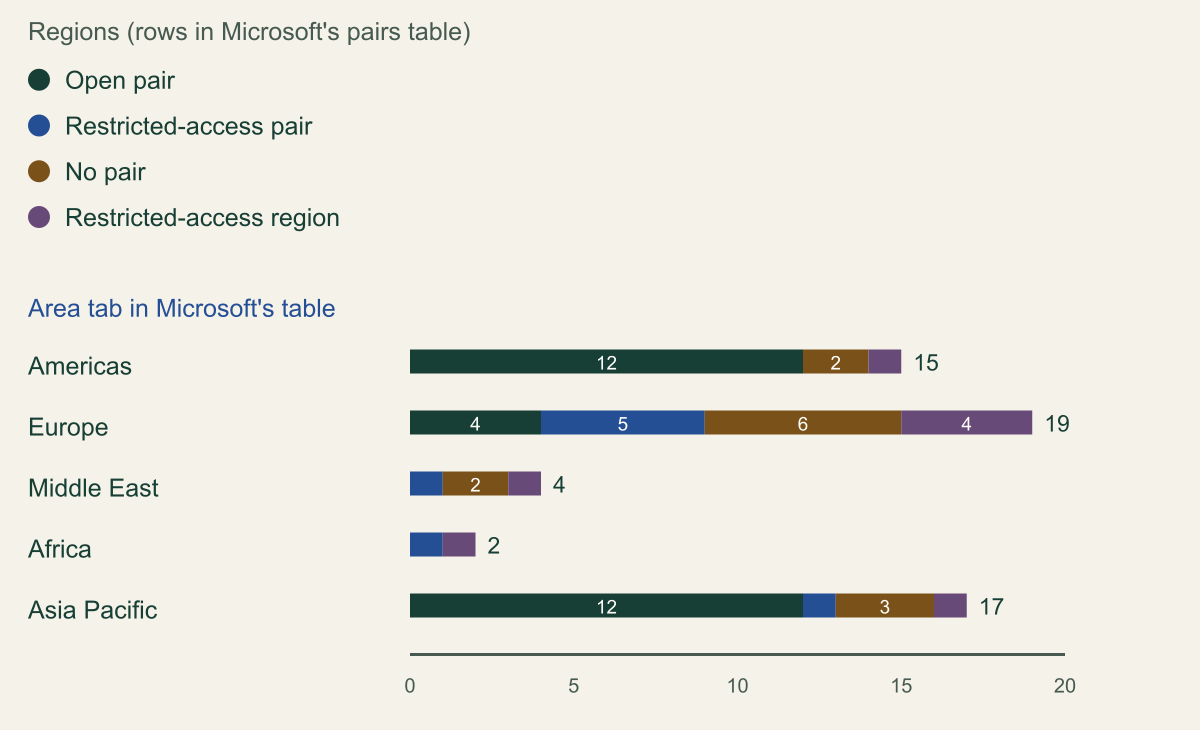
The chart groups the rows by Microsoft's area tabs. Europe is where pairing helps least. Of its 15 regions open to every customer, only North Europe, West Europe, UK South and UK West have an openly accessible pair. France Central, Germany West Central, Norway East, Sweden Central and Switzerland North are paired with restricted-access regions, and six regions have no pair. The Americas and Asia Pacific each have 12 openly paired regions. [1]
Two more facts from the regions list shape the design. All 13 nonpaired regions list three availability zones, which matches Microsoft's statement that many regions aren't paired and instead use availability zones as their primary means of redundancy. And each is the only region the list shows in its geography: Italy North is the whole Italy geography and Poland Central the whole Poland geography. Microsoft treats geographies as data residency boundaries, so any second region for these workloads sits outside the boundary. [1][4][5]
The service table was retrieved the same day; its footer shows June 2, 2026 and its page metadata September 28, 2026. Both tables change as regions launch, so recount before relying on these figures.
Europe has the fewest openly paired regions
Of 15 European regions open to every customer, 4 have an openly accessible pair, 5 a restricted-access pair and 6 none. [1]

Source. Counted from the area tabs of the Azure region pairs list on Microsoft Learn (page updated June 26, 2026), retrieved October 10, 2026; cross-checked against the List of Azure regions (updated September 23, 2026). [1][4]
Method. One count per table row (57 rows). Restricted-access region: the region cell carries the restricted icon. Of the other rows: N/A partner is no pair; a partner with the icon is a restricted-access pair; otherwise open pair. Pairing read in each row's direction. Sweden South has no row and is not counted. [1]
Accessible table and figure data
| Area tab | Open pair | Restricted-access pair | No pair | Restricted-access region |
|---|---|---|---|---|
| Americas | 12 | 0 | 2 | 1 |
| Europe | 4 | 5 | 6 | 4 |
| Middle East | 0 | 1 | 2 | 1 |
| Africa | 0 | 1 | 0 | 1 |
| Asia Pacific | 12 | 1 | 3 | 1 |
| Area tab | Open pair | Restricted-access pair | No pair | Restricted-access region |
|---|---|---|---|---|
| Americas | 12 | 0 | 2 | 1 |
| Europe | 4 | 5 | 6 | 4 |
| Middle East | 0 | 1 | 2 | 1 |
| Africa | 0 | 1 | 0 | 1 |
| Asia Pacific | 12 | 1 | 3 | 1 |
What a pair provides and what it does not
Microsoft lists three benefits of using a region's pair as the secondary. In a geography-wide outage, one region of every pair is prioritized for recovery. Azure strives to stagger planned platform updates across the two regions of a pair. And almost every pair sits inside one geography, which keeps replicated data within the same residency boundary. You cannot choose the pair, and for storage the secondary is fixed by the primary region and cannot be customized. [1][6]
The pair-based failovers are explicitly a last resort. For GRS storage, Microsoft-managed failover is likely to cover a whole region and can't be initiated for one account, subscription or customer, and Microsoft says not to rely on it; customer-managed failover typically completes within 60 minutes, and replication lag is expected to stay under 15 minutes without a guarantee. Key Vault's managed failover is best effort, can take several hours after the loss of the region, and leaves the vault read-only in the secondary region, where vault properties, access policies and firewall settings cannot be changed. [6][7]
It follows that a nonpaired region mainly loses this passive layer of copies Microsoft keeps and may one day fail over. What a recovery plan needs in any region, agreed objectives, a secondary you control and a rehearsed failover, stays the same. One paired-region benefit does need a substitute. Because Azure staggers updates across pairs, Microsoft's SQL Database guidance asks you to set different maintenance windows for the servers in each region when geo-replication or failover groups span nonpaired regions. [8]
Capabilities that stop at the pair
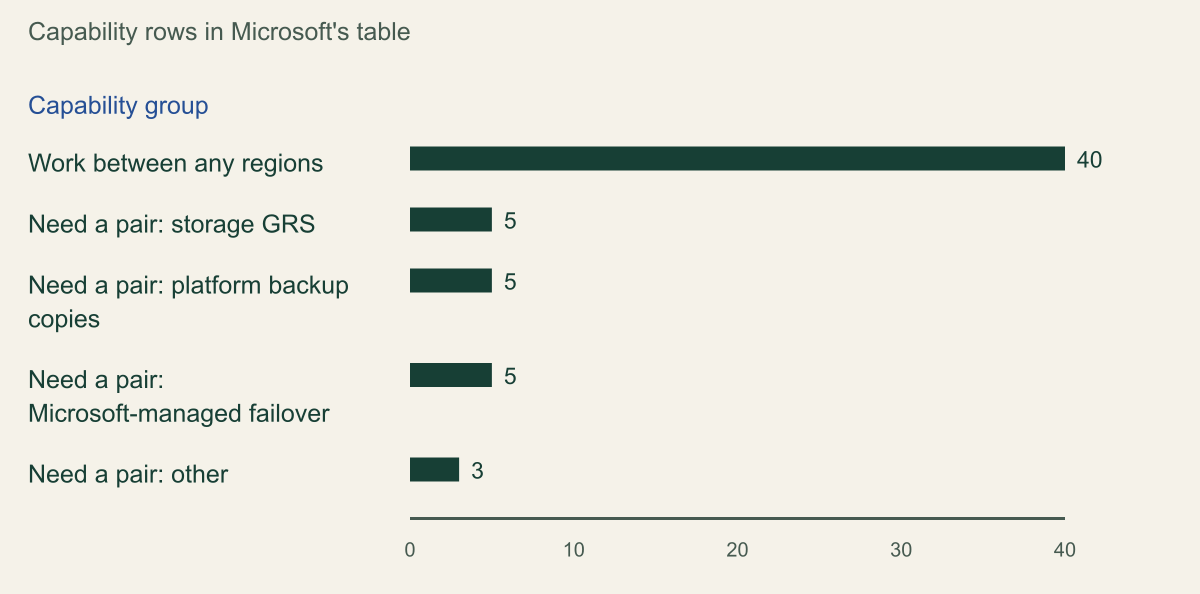
Grouped by what they do, the 18 pair-only rows fall into three groups of five and a remainder of three: storage GRS, platform backup copies and Microsoft-managed failover, plus Event Grid metadata recovery, Storage Actions and Fabric. Each is something Azure does for you. The 40 rows that work anywhere are mostly replication, routing and management you configure; four are labelled nonregional services (public and private DNS zones, Front Door and Traffic Manager), which Microsoft marks in both columns because they are not tied to a region. [2]
Any region does not mean every combination. A footnote on the table marks region selection constraints for Managed HSM replication, the global tier of Load Balancer, Monitor Logs workspace replication, NetApp Files cross-region replication and Notification Hubs in nonpaired regions. Monitor Logs replicates only within a region group, and NetApp Files replicates between region pairs Microsoft selects. Databricks managed disaster recovery is listed in preview, so do not build a production plan on it without accepting preview terms. [2]
A second tab lists 30 services with no built-in multiregion support at all, including Application Gateway, Azure Firewall, Bastion, Container Apps, Functions, Logic Apps, Virtual Network, VPN Gateway, ExpressRoute and Disk Storage. Those need your own second deployment in a paired region too, so the absence of a pair changes nothing for them, but they belong in the same inventory. The table below maps each pair-only capability to the documented alternative that works between any regions. [2]
| Pair-only capability | Rows | Works between any regions |
|---|---|---|
| GRS for Blob Storage | 1 | Object replication to an account in any region |
| GRS for Data Lake Storage Gen2 | 1 | A copy job you run; object replication excludes this account type |
| GRS for Azure Files | 1 | Second account synced with AzCopy, Data Factory or File Sync |
| GRS for Queue and Table Storage | 2 | Your own design, such as writing to a second account |
| Azure Backup GRS and cross-region restore | 1 | Site Recovery for VMs; incremental snapshot copy for disks |
| SQL Database and SQL Managed Instance automated backups | 2 | Failover groups or active geo-replication; exports to replicated storage |
| Cosmos DB periodic backup | 1 | More regions on the account (replication, not backup) |
| AKS Backup restore to another region | 1 | A second cluster, with Fleet Manager across clusters |
| Key Vault Microsoft-managed failover | 1 | A vault per region, or Managed HSM multi-region replication |
| Managed failover for Data Factory, IoT Hub, Device Registry, Storage Mover | 4 | Your own multiregion design per service guide |
| Event Grid, Storage Actions and Fabric recovery | 3 | Your own multiregion design per service guide |
Pair-only capabilities are copies and failovers Azure runs for you
40 of 58 capability rows work between any regions; the 18 that need a pair are storage GRS, platform backup copies, Microsoft-managed failover and three others. [2]

Source. Counted from the Built-in multiregion support tab of Azure services that support multiple regions on Microsoft Learn, retrieved October 10, 2026 (footer date June 2, 2026; metadata update September 28, 2026). [2]
Method. One count per capability row (58 rows, 48 services). Need a pair: Paired regions marked Yes and Nonpaired regions empty; any region: both marked Yes; footnotes ignored. Groups: rows for Azure Backup or a backup support type are backup copies; Geo-redundant storage rows are storage GRS; Microsoft-managed failover rows are managed failover; Event Grid, Storage Actions and Fabric are other. [2]
Accessible table and figure data
| Capability group | Capability rows |
|---|---|
| Work between any regions | 40 |
| Need a pair: storage GRS | 5 |
| Need a pair: platform backup copies | 5 |
| Need a pair: Microsoft-managed failover | 5 |
| Need a pair: other | 3 |
| Capability group | Capability rows |
|---|---|
| Work between any regions | 40 |
| Need a pair: storage GRS | 5 |
| Need a pair: platform backup copies | 5 |
| Need a pair: Microsoft-managed failover | 5 |
| Need a pair: other | 3 |
Storage without GRS
For Blob Storage, Microsoft's reliability guide points nonpaired regions to object replication. It copies block blobs asynchronously from a source account to a destination account in any region, including another subscription or Microsoft Entra tenant. It needs blob versioning on both accounts and change feed on the source, and handles block blobs only. It skips snapshots, excludes accounts with a hierarchical namespace and fails for blobs written with a customer-provided key. A source can replicate to at most two destination accounts, a policy holds up to 1,000 container rules, and by default only blobs created after a rule exists are copied unless you widen its copy scope. [6][9]
Failover becomes your operation. While a rule is active, writes to the destination container fail with 409 Conflict; to promote the copy you delete the rule or the whole policy and point clients at the destination account. Customer-managed account failover is not supported for either account in an object replication policy, so the planned-failover drill GRS customers use does not apply. Priority replication, which replicates 99.0 percent of objects within 15 minutes when both accounts are on the same continent and is backed by an SLA, gives a measurable lag target. Moving a blob to the archive tier in either account makes its replication fail. [9]
Object replication copies mistakes as faithfully as data. Deleting a blob in the source turns its current version into a previous version and that state replicates, so recovery from deletion still depends on versioning and soft delete, while an immutability policy on the destination can make replicated updates and deletions fail, leaving the two accounts out of step. [9]
The other storage types have fewer options. Data Lake Storage Gen2 accounts cannot use object replication at all. Azure Files gets GRS only for standard HDD shares, even in paired regions, and Microsoft's suggestion for nonpaired regions is a second account per region kept in sync with AzCopy, Data Factory or Azure File Sync, with conflict handling you build. Queue and Table Storage have no alternative in the table. A reasonable reading is that queues are rebuilt from their producers and tables are written to a second account by the application. [6][10][2]
Keys and secrets
Key Vault replicates across zones inside a region and copies vault contents to another region only when the region has a pair in the same geography. Microsoft lists Brazil South, Brazil Southeast, West US 3 and every region without a pair as having no Microsoft-managed cross-region replication or failover. Its documented alternative is a separate vault in each region, backup and restore to keep secrets consistent, and application logic that switches vaults. [7]
The backup route hits a limit in exactly this case. A Key Vault backup can be restored only to a vault in the same subscription and the same Azure geography. Each nonpaired region is the only region in its geography in Microsoft's list, so a reasonable reading is that a backup taken in Italy North can be restored only in Italy North: protection against deletion, not against losing the region. The same guide also says backup and restore can copy a vault to another region of your choice, which conflicts with its own geography rule for these regions, so this guide follows the more specific restriction. [4][7]
Fill each regional vault from the system that created the secret, such as the deployment pipeline or the certificate issuer, and where each data store has its own customer-managed key, create a separate key per region. Where the same key material must decrypt data in both regions, Managed HSM can extend a pool to one additional region, with both active. Writes can take up to six minutes to replicate, the extension up to 30 minutes, and billing doubles. Poland Central and Qatar Central cannot currently be extended regions, although any Managed HSM region can be a primary. Behind all of this is Microsoft's sovereignty rule: place keys where replicated data lives, because keys held only in the primary may be unavailable during its outage. [11][5]
Backups that leave the region
Azure Backup needs the vault in the same region as the data source, and its GRS and cross-region restore work only between paired regions. Without GRS, an outage of the vault's region may leave backup items visible, but the backup data is unavailable for restore. In a nonpaired region a Recovery Services vault is therefore protection against deletion, corruption and ransomware, through soft delete with a 14-day default and immutable vaults, not a copy for regional recovery. Even in a pair, Microsoft puts the backup RPO for a region outage at up to 36 hours: a 24-hour schedule plus up to 12 hours of replication. [12]
Replace it per workload. For virtual machines, Site Recovery replicates between any two regions, and Microsoft recommends placing its vault in the target region so that failover does not depend on the source region. For managed disks, a managed copy moves an incremental snapshot to another region and sends only the changes since the last copied snapshot; full snapshots cannot cross regions, and each disk's snapshots copy one at a time, in creation order. For SQL Database, failover groups and active geo-replication work in all regions; for backup copies outside the region, Microsoft suggests exporting the database to a storage account that object-replicates elsewhere. [13][14][8]
Cosmos DB periodic backups go to the paired region by default; in a nonpaired region, cross-region protection comes from adding regions to the account, which is replication with consistency tradeoffs rather than a backup. AKS Backup can restore from its vault tier to another region only when that region is the pair, so a second cluster deployed from code is the cross-region answer. A copy in another region that the same administrators can delete is still exposed to the same compromise, so isolate the authority over those copies as well as their location. [2]
When the pair needs an access request
Eight regions open to every customer are paired with a restricted-access region: Australia Central, France Central, Germany West Central, Norway East, South Africa North, Sweden Central, Switzerland North and UAE North. Microsoft restricts access to those regions to support specific customer scenarios, such as disaster recovery within a geographic area, and grants access through a support request. [4][3]
The service table does not separate restricted pairs from open ones, so the pair-only features are listed as available. The difference appears when you deploy into the pair yourself. Site Recovery reserves restricted regions for in-country recovery, for example Switzerland West for Switzerland North customers, France South for France Central and Germany North for Germany West Central, and requires both the source and the target subscription to be allow-listed. Brazil South can act only as a Site Recovery source, and Brazil Southeast only as a target. [2][15]
The request goes through Help and support as a quota request: for reserved regions the quota type is Other Requests, the description names the region and the organization, and it lists the initial compute, storage and SQL quota. Azure engineering validates the request and may contact you, and the page gives no turnaround time. File it during design for every subscription that might hold recovery resources. It also follows that a cross-region restore into a restricted pair creates resources in a region your subscription may not yet be allowed to use, so a backup plan that relies on the pair is untested until that access exists. [3][12]
Choose the recovery region
Settle residency before latency. Microsoft's sovereignty guidance says a workload that must stay within a jurisdiction should recover inside the same boundary, and that when no compliant secondary region exists the design should use single-region reliability with backup-based recovery and document the recovery tradeoffs. For the 13 nonpaired regions the geography holds only one region, so the question is whether the obligation is national or wider, for instance the European Union. That is a legal reading, not an engineering one, so record who made it. If the boundary is national, three availability zones and in-region backups are the design, and losing the region is an accepted, written gap. [5][4]
Latency comes next, and the table uses Microsoft's own measurements: median round-trip times over the 30 days ending July 30, 2026, read from the nonpaired region as the source because the values are directional. Italy North is 9 ms from Switzerland North, but Switzerland is a separate geography outside the European Union. Israel Central's nearest region open to every customer is Austria East at 48 ms. Restricted-access regions are left out because Site Recovery reserves them for in-country customers, and Chile Central is not in Microsoft's tables. Asynchronous replication tolerates any of these distances; synchronous designs and chatty application tiers do not. [16][15]
Then check capacity and services. Site Recovery makes you responsible for confirming that the target region offers the VM sizes you need and has capacity, and recommends on-demand capacity reservations so the compute exists when you fail over. Confirm that every service in your inventory is offered in the candidate region, that Managed HSM can be extended there if you need shared keys, and that maintenance windows differ between the two regions. [13][11][8]
The fragment below inventories what runs in three nonpaired regions and prints Azure's own pairing metadata for the regions the subscription can use. The metadata.pairedRegion field comes from the Subscriptions List Locations API, version 2022-12-01; compare its output with the N/A rows in Microsoft's table. [17]
| From nonpaired region | Nearest | Second and third |
|---|---|---|
| Italy North | Switzerland North 9 | Germany West Central 14; Austria East 15 |
| Poland Central | Austria East 17 | Denmark East 21; West Europe 22 |
| Spain Central | France Central 20 | Belgium Central 24; UK South 25 |
| Denmark East | Norway East 13 | West Europe 14; Germany West Central 15 |
| Israel Central | Austria East 48 | Italy North 49; Switzerland North 52 |
| Qatar Central | UAE North 15 | Central India 43; South India 60 |
| Mexico Central | South Central US 22 | West US 3 39; West Central US 44 |
| New Zealand North | Australia East 28 | Australia Central 32; Australia Southeast 40 |
# Example fragment: read-only inventory. Needs Reader on the subscriptions queried.
# The resource-graph extension installs itself on first use of az graph.
az graph query -q "Resources
| where location in~ ('italynorth', 'polandcentral', 'spaincentral')
| summarize resources = count() by type, location
| order by resources desc" --first 100

# Pairing metadata for the regions this subscription can use.
az account list-locations \
  --query "[?metadata.regionType=='Physical'].{region:name, geography:metadata.geography, pairedWith:metadata.pairedRegion[0].name}" \
--output tableDecide the design
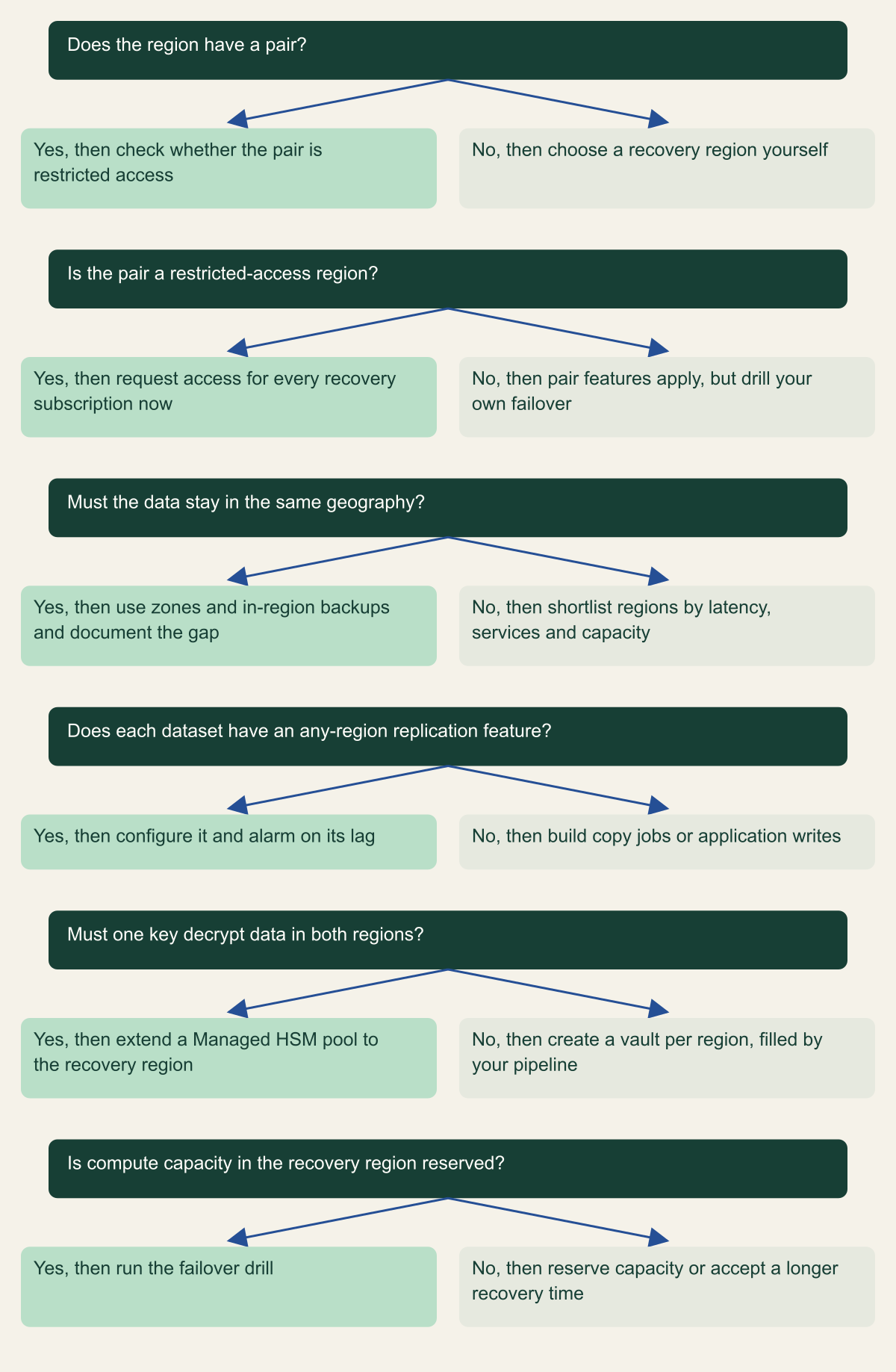
The tree turns the preceding sections into six questions, asked in order for each workload. The first two classify the region. The third is the residency decision, and a yes there ends the cross-region branch for that data. The last three are per service: whether each dataset has a replication feature that works between any regions, whether one key must decrypt data in both places, and whether compute in the recovery region is reserved or merely hoped for.
Two answers are easy to get wrong. A restricted pair can look like an open one until a restore or Site Recovery target fails for lack of access, and object replication can look like a backup even though it replicates deletions. Both surface only in a drill. [9][15]
Six questions for a recovery design without a usable pair
Classify the region, settle residency, then decide replication, keys and capacity per service. [1][5][13]

Source. Conceptual decision aid based on Microsoft's region pairs, multiregion support, sovereignty, Key Vault, Managed HSM and Site Recovery documentation reviewed October 10, 2026. [1][2][5][7][11][13][15]
Method. Conceptual ordering of documented guidance. Answer the first three questions once per workload and the last three once per service or dataset.
Accessible table and figure data
| Question | Yes, then | No, then |
|---|---|---|
| Does the region have a pair? | check whether the pair is restricted access | choose a recovery region yourself |
| Is the pair a restricted-access region? | request access for every recovery subscription now | pair features apply, but drill your own failover |
| Must the data stay in the same geography? | use zones and in-region backups and document the gap | shortlist regions by latency, services and capacity |
| Does each dataset have an any-region replication feature? | configure it and alarm on its lag | build copy jobs or application writes |
| Must one key decrypt data in both regions? | extend a Managed HSM pool to the recovery region | create a vault per region, filled by your pipeline |
| Is compute capacity in the recovery region reserved? | run the failover drill | reserve capacity or accept a longer recovery time |
| Question | Yes, then | No, then |
|---|---|---|
| Does the region have a pair? | check whether the pair is restricted access | choose a recovery region yourself |
| Is the pair a restricted-access region? | request access for every recovery subscription now | pair features apply, but drill your own failover |
| Must the data stay in the same geography? | use zones and in-region backups and document the gap | shortlist regions by latency, services and capacity |
| Does each dataset have an any-region replication feature? | configure it and alarm on its lag | build copy jobs or application writes |
| Must one key decrypt data in both regions? | extend a Managed HSM pool to the recovery region | create a vault per region, filled by your pipeline |
| Is compute capacity in the recovery region reserved? | run the failover drill | reserve capacity or accept a longer recovery time |
Test the replacements, not the pair
Paired-region features come with drills: planned failover for GRS accounts and cross-region restore for Azure Backup. The replacements need their own. For object replication, check the replication status on source blobs and the pending bytes and pending operations metrics, then rehearse promotion on a non-production policy by removing the rule and writing to the destination. For Site Recovery, Microsoft suggests test failovers every quarter or every six months. For Key Vault, run the application against the secondary vault and confirm that it holds the current versions of what it needs. For SQL Database, fail the failover group over and back during a window. [6][12][9][13][8]
For an EU financial entity, DORA Article 12 frames the evidence. It requires backup and restoration procedures that are tested periodically, redundant ICT capacities for entities other than microenterprises, and, for central securities depositories, a secondary processing site at a geographical distance with a distinct risk profile. Article 12 never mentions region pairs. A reasonable reading is that a nonpaired primary region is compatible with it and that a pair would not satisfy it alone; the recovery region you choose and the drill records carry the evidence. [18]
Write down the measured replication lag, the time to promote each store, whether reserved capacity was there and which access approvals were needed, next to the objectives they are meant to meet. The gaps between those numbers are the findings.
First steps for a region without a pair
One rule decides most of the design: if a capability appears only in the paired column of Microsoft's table, assume you do not have it until you have configured its any-region replacement and watched it work in a drill. Then work in this order.
- Classify each region as open pair, restricted-access pair or no pair from Microsoft's table, and record the date you read it.
- Inventory the resources in the region and mark each as pair-only, any-region or no built-in support.
- Settle the residency boundary, choose the recovery region and file access requests for every subscription involved.
- Put keys in the recovery region before data, through regional vaults or Managed HSM.
- Configure replication per service and alarm on its lag; move backup copies out with Site Recovery, snapshot copies and exports.
- Reserve recovery capacity or accept, in writing, the longer recovery time.
- Drill each replacement, record the measured results, and recount Microsoft's tables at every review.
Method and provenance
Source-led architecture analysis of Microsoft Learn reliability, storage, Key Vault, Backup, Site Recovery and networking documentation, the EU DORA regulation, and counts of Microsoft's region pairs and multiregion support tables. Sources were retrieved and reviewed on October 10, 2026.
No Azure subscription, region or service was configured or measured. Region and capability counts reflect Microsoft's tables as retrieved on October 10, 2026 and will change as regions launch; latency values are Microsoft's published medians for the 30 days ending July 30, 2026. Legal residency questions are flagged, not answered.
AI assistance. AI assisted research synthesis, table counting, drafting, diagram planning and visual production, with deterministic editorial checks. No personal deployment experience, independent human review or live test is claimed.
Published under the Cloud Security Desk organizational byline. Read the practitioner guide policy.
References
- Azure region pairs and nonpaired regions Microsoft. Accessed .
- Azure services that support multiple regions Microsoft. Accessed .
- Azure region access request process Microsoft. Accessed .
- List of Azure regions Microsoft. Accessed .
- Reliability and sovereignty in Azure Microsoft. Accessed .
- Reliability in Azure Blob Storage Microsoft. Accessed .
- Reliability in Azure Key Vault Microsoft. Accessed .
- Reliability in Azure SQL Database Microsoft. Accessed .
- Object replication overview (Azure Storage) Microsoft. Accessed .
- Reliability in Azure Files Microsoft. Accessed .
- Enable multi-region replication on Azure Key Vault Managed HSM Microsoft. Accessed .
- Reliability in Azure Backup Microsoft. Accessed .
- Reliability in Azure Site Recovery Microsoft. Accessed .
- Copy an incremental snapshot to a new region (Azure managed disks) Microsoft. Accessed .
- Support matrix for Azure VM disaster recovery with Azure Site Recovery Microsoft. Accessed .
- Azure network round-trip latency statistics Microsoft. Accessed .
- Subscriptions, List Locations (Azure Resource Manager REST API, 2022-12-01) Microsoft. Accessed .
- Regulation (EU) 2022/2554 on digital operational resilience for the financial sector (DORA) EUR-Lex, Publications Office of the European Union. Published . Accessed .