
Choose the correct Azure Blob Storage recovery path for a deleted blob, version, container or hierarchical directory. Check the retention state, restore the intended content and verify the consuming application before resuming work.
At a glance
Key findings
- Choose the right recovery action for a blob, version or container and verify restored bytes.
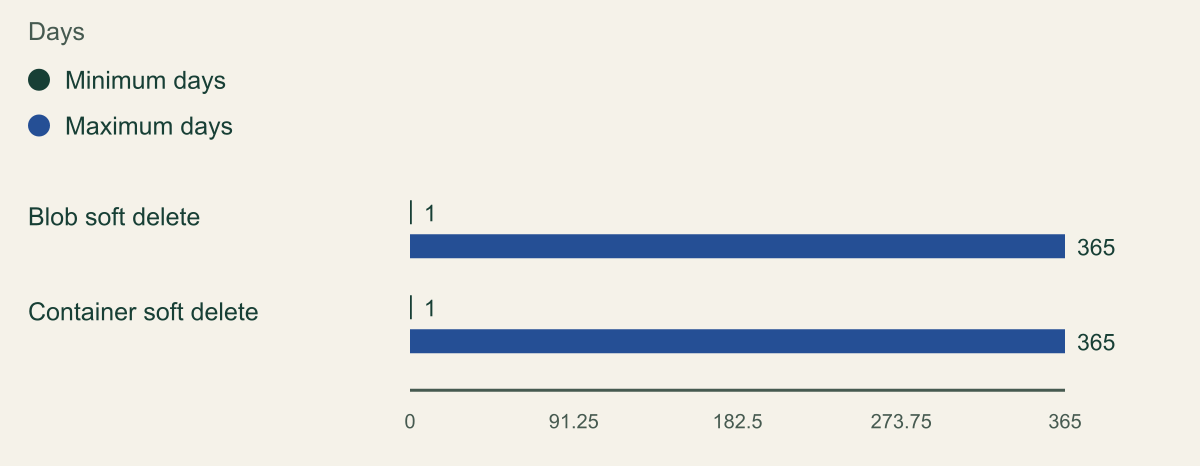
- Documented configurable retention bounds for blob and container soft delete. Equal ranges do not mean the features restore the same object type.
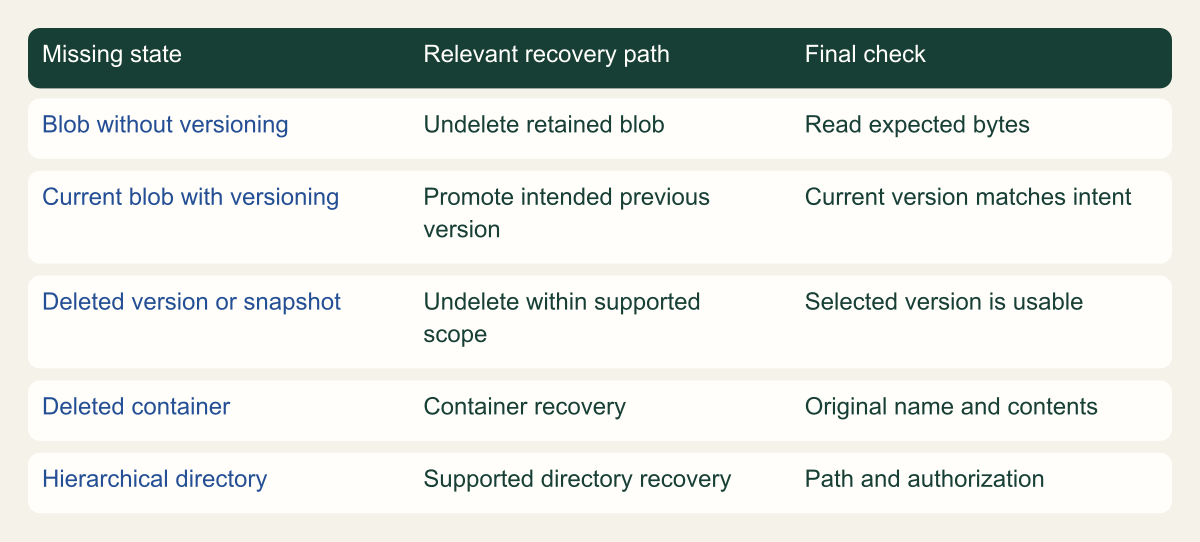
- Conceptual recovery tree separates ordinary blobs, current versions, retained versions, containers and hierarchical paths.
Identify what was deleted before choosing a button
Azure Blob Storage soft delete can preserve a deleted blob for recovery during its configured retention period. The correct recovery action depends on whether the account uses blob versioning, whether the container itself was deleted and whether the account has a hierarchical namespace. Start by identifying the missing object and its storage configuration. An Undelete button is not a universal restore procedure for every one of these cases. [1] [3]
Record the storage account, container, blob path and approximate deletion time. Ask whether the incident was a deletion, an overwrite or an application pointing to the wrong name. A missing file in an application can result from several causes, and creating a new empty object under the expected name can complicate the investigation. Preserve the current state while choosing the recovery path.
Use a harmless test object if you are learning the procedure. Give it recognizable content and retain a local copy or checksum so that recovery can be verified. Record its account, container, path and relevant version identifier before deleting it. Keep the rehearsal separate from production data, then compare the recovered object with that baseline before accepting the result.
The first successful outcome is finding the correct recoverable object. The final outcome is verifying its content and allowing the application to use the intended version again. Keep those milestones separate. A restored name alone does not prove that the object contains the expected bytes or belongs to the application state the team intended to recover.
Choose recovery by the object and versioning state
Conceptual recovery tree separates ordinary blobs, current versions, retained versions, containers and hierarchical paths.

Source. Microsoft documentation: Manage and restore soft-deleted blobs - Azure Storage [3]; Blob Versioning in Azure Storage - Azure Storage [4]; Soft delete for containers - Azure Storage [5].
Method. Original conceptual synthesis of the cited Microsoft documentation. No deployment measurements or risk scores. Reviewed 2026-09-12.
Accessible table and figure data
| Missing state | Relevant recovery path | Final check |
|---|---|---|
| Blob without versioning | Undelete retained blob | Read expected bytes |
| Current blob with versioning | Promote intended previous version | Current version matches intent |
| Deleted version or snapshot | Undelete within supported scope | Selected version is usable |
| Deleted container | Container recovery | Original name and contents |
| Hierarchical directory | Supported directory recovery | Path and authorization |
| Missing state | Relevant recovery path | Final check |
|---|---|---|
| Blob without versioning | Undelete retained blob | Read expected bytes |
| Current blob with versioning | Promote intended previous version | Current version matches intent |
| Deleted version or snapshot | Undelete within supported scope | Selected version is usable |
| Deleted container | Container recovery | Original name and contents |
| Hierarchical directory | Supported directory recovery | Path and authorization |
Check whether protection existed at deletion time
Inspect the account's Data protection settings and determine whether blob soft delete was enabled when the object was deleted. Enabling the feature afterward does not retroactively create a retained copy of an earlier permanently deleted object. Microsoft's enablement and overview guidance explain that the policy protects qualifying operations while the feature is active. [1] [2]
Record the retention period that applied to the deleted object. Changing the current setting does not necessarily change the deadline for data that was already deleted. The relevant evidence is the object's deletion and retention state, not merely the policy shown in the portal today. If the object is visible in the deleted-items view, inspect the remaining recovery period shown for that item.
Check whether versioning is enabled and whether the namespace is flat or hierarchical. Those settings affect the available recovery procedure. A guide for ordinary block blobs in a flat namespace should not be applied unchanged to a Data Lake Storage directory. Use the feature support and recovery instructions for the account's actual configuration. [3] [4]
If there is no retained object, look for another approved recovery source such as a version, snapshot or backup. Do not repeatedly issue recovery commands in the hope that they will discover data outside their scope. Microsoft's data-protection overview distinguishes in-account protections from broader backup and account-loss scenarios. Match the recovery source to the kind of loss. [6]
Recover retained content before the recovery window closes
Soft delete provides a bounded opportunity to recover retained blob content. The exact recovery operation depends on versioning and the kind of deletion.

Source. Microsoft documentation [1][3][4]. Reviewed September 12, 2026.
Method. Original conceptual illustration generated with ChatGPT and visually reviewed. The accessible table identifies the metaphor and its limits. It is not a provider screenshot, a complete policy evaluator, or measured service evidence.
Accessible table and figure data
| Visual element | Recovery concept | Limit |
|---|---|---|
| Blue folio on a side track | Retained deleted content | The applicable protection must have preserved this state |
| Bounded track | Configured retention window | Its visual length does not encode days or recovery speed |
| Return to shelf | Restore the wanted content | Verify the selected version and the application result |
| Visual element | Recovery concept | Limit |
|---|---|---|
| Blue folio on a side track | Retained deleted content | The applicable protection must have preserved this state |
| Bounded track | Configured retention window | Its visual length does not encode days or recovery speed |
| Return to shelf | Restore the wanted content | Verify the selected version and the application result |

Read the retention window as a deadline
Blob soft-delete retention can be configured from 1 through 365 days. The period begins when the qualifying object is deleted or overwritten, and the retained object becomes unavailable after the applicable period expires. The chart shows this documented configuration range in days. It is not a recommended recovery target or a measured time needed to restore an object. [1]
Choose a retention period based on how quickly the organization can notice and respond to loss, together with the cost of retained data. A one-day setting may be inadequate if the application owner only checks a weekly report. A long setting can preserve more opportunities for recovery but also retain more data. The appropriate decision requires the actual workload and operating process.
Container soft delete has its own policy and also supports a documented 1-to-365-day range. It protects a deleted container and its contents, while blob soft delete addresses qualifying blob-level operations. Matching numeric ranges do not make the two features interchangeable. The recovery tree keeps their object scopes separate. [5]
Treat a near-expiry recovery as an operational priority. Record the deadline and coordinate the owner who can authorize the restoration. Do not assume that opening a support ticket pauses retention. If the retained copy is still available, verify the selected recovery action promptly rather than spending the entire window redesigning the long-term backup policy.
Blob and container policies have separate object scopes
Documented configurable retention bounds for blob and container soft delete. Equal ranges do not mean the features restore the same object type.

Source. Microsoft documentation: Soft Delete for Blobs to Recover Data - Azure Storage [1]; Soft delete for containers - Azure Storage [5].
Method. Minimum and maximum settings transcribed from the Microsoft blob and container soft-delete overviews. Not elapsed restore time or a recommended setting. Reviewed 2026-09-12.
Accessible table and figure data
| Policy | Minimum days | Maximum days |
|---|---|---|
| Blob soft delete | 1 | 365 |
| Container soft delete | 1 | 365 |
| Policy | Minimum days | Maximum days |
|---|---|---|
| Blob soft delete | 1 | 365 |
| Container soft delete | 1 | 365 |
Restore a blob without versioning
For a flat-namespace account without blob versioning, open the relevant container and enable the view that shows deleted blobs. Select the intended deleted blob and inspect its properties. Use the documented Undelete action to restore it. The portal procedure also explains how associated soft-deleted snapshots are exposed and restored. [3]
The Azure CLI offers az storage blob undelete for the corresponding operation. Use the correct account, container and blob name, and choose the intended authentication mode explicitly. Avoid allowing a command-line tool to obtain an account key as an unnoticed fallback when the test is supposed to use an Entra data role. Review the current CLI reference for the exact options. [9]
The REST Undelete Blob operation restores soft-deleted blob data and associated snapshots within its supported scope. A successful response is the start of verification. Read the object's properties afterward and retrieve the harmless test content through the intended application identity. Do not declare the restore complete because a command returned without an error. [8]
If the missing content came from an overwrite, determine whether a retained snapshot or other version represents the desired earlier state. Restoring availability and selecting the right content are separate decisions. Coordinate with the application owner before overwriting a current object with an older copy, even if the older copy is easy to find in the portal.
CSD_STORAGE_ACCOUNT='examplestorageaccount'
CSD_CONTAINER='recovery-test'
CSD_BLOB='harmless-check.txt'
az storage blob undelete --account-name "$CSD_STORAGE_ACCOUNT" --container-name "$CSD_CONTAINER" --name "$CSD_BLOB" --auth-mode login
Restore the intended version when versioning is enabled
When blob versioning is enabled, recovery can require promoting a previous version to become current. Microsoft's portal instructions distinguish restoring deleted versions or snapshots from restoring the base blob. An Undelete action can make retained versions available without recreating the current blob; selecting the intended version and making it current is a separate step. [3]
Inspect the available versions and compare their creation times and contents with the application's expected state. The most recent surviving version is not automatically the correct one. A bad update may have happened before the deletion, or a valid version may correspond to a particular release or import job. Ask the owner to identify the desired state rather than guessing from chronology alone.
Blob versioning records separate versions for supported changes and has its own feature limitations and cost implications. Read the current versioning documentation for the account type and namespace in use. Do not assume that enabling versioning today creates historical versions of earlier writes, or that every Azure Storage protocol has identical support. [4]
After promoting the chosen version, check the current object and the application's reference. Some consumers use a version-specific URL while others request the current blob. Restoring the current version may not change a consumer pinned to a different version identifier. The acceptance test should use the same addressing strategy as the real application.
Recognize container and directory cases
If the container itself was deleted, inspect container soft delete rather than searching for a blob inside a container that no longer exists. The container policy can restore the retained container and its contents to the state at deletion. It requires recovery under the original container name, so creating a new container with that name can prevent restoration of the retained one until the conflict is addressed. [5]
Container recovery does not mean every earlier blob deletion is undone. Its scope is the container and contents represented by that retained container state. Read the exact documentation and inspect the recovered contents. If the application needs a blob deleted before the container event, blob-level protection or another recovery source may still be necessary.
Hierarchical-namespace accounts have separate handling for deleted blobs and directories. Microsoft's recovery guidance describes permission and visibility considerations, including cases where ACL-only access does not show soft-deleted items in the portal. A missing item in that view can therefore be a visibility issue rather than proof that no retained object exists. [3]
Avoid renaming directories or creating replacement containers while the recovery decision is still being made. Those actions can change the path or name context used by recovery procedures. Preserve the exact original path and have an authorized storage operator inspect the applicable retained state before trying to repair the application by recreating its directory structure.
Verify content before resuming the consumer
After the object is available, verify its name, length, relevant properties and content using the intended reader. For a harmless test file, compare the retrieved bytes or a locally computed checksum with the known original. For production data, use the application's approved integrity and business checks. A matching filename is insufficient when the incident involved overwrites or multiple versions.
Check the application behavior separately from the storage operation. A worker may cache a failed lookup, a browser may retain an old response or a job may have recorded the object as missing. Determine whether the application needs a controlled retry or refresh. Do not restart unrelated services automatically as part of a storage restore.
Preserve the selected version and recovery action in the incident record. If the restored object must be compared with another state, keep that work controlled and avoid exposing sensitive content in screenshots or tickets. The evidence can identify the object and verification method without reproducing the data itself.
Only resume a paused consumer when the owner accepts the recovered state. A file may be technically readable while still representing an incomplete export or an earlier transaction boundary. Soft delete restores an object within its supported scope; it does not independently decide which application state is correct. The storage operator and application owner should agree on that final check.
Check properties that the application relies on, not only file content. A consumer may depend on a content type, metadata field or expected object path. Compare those properties with the known original or the application's documented requirements. For a simple test file, verify the few properties needed to serve or process it correctly; for an application object, include any property the consumer uses to select, validate or interpret the data.
If a consumer uses a signed URL, recovery and delegation validity remain separate. The object may be restored while the link has expired, points to another version or lacks the required operation. Verify the normal authorized access path and handle a new delegation through the application's approved process. Do not make the container anonymous as a workaround for a failed signed link.
For large objects, plan how integrity will be checked without unnecessarily copying sensitive data to an operator's laptop. The application may already provide a suitable checksum or validation job. The recovery record should identify the method and result, together with any limits, rather than claiming verified content solely because the portal displays a nonzero size.
Run a small recovery rehearsal
Create a disposable object with known harmless content in a test container using the same relevant protection settings as the application. Record the namespace, versioning state and retention policy. Delete only the approved test object, find it in the retained state and recover it using the procedure that matches those settings. Keep the result distinct from a production recovery claim.
Test the branch that matters. A no-versioning rehearsal does not prove the version-promotion procedure, and a blob deletion does not prove container recovery. If both scenarios are important, run separate small tests with their own expected outcomes. The recovery tree can serve as a checklist of which branches were actually exercised.
Include the person who would perform recovery during an incident. An administrator with broad personal access may make the rehearsal look easy while the on-call operator lacks the required data permissions or cannot see deleted items. Record the identity used and whether the normal authorized recovery route worked.
End by cleaning up the disposable active objects according to the agreed policy and recording any retained soft-deleted data that remains until expiry. Do not disable protection or purge unrelated retained items merely to leave an empty-looking container. A rehearsal is complete when its test resources and expected retention behavior are understood, not when every recovery record has been erased.
Keep the deletion cause separate from the restore result. A successful recovery does not explain whether a lifecycle rule, application defect or authorized operator removed the object. Preserve the relevant evidence and arrange that investigation with the owner. Otherwise the restored file may be deleted again by the same unchanged process, leaving the team to repeat a recovery that appeared complete.
Balance retained copies and ongoing cost
Retained versions, snapshots and soft-deleted data have storage-cost implications. Microsoft's lifecycle-management guidance can help manage supported object versions and access tiers, but a lifecycle policy is another change that needs review. Do not introduce an aggressive deletion rule solely because a recovery test revealed more retained copies than expected. [7]
Compare the retention plan with the application's recovery needs. Keep enough opportunity to detect an error, obtain authorization and restore the correct object. For broader account loss or independent recovery requirements, review the protections described in the data-protection overview instead of stretching soft delete into a complete backup strategy. [6]
The final record should identify the policy that applied, the retained object or version selected, the recovery operation, the content check and the application acceptance result. Include any remaining limits, such as an untested directory branch or a version-specific consumer. This makes the evidence useful when the next incident differs from the rehearsal.
The practical aim is to know which recovery action fits the missing item before its retention window closes. A clear object identity, a verified retained copy and a tested consumer path are more useful than a general statement that soft delete is enabled. Keep the feature connected to an actual recovery procedure and an owner who can carry it out.
Method and provenance
Microsoft primary documentation was reviewed on September 12, 2026. The guide combines documented service behavior with original implementation guidance, conceptual figures and clearly identified hypothetical examples.
No Azure tenant, production application or customer deployment was executed or measured. Commands were checked against the cited references and locally parsed where applicable; the reader must verify permissions, service support and outcomes in the intended environment.
AI assistance. AI-assisted source research, drafting, original visual planning and consistency review. No firsthand deployment experience or human review is claimed.
Published under the Cloud Security Desk organizational byline. Read the practitioner guide policy.
References
- Soft Delete for Blobs to Recover Data - Azure Storage Microsoft. Accessed .
- Enable soft delete for blobs - Azure Storage Microsoft. Accessed .
- Manage and restore soft-deleted blobs - Azure Storage Microsoft. Accessed .
- Blob Versioning in Azure Storage - Azure Storage Microsoft. Accessed .
- Soft delete for containers - Azure Storage Microsoft. Accessed .
- Data protection overview - Azure Storage Microsoft. Accessed .
- Azure Blob Storage lifecycle management overview - Azure Blob Storage Microsoft. Accessed .
- Undelete Blob (REST API) - Azure Storage Microsoft. Accessed .
- az storage blob Microsoft. Accessed .