
A Microsoft 365 audit retrieval guide covering conditional retention, non-user entities, policy precedence, ingestion checks, portal query spans, nested exports and Management Activity API continuity.
At a glance
Key findings
Build a record specific evidence window
To determine whether a Microsoft 365 audit event is still available, identify the event's actor, workload, generation date and applicable retention treatment. The investigator's present license is not a reliable description of every record's lifetime. Start with the event population you need, then establish collection, retention, visibility and export as separate questions.
Microsoft Purview Audit has conditional defaults and licensed retention capabilities. Its retention contract is not the same as a Microsoft Entra portal's sign-in history, nor is it a content-retention policy for documents or mailboxes. Keep the product and record type explicit so that a familiar retention number from another interface does not become the basis of the investigation. [1]
A useful initial question is narrow: can the authorized investigator retrieve the relevant operation by the relevant actor during the relevant interval? Avoid beginning with a tenant-wide assertion that audit logs last a year. That statement may conceal differences between workloads, licensed users, guests, non-user entities and custom policies.
Build an evidence-window worksheet before repeatedly searching. Include the expected record type, operation, actor type, event period, suspected workload and source of policy evidence. Mark unknowns visibly. If the actor's license history is unavailable, the correct status is unresolved eligibility, not an assumed retention entitlement.
This guide does not inspect a tenant, establish a legal retention obligation or prove that a particular event was collected. It supplies a technical retrieval framework based on documentation reviewed on September 2, 2026. Organizational policy, legal advice and the actual tenant record remain necessary where the investigation has regulatory or litigation consequences.
The practical outcome is not simply a date range. It is a justified statement about which records were expected, why they should still exist, which authorized view was searched and what the export preserved. Each of those boundaries can fail independently, so the investigation receipt should not collapse them into one search-success indicator.
Separate defaults from policy entitlement
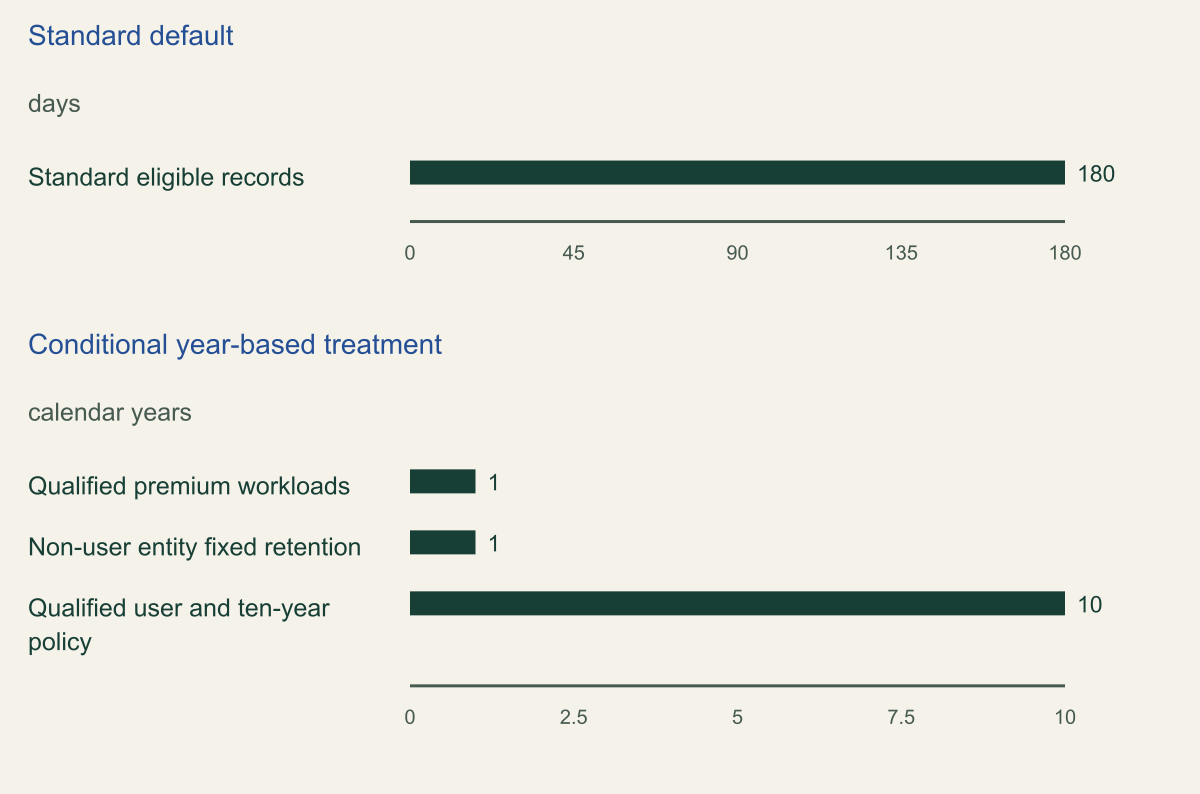
Standard Audit retains eligible records for 180 days, with the documented change applying to records generated on or after October 17, 2023. Qualified Premium users receive a one-year default for specified Microsoft Entra ID, Exchange, OneDrive and SharePoint activities. Other activities and users need their own eligibility review rather than inheriting that description. [1][2]
The current overview separately documents fixed one-year retention for non-user entities, such as service principals, system accounts and applications. It also describes ten-year retention for qualified users with the necessary add-on and policy. These are conditional branches, not interchangeable tenant settings or evidence that every historical record can be extended. [1]
The chart deliberately separates days from calendar years. Converting a year to an assumed 365-day duration would obscure the published contract. Each row names its scope, and none represents measured tenant history. Use the chart to select a question for the worksheet, not to infer the lifetime of a record whose actor or workload remains unknown.
For a hypothetical investigation involving both a licensed employee and an application identity, create separate rows. Do not merge the actors merely because their operations affected the same file. Their retention treatment can require different evidence, and the availability of one record does not prove that the other should be retrievable.
Ten-year capability also needs a concrete policy review. A product entitlement alone is not proof that the desired treatment was configured for the relevant activity. Ask which policy matched, when it applied and what population it covered. Preserve the answer beside the source record rather than treating a procurement statement as collection evidence.
Use plain language in the incident summary. Say that a particular record class appears eligible under an identified rule, with license or policy uncertainties noted. Avoid saying that the tenant has complete long-term audit coverage unless the actual configuration and collection evidence support that much broader claim.
Retention durations have different qualifying conditions
Select the applicable population before using a retention number. [1][2]

Source. Microsoft Purview overview and retention-policy documentation, reviewed September 2, 2026. [1][2]
Method. Direct documented durations. Separate units; no year-to-day conversion. Every row is conditional, not a tenant-wide guarantee.
Accessible table and figure data
| Scope | Days | Calendar years |
|---|---|---|
| Standard eligible records | 180 | Not applicable |
| Qualified premium workloads | Not applicable | 1 |
| Non-user entity fixed retention | Not applicable | 1 |
| Qualified user and ten-year policy | Not applicable | 10 |
| Scope | Days | Calendar years |
|---|---|---|
| Standard eligible records | 180 | Not applicable |
| Qualified premium workloads | Not applicable | 1 |
| Non-user entity fixed retention | Not applicable | 1 |
| Qualified user and ten-year policy | Not applicable | 10 |
Evaluate policy at the time it applied
Custom retention policies can take precedence over defaults, including when a custom duration is shorter. Microsoft's policy documentation states that lower numeric priority values have higher priority. Inspect the applicable policy rather than assuming that the most generous available duration always wins. [2]
Retention is also historical. Current documentation describes the lifetime of an audit item as committed under the applicable treatment; later policy or licensing changes do not simply rewrite already committed items. Expired evidence is not restored by assigning a new license during the investigation. This boundary should be visible before anyone promises historical recovery. [1][2]
Preserve policy evidence with its temporal meaning. A current configuration export can demonstrate what is configured now, but it may not establish what matched an older event. Use available change history and administrative records to distinguish those claims. If the history cannot be reconstructed, keep that uncertainty in the retrieval assessment.
Consider a hypothetical team that sees a long-duration policy and concludes that all older activity must remain. The review should ask whether the event's actor and workload matched that policy at the relevant time, whether another policy took precedence and whether the event was generated under the necessary entitlement. The present policy name alone answers none of those questions.
Avoid copying inconsistent examples without checking their parameters. The current retention-policy page includes an example whose description and selected duration do not agree. This guide therefore explains the precedence and eligibility model without reproducing that command as an approved template. An actual policy change should follow the organization's normal review and authorization process.
The immediate investigation usually needs read-only evidence, not a retention change. Record a future collection improvement separately from the current retrieval result. Otherwise a useful administrative correction can be mistaken for a successful recovery of old evidence that remained unavailable.
Check ingestion before searching again
An empty search can reflect collection status rather than expired retention. Microsoft documents exceptions to auditing defaults for some small-business subscriptions and trials. Verify the actual unified audit ingestion setting instead of assuming that every tenant began collecting automatically under the same conditions. [4]
The documented verification uses the Exchange Online PowerShell context for UnifiedAuditLogIngestionEnabled. Microsoft's guidance warns against using the Security and Compliance PowerShell session for this particular check. Record the service context along with the value; a command result obtained through the wrong connection should not be promoted into evidence about ingestion. [4]
Current status still does not prove uninterrupted historical collection. If ingestion is enabled today, ask what evidence establishes its state during the event interval. Distinguish a current readiness check from a history claim. This is especially important when an investigation spans a tenant transition, license change or earlier monitoring incident.
Event availability is asynchronous, and Microsoft's audit-search documentation does not provide a guaranteed universal arrival deadline. A recent event that has not appeared may need a later controlled retrieval attempt, but repeated waiting is not a substitute for checking whether the operation is covered and the query is correctly scoped. [3]
Design a benign collection check only when authorized and useful. Choose an activity whose audit behavior is documented, record the actor and time, and verify retrieval through the intended investigator's view. The result should name the tested operation and configuration. No such test was run for this article, and no fabricated event-delivery latency is presented.
If collection was disabled during the period, keep that as an explicit gap. Turning ingestion on can improve future visibility but does not prove that intervening activity has become retrievable. Route the missing historical question to other authorized evidence sources without representing them as identical substitutes for the absent audit record.
Check the investigators view
Retention does not guarantee visibility to the current investigator. Audit roles and administrative-unit restrictions can limit which records a person can search. Establish the authorized scope before interpreting an empty result, and avoid broadening access beyond the investigation simply to make a query appear complete. [3]
The portal's maximum query span is 180 days, even when records have longer retention. Search-job history is another clock: completed jobs are retained for 30 days. A missing old search job therefore does not establish that the underlying event expired, and a long-retained event may require successive query intervals. [3]
Plan the intervals explicitly. Record start and end, timezone, filters and the relationship between adjacent searches. Ensure that the chosen boundaries neither omit an intended period nor create unexplained duplicate exports. The important artifact is the defined search universe, not a screenshot showing that one query finished.
Use the narrowest filters that are justified by evidence, and preserve broader alternatives when a key identity or operation is uncertain. An incorrect actor identifier can hide the desired record as effectively as insufficient retention. If a filter is based on a hypothesis, label it as such rather than treating the resulting population as the complete investigation universe.
A useful peer review asks someone to reconstruct the search from the receipt. Can they identify the expected workload, authorized scope, UTC interval and filter logic? Can they tell which populations were not searched? This review need not expose sensitive content broadly; a restricted case record can preserve the exact values while the summary explains the method.
Do not merge several kinds of absence. Record not retained, record not visible to this role, search not covering the interval and completed job no longer listed are different conditions. They imply different next actions and different confidence in a statement about whether the activity occurred.
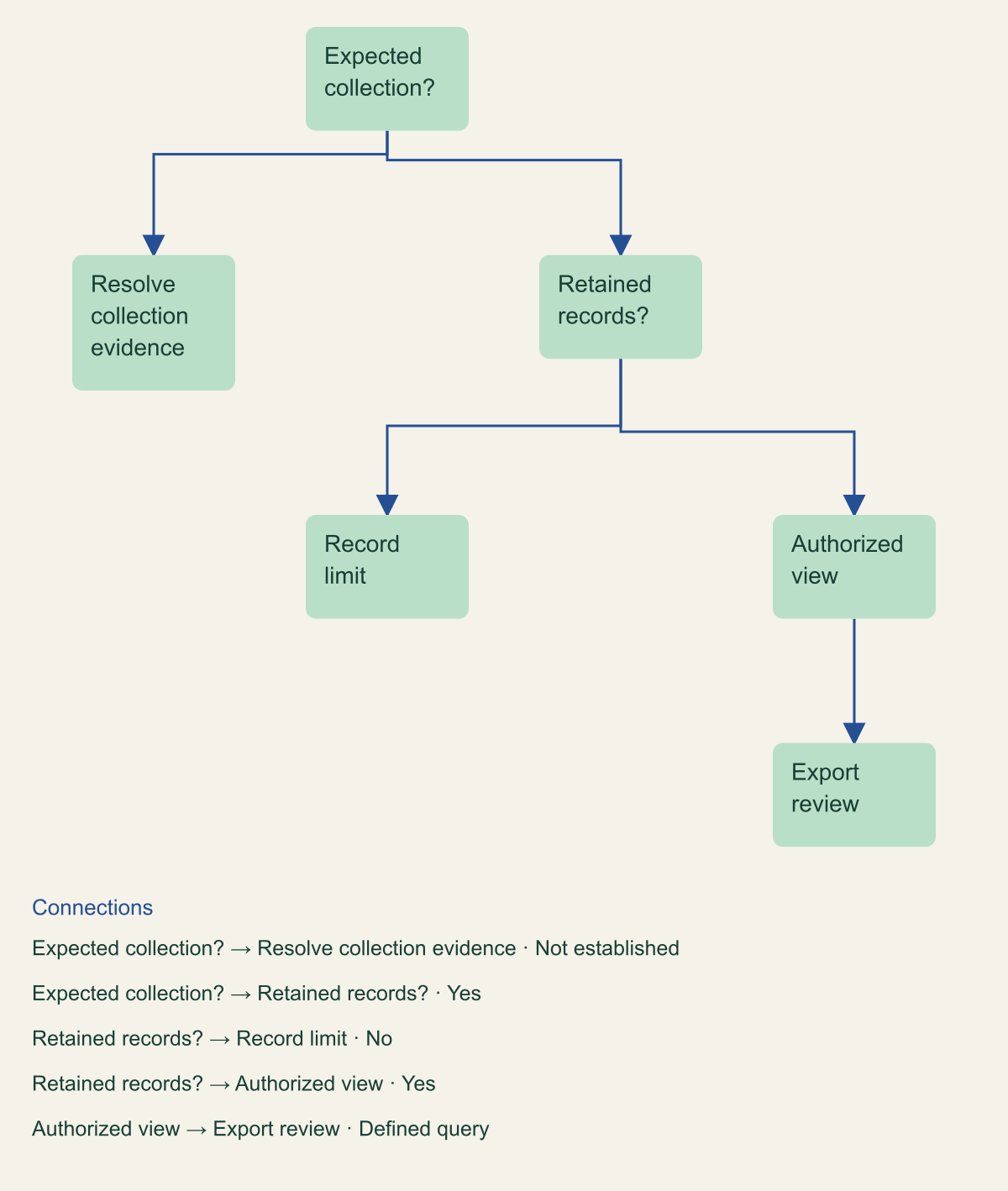
Retention is only one retrieval gate
An empty query needs checks for collection, eligibility, visibility and export scope.

Source. Original retrieval framework informed by Microsoft documentation. [1][2][3][4][6]
Method. Conceptual investigation aid, not legal advice or a completeness score.
Accessible table and figure data
| Question | If yes | If no |
|---|---|---|
| Expected event collected? | Check retention eligibility | Resolve collection evidence |
| Record expected retained? | Check authorized visibility | Record retention limit |
| View covers population? | Search defined intervals | Resolve scope |
| Export preserves population? | Analyze raw evidence | Segment or reconcile |
| Question | If yes | If no |
|---|---|---|
| Expected event collected? | Check retention eligibility | Resolve collection evidence |
| Record expected retained? | Check authorized visibility | Record retention limit |
| View covers population? | Search defined intervals | Resolve scope |
| Export preserves population? | Analyze raw evidence | Segment or reconcile |
Export without losing the raw event
A successful search is not the final evidence artifact. Microsoft documents export limits of 50,000 records for Standard and 1,000,000 for Premium. Where the intended population may exceed the applicable limit, plan segmented retrieval and reconcile the segments rather than calling a bounded export complete. [6]
The exported CSV contains AuditData as nested JSON. Preserve the original structure before flattening it for analysis. Microsoft's conversion guidance also notes that field discovery from sampled rows can miss fields that appear later. A convenient tabular view can therefore omit useful attributes even when the original export retained them. [6]
Keep a raw export, a transformation description and the derived analysis distinguishable. Record the query, export time, segment boundaries and any warnings or limits reported by the service. If a script normalizes names or timestamps, retain its version and describe the output columns. Do not let an analyst's spreadsheet become the only remaining evidence representation.
Reconcile the population at each boundary. Compare the expected search segments with the files actually obtained, and explain duplicate records introduced by overlapping intervals. A count comparison is useful only when the underlying populations are compatible. Do not fabricate a completeness percentage from a search count and an export whose scope differs.
Test the parser against records with different structures, not only the first familiar operation. A field absent from one event may appear in another class, and a transformation should preserve unknown fields where practical. Treat parse failures as exceptions requiring review rather than silently discarding them from the analysis dataset.
Protect the export according to its contents. Audit records can reveal identities, operations and sensitive organizational context even without document bodies. Restrict handling and share a concise finding with controlled references to the underlying files. Evidence portability should not become an excuse to place the full export in a broadly accessible ticket.
Keep feed continuity separate from search retention
The Office 365 Management Activity API introduces a collection path with its own subscription and content-delivery behavior. Microsoft documents that content blobs can arrive out of order and that stopping a subscription creates a gap that cannot simply be retrieved through the restarted subscription. Native audit retention is not a universal replay guarantee for this feed. [5]
If the investigation depends on a downstream archive, identify what the collector actually received. Record subscription state, content references, fetch results and parser outcomes. The relevant question is not only whether Microsoft retained a native audit item, but whether the organization's separate evidence copy contains the required population.
A collector outage should therefore produce a continuity review. Determine the affected event classes and interval, then examine supported retrieval options without assuming that every missing streamed or feed record can be reconstructed from a portal export. Different routes may expose different limits and operational behavior.
Keep source delivery order separate from event occurrence order. A later-arriving content blob can contain earlier activity. Preserve both the event timestamps and arrival metadata so a reconstruction does not confuse delayed delivery with the order of user actions. This guide offers no measured out-of-order rate or guarantee about a particular connector.
The existing collector-trust problem remains important but distinct. Transport success, parsing success and archive retention need their own evidence. A healthy current collector does not establish that its past gap was filled, and a native search returning some events does not prove that every downstream omission was recovered.
Write the investigation limitation explicitly
Close the retrieval assessment with a bounded statement. Identify the record population, period, actor treatment, policy evidence, investigator scope and export method. State which of those facts were observed and which remain uncertain. A careful limitation is part of the result, not an embarrassment to remove from the summary.
When records are missing, list the supported alternatives: the activity was not collected, its retention treatment expired, the current view excludes it, the query missed it or the export did not preserve it. Do not select one explanation merely because it is the easiest to communicate. Assign the next evidence check to an owner.
For future readiness, choose a specific correction supported by the gap: verify ingestion history, document license-dependent populations, preserve policy changes, segment exports or strengthen feed receipts. These improvements should remain distinct from the historical finding. The investigation is complete only when its evidence boundary is understandable, not when every uncertainty has been renamed as a retention issue.
Method and provenance
Source-led technical analysis of directly reviewed project and vendor documentation, with original decision frameworks and explicitly hypothetical examples. Sources were reviewed on September 2, 2026.
No customer environment, live configuration, workload measurement or production test was inspected. Product behavior and limits are bounded to the cited documentation and stated review date.
AI assistance. AI assisted research synthesis, drafting, diagram planning and deterministic editorial checks. No personal deployment experience, independent human review or live test is claimed.
Published under the Cloud Security Desk organizational byline. Read the practitioner guide policy.
References
- Auditing solutions in Microsoft Purview Microsoft. Accessed .
- Manage audit log retention policies Microsoft. Accessed .
- Search the audit log Microsoft. Accessed .
- Turn auditing on or off Microsoft. Accessed .
- Office 365 Management Activity API reference Microsoft. Accessed .
- Export and view audit log records Microsoft. Accessed .