
A guide for Google Cloud administrators and security architects to principal access boundary policies, based on Google Cloud IAM, Policy Intelligence and gcloud documentation reviewed in October 2026. It covers evaluation order, enforcement versions, principal sets and conditions, a rollout sequence, troubleshooting and documented limits.
At a glance
Key findings
- PAB policies are bound to principal sets and limit which projects, folders and organizations those principals are eligible to access; they never grant access and became generally available on December 16, 2024. [1][6]
- Eligibility is the union of every boundary a principal is subject to, and a principal with no boundary is eligible for all resources, so narrowing must add the replacement policy before removing the old one. [1][7]
- A boundary blocks only permissions in its enforcement version; version 4 is the default, and as of October 8, 2026 no version lists Compute Engine instance permissions. [4]
- Bindings target organizations, folders, projects, Workspace domains, workforce and workload identity pools and agent identities, with at most 10 policies per principal set and conditions limited to principal.type and principal.subject. [1][11]
- Policy Simulator and Policy Troubleshooter support for PAB are both in Preview; the simulator replays 90 days of logs for Google Accounts and service accounts only. [9][10]
Three policy types, three questions
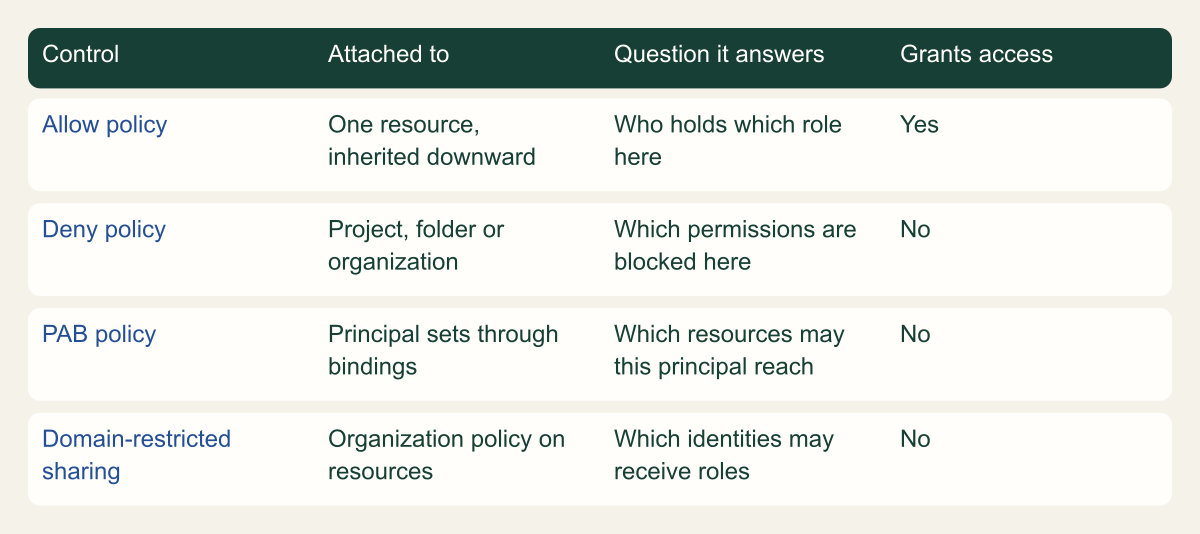
A principal access boundary (PAB) policy answers a question that allow and deny policies cannot: which resources may this principal touch at all, wherever its roles were granted. Allow policies and deny policies are attached to a resource and describe who may or may not use permissions on that resource. A PAB policy is bound to a set of principals and lists the projects, folders and organizations those principals are eligible to access. If a resource is not on the list, a supported permission is blocked even when an allow policy somewhere grants it. [1][3]
That difference matters most for grants you do not control. Google's own example is a user in example.com who holds Storage Admin on a bucket in another company's organization. Administrators of example.com cannot edit the other organization's allow policy and cannot attach a deny policy there, so neither resource-side tool can stop the access. A boundary bound to their own organization's principal set can, because it travels with the principal rather than living on the bucket. [5]
PAB never grants anything. Its rules have one possible effect, ALLOW, which here means eligible, not authorized. Access still needs a role from an allow policy and must survive any deny policy. Google released PAB in Preview on June 10, 2024 and made it generally available on December 16, 2024; it is managed through the IAM v3 API and the gcloud iam principal-access-boundary-policies and gcloud iam policy-bindings command groups. [6][2][3]
The rollout answer, in short: pin an enforcement version, start with one narrow principal set such as a single project's service accounts, simulate before binding, exempt only named break-glass identities, and never let a principal drop from one boundary to none while you narrow access, because a principal with no boundary is eligible for every resource in Google Cloud. The sections below explain why each of those steps exists. [1][7][9]
Three policy types answer three different questions
Only PAB is bound to principals, and only allow policies grant access. [3]

Source. Conceptual comparison based on Google Cloud IAM policy types and domain-restricted sharing documentation. [3][14]
Method. Conceptual summary of documented behavior. Access policies for Eventarc are omitted.
Accessible table and figure data
| Control | Attached to | Question it answers | Grants access |
|---|---|---|---|
| Allow policy | One resource, inherited downward | Who holds which role here | Yes |
| Deny policy | Project, folder or organization | Which permissions are blocked here | No |
| PAB policy | Principal sets through bindings | Which resources may this principal reach | No |
| Domain-restricted sharing | Organization policy on resources | Which identities may receive roles | No |
| Control | Attached to | Question it answers | Grants access |
|---|---|---|---|
| Allow policy | One resource, inherited downward | Who holds which role here | Yes |
| Deny policy | Project, folder or organization | Which permissions are blocked here | No |
| PAB policy | Principal sets through bindings | Which resources may this principal reach | No |
| Domain-restricted sharing | Organization policy on resources | Which identities may receive roles | No |
How a request is evaluated
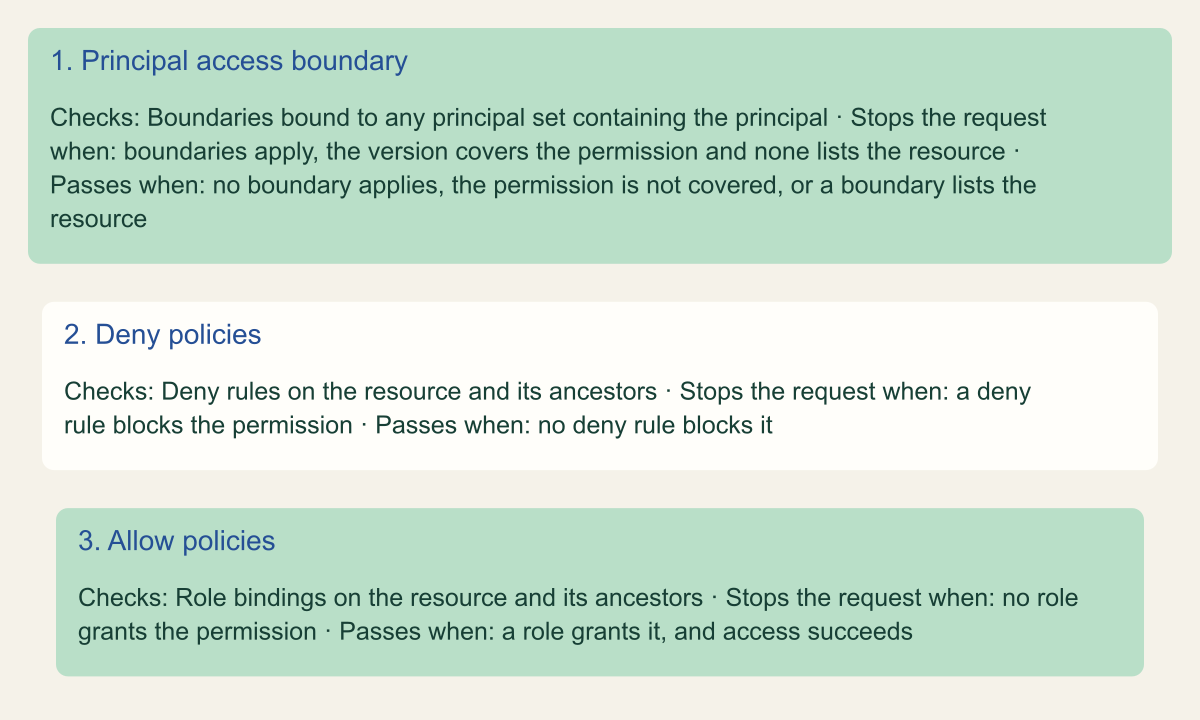
Google describes IAM as evaluating all policy types at once, but the result is easiest to reason about as three gates in order. First, the PAB policies the principal is subject to decide whether the principal is eligible for the resource. If it is not, the request stops there. Second, deny policies attached to the resource or inherited from its ancestors are checked. Third, allow policies decide whether the principal actually holds the permission. A principal with no PAB policies skips the first gate entirely. [3]
Eligibility is a union. When a principal is subject to several boundaries, it is eligible for every resource named in any of them, so one permissive policy cancels the effect of a strict one. Google's guidance states the consequence directly: to shrink what a principal can reach, every boundary that principal is subject to must exclude the resource. Listing a resource in a rule also covers its descendants, so naming a folder makes every project under it eligible. [1][15]
A boundary blocks a request only when three things are true together: the principal is subject to at least one boundary, the permission in the request is in the enforcement version of a relevant policy, and none of the relevant policies list the resource. If a permission falls outside the enforcement version, the policy has no effect on it at all. Google's example is dataflow.jobs.snapshot, which a bounded user can still exercise in a foreign organization because the boundary cannot block that permission. [1]
Two edge behaviors are worth knowing before production. PAB fails closed: if IAM hits an error while evaluating a boundary, it refuses access, and the most common cause is a newly created user whose details are still propagating, which resolves if the user waits and retries. And for publicly visible resources that a service caches, such as publicly readable Cloud Storage objects, a boundary cannot stop an ineligible principal from viewing the cached copy, although it still blocks changes and deletion. [1]
Eligibility is checked before deny and allow
A request must be eligible, not denied and allowed. [3]

Source. Conceptual model based on Google Cloud's IAM policy evaluation description and PAB evaluation rules. [1][3]
Method. Conceptual staging. Google states that IAM evaluates all policy types simultaneously; the order shown is the documented way to reason about the result.
Accessible table and figure data
| Gate | Checks | Stops the request when | Passes when |
|---|---|---|---|
| 1. Principal access boundary | Boundaries bound to any principal set containing the principal | boundaries apply, the version covers the permission and none lists the resource | no boundary applies, the permission is not covered, or a boundary lists the resource |
| 2. Deny policies | Deny rules on the resource and its ancestors | a deny rule blocks the permission | no deny rule blocks it |
| 3. Allow policies | Role bindings on the resource and its ancestors | no role grants the permission | a role grants it, and access succeeds |
| Gate | Checks | Stops the request when | Passes when |
|---|---|---|---|
| 1. Principal access boundary | Boundaries bound to any principal set containing the principal | boundaries apply, the version covers the permission and none lists the resource | no boundary applies, the permission is not covered, or a boundary lists the resource |
| 2. Deny policies | Deny rules on the resource and its ancestors | a deny rule blocks the permission | no deny rule blocks it |
| 3. Allow policies | Role bindings on the resource and its ancestors | no role grants the permission | a role grants it, and access succeeds |
Enforcement versions decide what is blocked
Each policy carries an enforcementVersion, and each version lists the permissions it can block. A new version includes everything in the previous one and adds services. As reviewed on October 8, 2026, the gcloud and REST pages accept versions 1 to 4 and latest, and the reference page names version 4 as the default used for policies that specify latest or no version. Google released version 3 on May 5, 2025. [2][4][6]
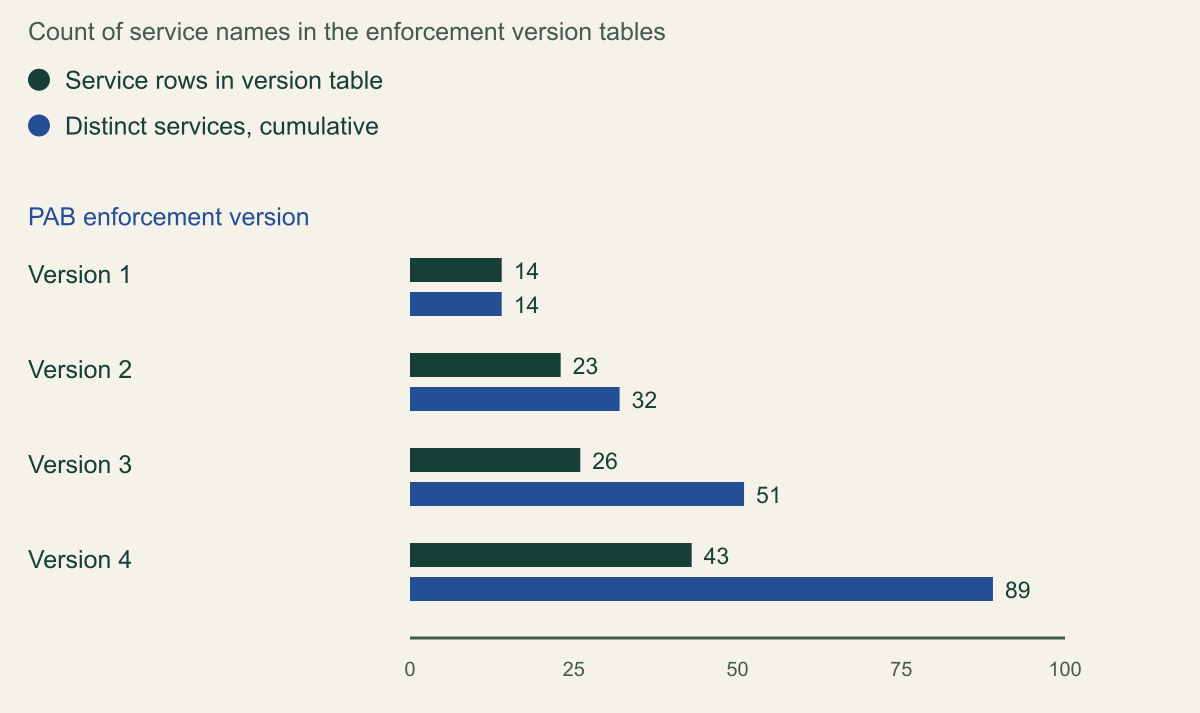
Coverage grew substantially across versions. Version 1 lists 14 services, including Cloud Storage, BigQuery, Pub/Sub and Cloud Run. Version 2 adds Resource Manager, Cloud Build, Identity-Aware Proxy and broader Cloud Storage coverage. Version 3 adds IAM service accounts and keys, Compute Engine networking, Cloud SQL, Spanner, GKE and parts of Cloud KMS. Version 4 adds Secret Manager, broader Cloud KMS coverage, Security Command Center, Service Usage and workforce and workload identity pool administration. Counting service names as written, the four tables together cover 89 distinct services. [4]
Read the tables, not the summary. The Compute Engine rows in versions 2 and 3 list networks, firewalls, load balancing components, routers and VPN resources; as of the review date, no version lists compute.googleapis.com/instances.* or disk permissions. Several rows also carry exceptions, such as the policy binding permissions under IAM and Resource Manager. Before relying on a boundary for a data path, check that each permission in that path appears in your policy's version. [4]
Google recommends against latest. A policy set to latest moves to each new default automatically, which can remove eligibility for permissions that were never blocked before, and Google notes a new version can take up to four weeks to become the default. A pinned number turns each upgrade into a reviewed change that you can simulate first. [1]
Each enforcement version adds services
Version 4 tables cover 89 distinct services, up from 14 in version 1. [4]

Source. Calculated from Google Cloud's PAB enforcement version permissions reference, reviewed October 8, 2026. [4]
Method. Rows counted per version table. Cumulative value is the count of distinct service names across that version and all earlier ones, as written on the page; a service with partial coverage counts once.
Accessible table and figure data
| Enforcement version | Service rows in version table | Distinct services, cumulative |
|---|---|---|
| Version 1 | 14 | 14 |
| Version 2 | 23 | 32 |
| Version 3 | 26 | 51 |
| Version 4 | 43 | 89 |
| Enforcement version | Service rows in version table | Distinct services, cumulative |
|---|---|---|
| Version 1 | 14 | 14 |
| Version 2 | 23 | 32 |
| Version 3 | 26 | 51 |
| Version 4 | 43 | 89 |
Bindings and principal sets
Policies live under the organization; bindings attach them. A binding names one policy and one principal set, and its parent is the Resource Manager resource closest to that set. [3][12] One policy can be bound to any number of principal sets, and each principal set can carry at most 10 boundaries. The target principal set cannot be changed after the binding is created. [1][2][3]
Principal sets nest upward. A service account in a project belongs to that project's principal set, to the set of every folder above the project and to the organization's set, so boundaries bound at any of those levels apply to it. Users are different: a Google Workspace identity reaches boundaries through the Workspace domain set or the organization set, not through a project. Google groups do not appear in the supported list, so a boundary cannot be scoped to a group. [1]
Conditions narrow a binding to some members of the set. Only two attributes are accepted, principal.type and principal.subject, with at most 10 logical operators and 250 characters. If a condition evaluates to true or cannot be evaluated, the policy is enforced; only false exempts the principal. Google recommends pairing principal.subject with principal.type, because the same identifier can name a Google Account and a workforce pool user, and warns that startsWith() and endsWith() match more than you may expect. Subject conditions compare the primary email address only, not aliases. [1][2][11]
Two edges come from the ownership model. Bindings cannot cross organizations: if you move a project to another organization, IAM eventually deletes the binding that tied your policy to it, so a migrated project can quietly leave its boundary behind. And, going by the membership rules above, identities outside your principal sets, such as personal Google Accounts that a project owner adds to an allow policy, are not subject to your boundaries at all. That is the job of resource-side controls; domain-restricted sharing, enforced by default for organizations created on or after May 3, 2024, limits which domains can be granted roles in the first place. [1][14]
| Principal set | Members | Binding parent |
|---|---|---|
| Organization | Workspace identities, workforce pools, and all service accounts, workload pools and agent identities in the organization | Organization |
| Folder | Service accounts, workload pools and agent identities in any project under the folder | Folder |
| Project | Service accounts, workload pools and agent identities in the project | Project |
| Google Workspace domain | All identities in the Workspace customer | Organization |
| Workforce identity pool | All identities in the pool | Organization |
| Workload identity pool | All identities in the pool | Project that owns the pool |
| Agent identities | Agent identities in the project's trust domain | Project |
Use cases that hold up
Keep the whole organization inside the organization. One policy whose only rule lists //cloudresourcemanager.googleapis.com/organizations/ORG_ID, bound to the organization's principal set, makes every member eligible only for resources you own. It stops employees and service accounts from using supported permissions in other companies' organizations, which Google presents as a defense against phishing and data exfiltration. [1][5]
Confine a project's service accounts to that project. A second policy lists one project and is bound to that project's principal set with the condition principal.type == 'iam.googleapis.com/ServiceAccount'. A leaked key or a compromised workload then cannot use supported permissions anywhere else in the organization, even if someone granted that service account a role on a production project by mistake. [5]
Layer the two, and handle the union. Because eligibility adds up, the organization-wide policy would make the project's service accounts eligible for the whole organization again. Google's example fixes this with a condition on the organization binding that exempts the project's service accounts; its expression also excludes the project's App Engine and Compute Engine default service accounts by address. The JSON below is a shortened hypothetical version of that binding. Create and bind the project policy before adding the exemption, so the service accounts are never left with no boundary. [5][7]
Version 3 brought iam.googleapis.com/serviceAccounts.* into scope, which bears on impersonation. Two inferences follow from Google's evaluation rule, though neither is a documented example. A bounded user should be unable to use permissions such as iam.serviceAccounts.getAccessToken on a service account in a project outside the user's eligible resources. And once impersonation succeeds, IAM evaluates the boundaries of the principal making each request, which is now the service account, so its own boundaries decide where the token can be used. [1][4]
{
  "displayName": "Org boundary, example-dev service accounts exempt",
  "target": {
    "principalSet": "//cloudresourcemanager.googleapis.com/organizations/123456789012"
  },
  "policyKind": "PRINCIPAL_ACCESS_BOUNDARY",
  "policy": "organizations/123456789012/locations/global/principalAccessBoundaryPolicies/example-org-only",
  "condition": {
    "title": "Exempt example-dev service accounts",
    "expression": "principal.type != 'iam.googleapis.com/ServiceAccount' || !principal.subject.endsWith('@example-dev.iam.gserviceaccount.com')"
  }
}Roll out without locking people out
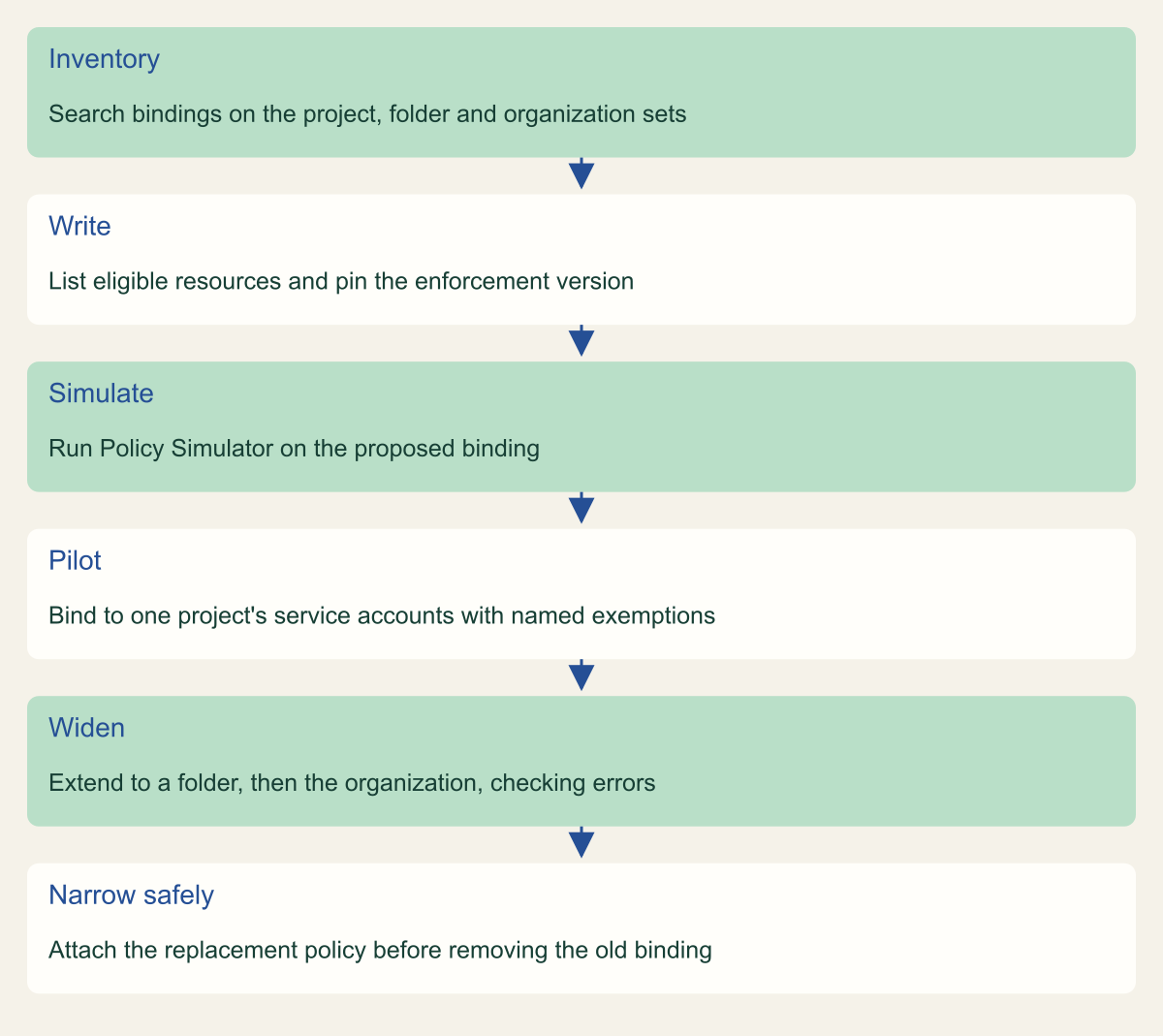
Begin with an inventory, because a boundary can only be safe if you know who will be subject to it and what they currently reach. List existing policies with gcloud iam principal-access-boundary-policies list, then run gcloud iam policy-bindings search-target-policy-bindings for every principal set that contains the identities you care about. Each search takes a single target, so to see every boundary a service account is subject to, run it for the account's project, each folder above it and the organization. [8][1]
Write the first policy for the narrowest useful set and pin its version. One project's service accounts is a good pilot: the members are known, the resource list is short, and a mistake affects workloads you can redeploy rather than every employee. Use the console's Test changes button before you add the binding. Policy Simulator for PAB, still in Preview, replays the last 90 days of access logs and lists access that would be gained or revoked, but it reviews only Google Accounts and service accounts and evaluates only PAB, not allow or deny policies. [9][2]
Decide on exemptions before binding anything to a broad set. Google's binding example exempts a named administrator with principal.subject != 'super-admin@example.com'. Keep any such list short, pair it with a type check, and record why each identity is exempt. Then widen in steps: one project, then a folder of similar projects, then the organization. Watch for permission errors after each step before moving on. [1][11]
Narrowing later follows a strict order. Attach the replacement policy that holds only the resources you want, confirm it is bound, then remove the broader binding or tighten it with a condition. Deleting the last boundary a principal is subject to makes it eligible for everything, and deleting a policy that still has bindings leaves those bindings counting against the limit of 10 per principal set until IAM removes them. Upgrades to the enforcement version deserve the same treatment as a policy change: simulate, then change the version on the existing policy. [7][1]
# Example fragment. Placeholders: organization 123456789012, project example-dev
# with project number 901234567890. Run each step only after the previous one succeeds.

# 1. Write the rule file and create the policy with a pinned enforcement version.
cat > example-dev-rules.json <<'EOF'
[
  {
    "description": "example-dev service accounts stay in example-dev",
    "resources": [
      "//cloudresourcemanager.googleapis.com/projects/example-dev"
    ],
    "effect": "ALLOW"
  }
]
EOF
gcloud iam principal-access-boundary-policies create example-dev-only \
  --organization=123456789012 --location=global \
  --display-name="example-dev service accounts" \
  --details-rules=example-dev-rules.json \
  --details-enforcement-version=4

# 2. See what is already bound to the project's principal set. The gcloud reference
#    documents the project number for --target; the binding in step 3 uses the
#    project ID format shown in the principal access boundary overview.
gcloud iam policy-bindings search-target-policy-bindings \
  --project=example-dev --location=global \
  --target=//cloudresourcemanager.googleapis.com/projects/901234567890 \
  --format=json

# 3. After a Policy Simulator run in the console, bind it to service accounts only.
gcloud iam policy-bindings create example-dev-only-binding \
  --project=example-dev --location=global \
  --policy=organizations/123456789012/locations/global/principalAccessBoundaryPolicies/example-dev-only \
  --target-principal-set=//cloudresourcemanager.googleapis.com/projects/example-dev \
  --condition-title="Service accounts only" \
  --condition-expression="principal.type == 'iam.googleapis.com/ServiceAccount'"
Roll out one principal set at a time
Simulate before binding and never leave a principal with zero boundaries. [7][9]

Source. Conceptual rollout sequence based on Google Cloud guidance for creating, viewing, simulating and removing PAB policies. [2][7][8][9]
Method. Conceptual ordering of documented steps; the staging from project to organization is an editorial recommendation.
Accessible table and figure data
| Step | Action |
|---|---|
| Inventory | Search bindings on the project, folder and organization sets |
| Write | List eligible resources and pin the enforcement version |
| Simulate | Run Policy Simulator on the proposed binding |
| Pilot | Bind to one project's service accounts with named exemptions |
| Widen | Extend to a folder, then the organization, checking errors |
| Narrow safely | Attach the replacement policy before removing the old binding |
| Step | Action |
|---|---|
| Inventory | Search bindings on the project, folder and organization sets |
| Write | List eligible resources and pin the enforcement version |
| Simulate | Run Policy Simulator on the proposed binding |
| Pilot | Bind to one project's service accounts with named exemptions |
| Widen | Extend to a folder, then the organization, checking errors |
| Narrow safely | Attach the replacement policy before removing the old binding |
Diagnose a blocked request
A boundary denial looks like any other denial. Google's permission error page lists four causes for the same message: a missing permission, a deny policy, a resource outside the principal's PAB rules, or a resource that does not exist. The gcloud and REST errors name the permission, the resource, the account and an error identifier, and include a link to a Policy Troubleshooter summary. [13]
Policy Troubleshooter evaluates PAB alongside allow and deny policies, with PAB support in Preview. From the CLI, use the beta track: gcloud beta policy-intelligence troubleshoot-policy iam with the resource's full name, --principal-email and --permission. The response includes a pabPolicyExplanation that shows, per binding and policy, whether the condition matched, whether the resource was included and whether the policy's version enforces the permission. Without permission to view the boundaries that apply to the principal, the PAB result is Unknown. [10]
Those viewing rights sit in the principal's organization, not the resource's. For service accounts and agent identities that is the organization containing their project; for Google Accounts it is the organization tied to their Workspace domain. Google lists Principal Access Boundary Viewer plus a role for the principal set type, such as Organization Administrator or Workspace Pool IAM Admin. Grant those to the people who handle access tickets before the rollout, not during an incident. [10]
When the troubleshooter is not available, work the three conditions by hand: list every binding on every principal set the identity belongs to, read each policy's rules and version, and check whether the permission appears in that version's table. If the identity was created minutes ago, retry before changing policy, since fail-closed evaluation during propagation is expected behavior. [1][4][8]
Limits to plan around
Most of the quotas are high, but two of them shape design. The cap of 10 boundaries per principal set pushes you toward a few broad policies scoped with conditions rather than one policy per team, and the 500-resource cap per policy means large estates should name folders rather than long lists of projects. [1]
- Up to 1,000 PAB policies per organization, each with up to 500 rules and 500 resources across all rules. [1]
- Up to 10 PAB policies bound to one principal set; deleted policies' leftover bindings still count until IAM removes them. [1][7]
- Rules name only projects, folders and organizations, and the only effect is
ALLOW; you cannot list a single bucket or deny a resource. [1] - Binding conditions accept only
principal.typeandprincipal.subject, up to 10 logical operators and 250 characters. [2] - Policy and binding display names are limited to 63 characters; rule descriptions to 256. [2]
- Cross-organization bindings cannot be created, and existing ones are deleted periodically. [1]
Fitting boundaries into existing controls
Begin with the question each control answers. If the risk is a principal acting in places you do not own or did not intend, use a boundary. If the risk is a permission being used on a resource you own, use a deny policy. If the risk is a role landing on the wrong identity, use domain-restricted sharing and tighter allow policies. Most organizations need all three, and PAB is the only one that follows the principal across organizations. [1][3][14]
A workable sequence is short. Grant the people who triage access the PAB viewer roles first. Pilot one boundary on one project's service accounts with a pinned version, simulated before binding. Add an organization-only boundary for everyone else with a deliberate exemption for the pilot project. Then review the enforcement version tables each quarter and treat every upgrade, every new principal set and every project move between organizations as a change that needs the same simulation and inventory check as the first rollout. [2][4][9][10]
Method and provenance
Source-led technical analysis of Google Cloud IAM, Policy Intelligence, organization policy and gcloud reference documentation, with original diagrams and one calculated chart. Sources were reviewed on October 8, 2026.
No Google Cloud organization, policy or log data was inspected. Enforcement version coverage, limits and feature stages reflect the cited pages on the review date and change as Google adds versions; the cumulative service count depends on service names as written on the reference page.
AI assistance. AI assisted research synthesis, drafting, diagram planning and visual production, with deterministic editorial checks. No personal deployment experience, independent human review or live test is claimed.
Published under the Cloud Security Desk organizational byline. Read the practitioner guide policy.
References
- Principal access boundary policies Google Cloud. Accessed .
- Create and apply principal access boundary policies Google Cloud. Accessed .
- IAM policy types Google Cloud. Accessed .
- Principal access boundary policy enforcement version permissions Google Cloud. Accessed .
- Example use cases for principal access boundary policies Google Cloud. Accessed .
- IAM release notes Google Cloud. Accessed .
- Remove principal access boundary policies Google Cloud. Accessed .
- View principal access boundary policies Google Cloud. Accessed .
- Policy Simulator for principal access boundary policies Google Cloud. Accessed .
- Troubleshoot IAM permissions Google Cloud. Accessed .
- IAM conditions attribute reference Google Cloud. Accessed .
- gcloud iam policy-bindings create Google Cloud. Accessed .
- Permission error messages Google Cloud. Accessed .
- Restrict identities with domain-restricted sharing Google Cloud. Accessed .
- gcloud iam principal-access-boundary-policies create Google Cloud. Accessed .