
A comparative evaluation of Route 53 Resolver DNS Firewall, Azure DNS resolver policy and Azure Firewall FQDN filtering, and Google Cloud DNS response policies, DNS Armor and Cloud NGFW FQDN objects and URL filtering, based on provider documentation and release notes reviewed October 10, 2026. It maps the bypass classes each provider documents, failure modes, quotas with their stated scopes and the connection-level rules that close each gap.
At a glance
Key findings
- AWS documents that Route 53 Resolver DNS Firewall filters only on the domain name, does not block the address a name resolves to and does not filter HTTPS, SSH, TLS or FTP. [1]
- Google's DNS Armor analyzes queries asynchronously after they resolve, so it detects and logs rather than blocks; it excludes serverless workloads, queries sent to other resolvers and DNS peering hub designs. [23]
- Azure Firewall FQDN network rules refresh resolved addresses every 15 seconds and keep a stale address for 15 minutes, and Microsoft says clients that bypass the firewall's DNS proxy may resolve names differently. [13][14]
- AWS's DNS Firewall configuration page says the default failure mode is closed, while a setup step in its overview reads as if blocking needs a change, so read
FirewallFailOpenfor each VPC. [1][2] - Connection controls read names from SNI or the Host header: Google's URL filtering passes QUIC, ESNI and ECH traffic only with TLS inspection off and an explicit allow filter, and Microsoft lists ESNI and QUIC as uninspected. [16][24]
One decision at the resolver
A resolver-layer egress control makes one decision: when a workload asks the provider's resolver for a name, the resolver answers, refuses or logs. Route 53 Resolver DNS Firewall, Azure DNS resolver policy and Cloud DNS response policies all act at that point. They stop name resolution through that resolver, for workloads that use it, and nothing after it. AWS states the boundary plainly: DNS Firewall filters only on the domain name, does not resolve the name into an address it could block, and does not filter HTTPS, SSH, TLS, FTP or other application protocols. [1]
That leaves three kinds of traffic outside the DNS layer: connections that never needed a lookup, lookups sent to some other resolver, and workloads whose traffic never crosses the network where the control lives. Covering them takes a connection control in the egress path that decides on every flow. In practice that is AWS Network Firewall with domain list rules, Azure Firewall application rules, or Cloud NGFW URL filtering, each matching the TLS Server Name Indication (SNI) or the HTTP Host header, with IP and port rules for traffic that carries no name. The same control has to deny DNS to resolvers you did not approve, or a single configuration change on a host skips the DNS layer. [8][9][13][15][24]
Keep the DNS layer anyway. By AWS's account it is the lowest-cost control to deploy in every network, the only one that sees data encoded in queries the provider resolver relays, and the place where managed threat lists and tunneling detection run. AWS's egress guidance deploys DNS Firewall first and Network Firewall second, and points out that queries to the VPC resolver never traverse Network Firewall endpoints, so neither replaces the other. Google's DNS Armor sits at the far end of the range, as a detector that blocks nothing. [9][23]
AWS, Azure and Google Cloud controls compared
The table lines up the first-party controls by the job they do. Names and status were checked against provider documentation and release notes on October 10, 2026. Microsoft announced the VNet control as Azure DNS security policy and now documents it as DNS resolver policy; this piece uses resolver policy from here on. [17][20]
Google is the outlier at the resolver. A response policy rule either returns local data you define or exempts a name, and Google says bypass is the only behavior it supports, so blocking a name on Google means rewriting its answer. DNS Armor, a managed threat detector powered by Infoblox, writes findings to Cloud Logging after resolution and adds no latency because it is not in the resolution path. On Google Cloud, preventing connections to domains that only a threat feed knows about therefore falls to the connection layer or to response policy rules you maintain yourself. [23][25]
Azure's resolver policy blocks by answering. In Microsoft's worked example a blocked query returns NOERROR with a CNAME pointing at blockpolicy.azuredns.invalid, not an error code, which matters when a team reads application errors to judge whether block mode broke something. Rules follow the DNS hierarchy: an allow for contoso.com in a higher-priority rule also allows sub.contoso.com even if a lower-priority rule blocks it. [17][18]
AWS has the widest resolver feature set: custom block responses, rules by query type, inspection of every name in a CNAME chain, and Advanced rules for DNS tunneling, DGA and dictionary DGA with a confidence threshold. Since May 11, 2026 the Advanced tier also carries threat and content categories, and on September 29, 2026 Palo Alto Networks Advanced DNS Security rules became generally available inside DNS Firewall in 32 Regions. Every one of these features still decides on names. [1][6][7]
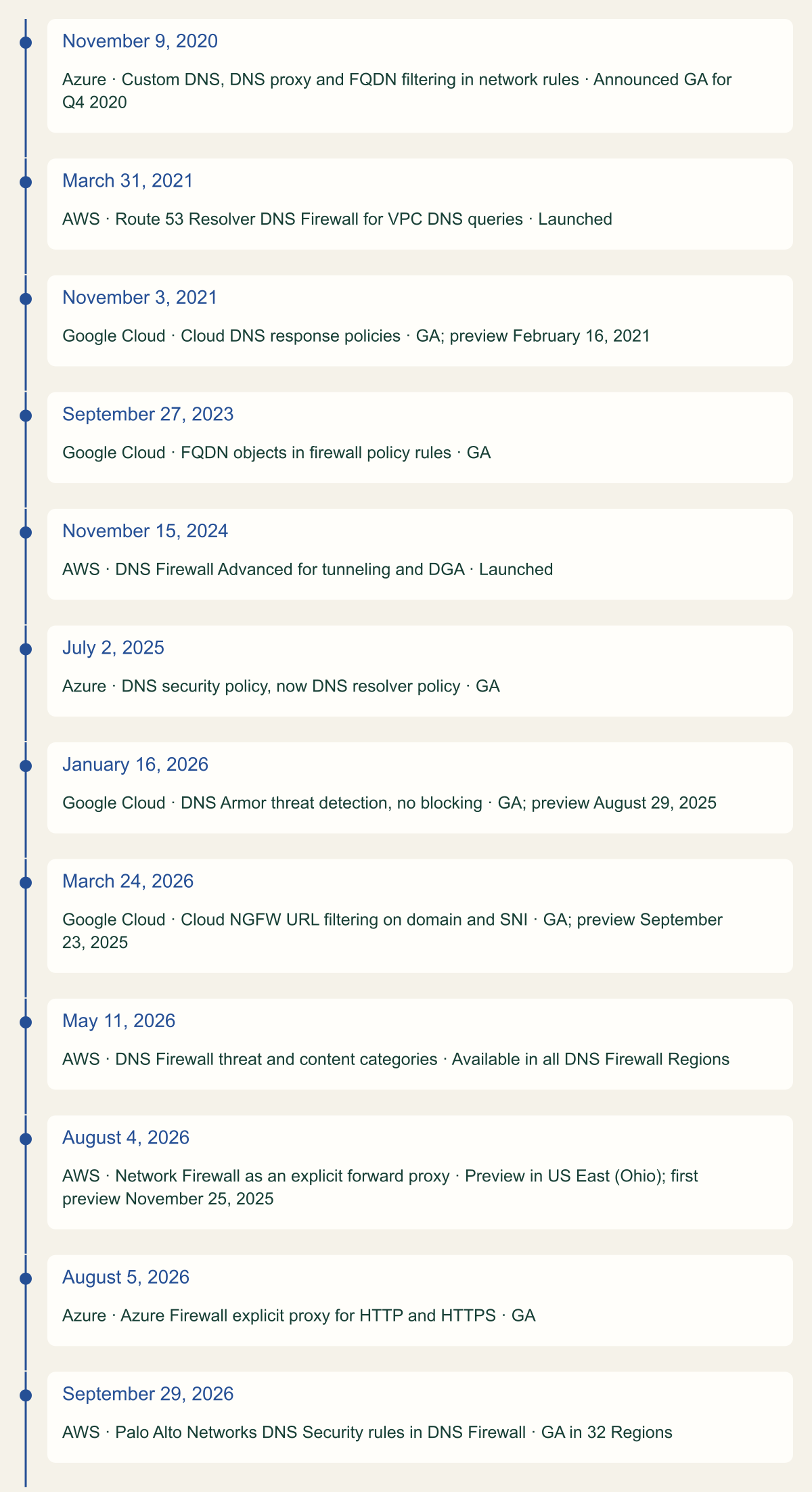
The timeline shows how recent most of this is. Seven of the twelve dated changes landed in 2025 or 2026, including both explicit proxies and Google's URL filtering, so a design reviewed before 2025 may assume a feature was missing or still in preview.
| Job | AWS | Azure | Google Cloud |
|---|---|---|---|
| Block or rewrite at the resolver | Route 53 Resolver DNS Firewall: allow, block, alert | DNS resolver policy: allow, block, alert | Response policy: local data or bypass |
| Managed threat lists and anomaly detection | Managed lists; Advanced tunneling, DGA and categories | Threat Intelligence managed domain list | DNS Armor: detects and logs, does not block |
| Names resolved into IP rules | Not documented; domain lists read SNI and Host | Network rules with DNS proxy | FQDN objects in firewall policy rules |
| Name match on the connection | Network Firewall domain lists: SNI, Host | Application rules: SNI, Host; URL with TLS inspection | URL filtering: SNI, Host |
Twelve dated DNS and domain egress changes, 2020 to 2026
Seven of the twelve dated changes landed in 2025 or 2026, including both explicit proxies and Google's URL filtering. [5][6][7][10][19][20][21][28][29]

Source. Dates and status copied from the Route 53 Developer Guide document history, AWS What's New posts, Azure Updates records and the Cloud DNS and Cloud NGFW release notes, reviewed October 10, 2026. [5][6][7][10][19][20][21][28][29]
Method. One card per dated first-party change to DNS-layer or domain-based egress control. The date is the publication date of the provider's record; preview dates are shown where the provider records them. Regional expansions and pricing changes are excluded.
Accessible table and figure data
| Date | Provider | Change | Status |
|---|---|---|---|
| November 9, 2020 | Azure | Custom DNS, DNS proxy and FQDN filtering in network rules | Announced GA for Q4 2020 |
| March 31, 2021 | AWS | Route 53 Resolver DNS Firewall for VPC DNS queries | Launched |
| November 3, 2021 | Google Cloud | Cloud DNS response policies | GA; preview February 16, 2021 |
| September 27, 2023 | Google Cloud | FQDN objects in firewall policy rules | GA |
| November 15, 2024 | AWS | DNS Firewall Advanced for tunneling and DGA | Launched |
| July 2, 2025 | Azure | DNS security policy, now DNS resolver policy | GA |
| January 16, 2026 | Google Cloud | DNS Armor threat detection, no blocking | GA; preview August 29, 2025 |
| March 24, 2026 | Google Cloud | Cloud NGFW URL filtering on domain and SNI | GA; preview September 23, 2025 |
| May 11, 2026 | AWS | DNS Firewall threat and content categories | Available in all DNS Firewall Regions |
| August 4, 2026 | AWS | Network Firewall as an explicit forward proxy | Preview in US East (Ohio); first preview November 25, 2025 |
| August 5, 2026 | Azure | Azure Firewall explicit proxy for HTTP and HTTPS | GA |
| September 29, 2026 | AWS | Palo Alto Networks DNS Security rules in DNS Firewall | GA in 32 Regions |
| Date | Provider | Change | Status |
|---|---|---|---|
| November 9, 2020 | Azure | Custom DNS, DNS proxy and FQDN filtering in network rules | Announced GA for Q4 2020 |
| March 31, 2021 | AWS | Route 53 Resolver DNS Firewall for VPC DNS queries | Launched |
| November 3, 2021 | Google Cloud | Cloud DNS response policies | GA; preview February 16, 2021 |
| September 27, 2023 | Google Cloud | FQDN objects in firewall policy rules | GA |
| November 15, 2024 | AWS | DNS Firewall Advanced for tunneling and DGA | Launched |
| July 2, 2025 | Azure | DNS security policy, now DNS resolver policy | GA |
| January 16, 2026 | Google Cloud | DNS Armor threat detection, no blocking | GA; preview August 29, 2025 |
| March 24, 2026 | Google Cloud | Cloud NGFW URL filtering on domain and SNI | GA; preview September 23, 2025 |
| May 11, 2026 | AWS | DNS Firewall threat and content categories | Available in all DNS Firewall Regions |
| August 4, 2026 | AWS | Network Firewall as an explicit forward proxy | Preview in US East (Ohio); first preview November 25, 2025 |
| August 5, 2026 | Azure | Azure Firewall explicit proxy for HTTP and HTTPS | GA |
| September 29, 2026 | AWS | Palo Alto Networks DNS Security rules in DNS Firewall | GA in 32 Regions |
What the providers say their DNS controls cannot see
Each provider documents the edge of its DNS control, in different places and with different precision. The table collects those statements and the design consequence of each.
AWS's scope statement is narrow. DNS Firewall filters queries that originate in the VPC and pass through VPC DNS, plus queries that arrive through Resolver endpoints from on-premises networks. It follows that a query an instance sends straight to a resolver on the internet is outside that scope, which is why the connection control has to stop it. AWS also warns that trusting a CNAME chain applies only within one query transaction: a client that later asks for the chain's target directly gets evaluated with no memory of the first query. [1]
Google publishes the most explicit exclusion list. DNS Armor does not inspect Cloud Run, Cloud Run functions or App Engine standard; queries from workloads configured to skip the Cloud DNS resolver at 169.254.169.254 for a server such as 8.8.8.8; queries for internal names, private zones and hybrid forwarding; queries to inbound forwarding endpoints; queries made by Secure Web Proxy; and anything that crosses a DNS peering zone. The last exclusion matters for hub-and-spoke DNS: spokes that forward every query, internet names included, to a hub through a peering zone are treated as internal traffic in both networks, so none of it is inspected. [23]
Microsoft's resolver policy page lists no exclusions and says a linked policy applies to all resources inside the VNet, and the worked example in Microsoft's DNS traffic guide sends its test query to 168.63.129.16. A reasonable reading is that coverage follows Azure's resolver at that address, so a VM pointed at some other DNS server is the case to test before relying on the policy. On the firewall side Microsoft is explicit: if clients do not use Azure Firewall as their DNS proxy, their lookups can happen at different times or return different answers from the ones the firewall used to build its network rules. Client queries forwarded by the DNS proxy also ignore Private DNS zones linked to the firewall's VNet unless the upstream server can see those zones. [14][17][18]
| Control | Documented limit | Design consequence |
|---|---|---|
| Route 53 Resolver DNS Firewall | Names only; no IP blocking; no HTTPS, SSH, TLS or FTP filtering | Add Network Firewall IP and domain rules |
| Route 53 Resolver DNS Firewall | Covers queries through VPC DNS and inbound Resolver endpoints | Deny DNS to other resolvers at the firewall |
| Route 53 Resolver DNS Firewall | CNAME chain trust lasts one query | Allow chain targets queried directly |
| Google DNS Armor | Skips serverless, other resolvers, peering hubs, private and hybrid names | Expect blind spots in hub designs |
| Google DNS Armor | Runs after resolution, outside the resolution path | Treat findings as alerts, not prevention |
| Azure Firewall network rules | Clients outside the DNS proxy may resolve differently | Point every VNet at the proxy |
| Azure DNS resolver policy | No exclusions listed | Test coverage with other resolvers |
Bypass paths to plan for
The provider statements group into five classes of traffic that a DNS control does not stop. They are named so that each gets an owner and a control, not as a catalogue of techniques.
- No lookup at all. A workload that connects to an address it already holds, hard-coded, cached or handed over by another channel, never asks the resolver. AWS's guidance assigns these connections to Network Firewall, which sees the flow whether or not a name preceded it. [1][9]
- Another resolver. Lookups sent directly to a public resolver or an encrypted DNS service skip the provider's resolver; Google names this exclusion and AWS's scope statement implies it. A port rule at the connection control covers plain DNS to outside servers. Encrypted DNS carried inside HTTPS looks like any other web connection, so the reasonable control is a name and IP allowlist that does not include public resolver services. [1][23]
- A path outside the network. Lambda functions that are not attached to a VPC reach the internet by default, and Google excludes Cloud Run, Cloud Run functions and App Engine standard from DNS Armor and serverless egress from URL filtering. It follows that neither control sees that traffic, and the options are to attach the workload to a network with the same egress path or to record the gap as accepted. [11][23][24]
- Data inside allowed DNS. The provider resolver relays queries for any name it allows, so data encoded in query names reaches the authoritative server for that domain even when no connection is ever made. This is the bypass the DNS layer is placed to catch, through AWS's tunneling and DGA rules or DNS Armor's tunneling and DGA detections. [1][23]
- Hidden or misstated names. Connection controls read the name from SNI or Host. AWS recommends separate IP rules for cases where those headers have been manipulated; Google's URL filtering cannot read names in QUIC, ESNI or ECH traffic; Microsoft lists ESNI and QUIC as uninspected by Azure Firewall Premium. [8][16][24]
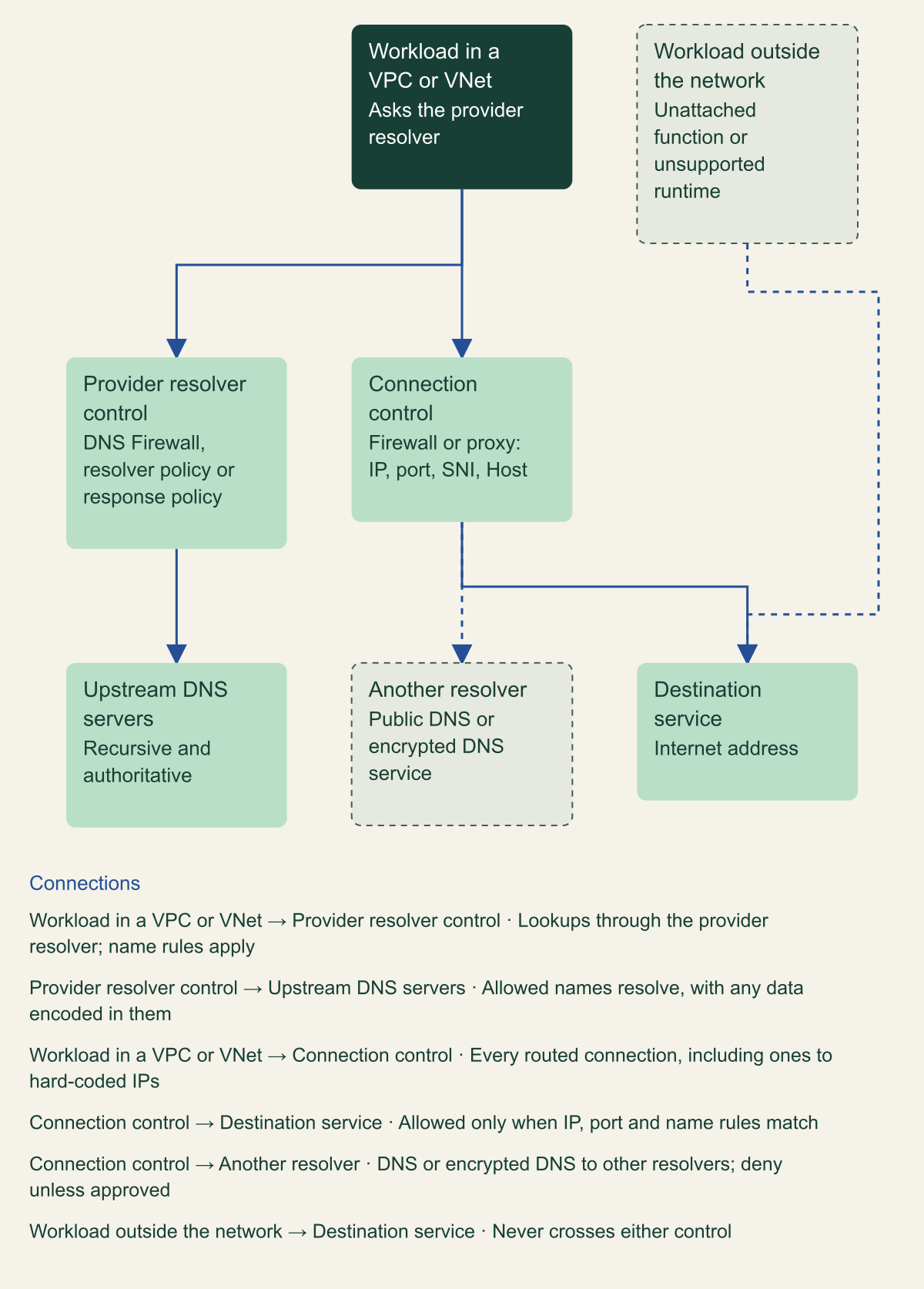
Two paths out, and the traffic each control misses
The resolver control sees only lookups that reach it; the connection control sees every routed flow but only the names that flows reveal; unattached workloads meet neither. [1][9][11][23][24]

Source. Conceptual architecture based on AWS, Microsoft and Google Cloud documentation of DNS Firewall, DNS Armor, URL filtering, Network Firewall and Lambda networking. [1][8][9][11][14][23][24]
Method. Conceptual. Edges are authored to show the two documented paths and the bypass classes named in the cited pages; they are not a packet trace of any one provider.
Accessible table and figure data
| Path | Control that sees it | What it misses |
|---|---|---|
| Lookup through the provider resolver | Resolver control: names, query types, tunneling patterns | The connection that follows |
| Connection after a lookup | Connection control: IP, port, SNI or Host | Names hidden by QUIC, ESNI or ECH |
| Connection to a hard-coded IP | Connection control: IP and port only | Resolver control never sees it |
| DNS to another resolver | Connection control, if it denies it | Resolver control never sees it |
| Workload outside the network | Neither control | Both controls |
| Data encoded in allowed queries | Resolver control detection | Connection control |
| Path | Control that sees it | What it misses |
|---|---|---|
| Lookup through the provider resolver | Resolver control: names, query types, tunneling patterns | The connection that follows |
| Connection after a lookup | Connection control: IP, port, SNI or Host | Names hidden by QUIC, ESNI or ECH |
| Connection to a hard-coded IP | Connection control: IP and port only | Resolver control never sees it |
| DNS to another resolver | Connection control, if it denies it | Resolver control never sees it |
| Workload outside the network | Neither control | Both controls |
| Data encoded in allowed queries | Resolver control detection | Connection control |
Pair DNS filtering with a connection control
On AWS the pairing is Network Firewall. Its domain lists match SNI for HTTPS and the Host header for HTTP, and the firewall does not pause a connection to look the name up, so it trusts the name the client presents; AWS's answer to manipulated headers is IP rules alongside or instead of the domain rules. Two settings decide whether a domain list enforces anything. An Allow list adds a deny for non-matching traffic of the same protocol only when the firewall policy uses default action order; under strict order that deny is not added and the policy needs its own default drop. Domain inspection also applies only to traffic from HOME_NET, which defaults to the CIDR of the VPC where the firewall runs, so a central inspection VPC behind a transit gateway filters spoke traffic by name only after HOME_NET lists the spoke ranges. Network Firewall can also run as an explicit forward proxy, in preview in US East (Ohio) since August 4, 2026. [8][9][10]
Azure Firewall offers two FQDN mechanisms that behave differently. Application rules for HTTP, HTTPS and MSSQL use a transparent proxy and SNI, so they can tell apart two names that share one address. Network rules turn names into addresses through the firewall's DNS proxy for any TCP or UDP protocol, refresh those addresses every 15 seconds and keep an address for 15 minutes after DNS stops returning it. Microsoft's advice is to use application rules wherever the protocol allows. Rule order then decides which mechanism applies: network rules are processed before application rules regardless of priority and processing stops on a match, so a broad network rule allowing TCP 443 makes every HTTPS application rule irrelevant. The built-in infrastructure FQDN collection is also allowed after application rules unless a deny-all application rule collection comes last. Explicit proxy for HTTP and HTTPS reached general availability in August 2026. [13][15][21]
Network rules inherit DNS caching. The proxy keeps positive answers for up to an hour and negative answers for up to 30 minutes, and Microsoft suggests FQDNs that resolve to a single address. VNets must list the firewall's private IP as their DNS server, and VMs keep their old settings until they restart. Microsoft's documentation also disagrees with itself on policy inheritance: the DNS settings page says child policies inherit the parent's DNS settings, while the known issues page says they do not and recommends configuring DNS on each child policy. Follow the known issue until the two pages agree. [14][16]
Google Cloud has the same split between address rules and name matching. FQDN objects in Cloud NGFW become IP addresses: each object holds at most 32 IPv4 and 32 IPv6 addresses, Cloud NGFW resolves names in each region that contains a target, and when two objects share an address the higher-priority rule matches traffic for both. Google says most Google domain names, googleapis.com among them, do not fit this model and should be handled with IP addresses or address groups; it also advises against A records with TTLs under 90 seconds, and FQDN objects cannot be used at all in a network whose outbound server policy names an alternative name server. URL filtering matches domain and SNI at zonal firewall endpoints, with optional TLS inspection to read the Host header, and its coverage follows placement: a rule that applies a security profile group to 0.0.0.0/0 lets traffic from zones without an endpoint through without layer 7 inspection. [22][24]
Decide what happens when the filter cannot answer
On AWS the failure mode is a per-VPC setting. The VPC configuration page says the default is closed: when VPC Resolver gets no reply from DNS Firewall it blocks the query and returns SERVFAIL, and fail open lets queries through instead. The overview page agrees in its components section but, in its high-level steps, lists changing the configuration as an optional step for anyone who wants queries blocked when DNS Firewall does not respond, which reads as if the default were open. Follow the configuration page, but do not rely on the default either way: read FirewallFailOpen for every VPC and set it on purpose. The setting is enforced only while at least one rule group is associated with the VPC. [1][2]
Azure's DNS proxy stops using an upstream server it detects as unhealthy and runs five-second health checks until it recovers, but if every upstream server is unavailable there is no fallback, so it follows that clients pointed at the proxy lose name resolution. Network rules fail toward denial too: Microsoft's known issues list brief traffic loss and unexpected deny logs during scale-out when more than 1,000 FQDNs sit in network rules or the upstream DNS server answers slowly, with prescaling and maintenance windows as mitigation. [14][16]
Google's FQDN objects fail by disappearing. When a lookup returns NXDOMAIN, no address, or the DNS server is unreachable, Cloud NGFW ignores the object and programs the rest of the rule. It follows that an egress allow rule built on that name stops matching, which fails closed for that destination, while a deny rule built on it stops denying, which fails open. DNS Armor is outside the resolution path, so an outage costs detections rather than lookups, and URL filtering in a zone without an endpoint fails open for layer 7 inspection. [22][23][24]
A workable rule follows from those behaviors: fail closed where the DNS control is the only barrier, as in an isolated subnet with an allowlist, and accept fail open only where a connection control enforces the same policy. Whatever the choice, record it per network so an outage review does not have to rediscover it.
# Example: list the DNS Firewall failure mode of each VPC configuration in the Region,
# then pin one VPC to fail closed. Placeholder VPC ID.
# DISABLED means fail open is off, so unanswered queries get SERVFAIL.
aws route53resolver list-firewall-configs \
  --query "FirewallConfigs[].[ResourceId,FirewallFailOpen]" \
  --output table

aws route53resolver update-firewall-config \
  --resource-id vpc-0123456789abcdef0 \
  --firewall-fail-open DISABLED
Quotas and rule design
The documented limits do not share a unit or a scope, so they are listed with their scope rather than charted. AWS counts domains per account per Region, Google counts names per rule, per network and per policy, Microsoft gives a per-firewall FQDN threshold through a known issue, and the resolver policy restrictions table gives numbers with no unit or scope at all. [3][16][17][26][27]
Two AWS numbers interact. One S3 import file can hold 250,000 domains, while all domain lists in an account and Region share a default of 100,000; it follows that a file at the import maximum cannot load until that quota is raised, and the quotas page offers increases for both but none for the five rule groups a VPC can carry. These limits mostly constrain large blocklists. AWS calls the opposite approach, allowing only approved domains, a walled garden, and a list of the destinations a workload actually needs is easier to keep inside one rule group and to review. [1][3]
Chains and wildcards need deliberate handling. AWS inspects every name in a CNAME or DNAME chain by default, so an allowlist must include the chain's targets unless the rule is set to trust the chain. Azure's resolver policy chases CNAME chains, so a block on a target also blocks any name that aliases to it, and Cloud NGFW follows CNAMEs when it resolves FQDN objects. Azure network rules and Google FQDN objects accept no wildcards, Azure resolver policy domain lists do, and Network Firewall marks a wildcard with an initial dot, as in .example.com. [1][8][13][17][22]
| Control | Documented limit | Scope |
|---|---|---|
| Route 53 Resolver DNS Firewall | 5 rule groups | Per VPC; no increase offered |
| Route 53 Resolver DNS Firewall | 100 rules | Per rule group |
| Route 53 Resolver DNS Firewall | 100,000 domains | All domain lists, per account per Region |
| Route 53 Resolver DNS Firewall | 250,000 domains | Per S3 import file |
| Azure Firewall network rules | More than 1,000 FQDNs | Known issue: drops during scale-out |
| Azure Firewall DNS | 15 custom DNS servers | Per firewall |
| Azure DNS resolver policy | 100 traffic rules; 100,000 domains | Unit and scope not stated |
| Cloud NGFW FQDN objects | 100 FQDNs | Per rule; cannot be increased |
| Cloud NGFW FQDN objects | 1,000 FQDNs | Per VPC network |
| Cloud NGFW FQDN objects | 32 IPv4 and 32 IPv6 addresses | Per FQDN object |
| Cloud NGFW URL filtering | 2,500 matcher strings | Per security profile |
| Cloud DNS response policy | 10,000 rules | Per policy; one policy per network |
Logging and detection value
DNS logs are where the resolver layer earns its place even when a firewall enforces. AWS VPC Resolver query logs record query_name, query_type, rcode, rdata and srcaddr for each query, and fill firewall_rule_group_id, firewall_rule_action and firewall_domain_list_id only when an alert or block rule matched, so a query that passed an allow rule carries no record of which rule allowed it. Azure writes resolver policy events to the DNSQueryLogs table with QueryName, QueryType, SourceIpAddress, ResolutionPath and ResolverPolicyRuleAction; Microsoft notes that Azure Firewall's own management lookups also appear in DNS logs and can be filtered out by domain. Google's DNS Armor threat logs put the name the workload asked for in dnsQuery.queryName and, for a CNAME chain, the member that triggered the finding in threatInfo.threatIndicator. [4][16][18][23]
The join between DNS and connection logs is the useful part. A DNS record ties a name to the address it returned, which connection logs lack. AWS flow logs leave out instances' traffic to the Amazon DNS server but log all traffic to a DNS server you run yourself, so the resolver logs carry the provider path and flow logs show the rest. Two signals follow from the bypass classes, as reasoned detections rather than provider features: DNS traffic in connection logs to anything other than the approved resolvers, and connections to addresses that no logged query returned. Run new resolver rules in alert mode first and read those logs before switching to block. [1][4][12]
Build a new egress design in layers
Work through the layers in this order; later steps assume the earlier ones are in place.
- Inventory resolution paths. For each workload, record which resolver it uses and whether its traffic crosses your network at all, including unattached functions, serverless runtimes and DNS peering hubs. [11][23]
- Close the other-resolver path at the connection control. Deny DNS to anything except the provider resolver and approved forwarders, then allowlist names by SNI and Host with IP rules for traffic that has no name. [8][9]
- Settle rule order before writing rules: default versus strict action order and HOME_NET on Network Firewall, network rules before application rules on Azure Firewall, and an endpoint in every zone for Cloud NGFW URL filtering. [8][15][24]
- Turn on the resolver control in alert mode, then block, and set the failure mode explicitly for each VPC or network. [1][2]
- Decide QUIC and ECH on purpose: Google's URL filtering does not pass them with TLS inspection on and, with it off, passes them only on an explicit allow filter, and Microsoft's documented mitigation for QUIC passes UDP 80 and 443 through network rules, which leaves that traffic without FQDN inspection. [16][24]
Method and provenance
Source-led comparative analysis of AWS, Microsoft and Google Cloud documentation, quota pages, release notes, What's New posts and Azure Updates records for resolver-layer and connection-layer egress controls. Sources were reviewed on October 9 and 10, 2026.
No cloud account, firewall, resolver or live traffic was configured or observed. Feature status, limits and behaviors are bounded to the cited pages as of October 10, 2026, and inferences about coverage are labeled where providers do not state it.
AI assistance. AI assisted research synthesis, drafting, diagram planning and visual production, with deterministic editorial checks. No personal deployment experience, independent human review or live test is claimed.
Published under the Cloud Security Desk organizational byline. Read the practitioner guide policy.
References
- How Resolver DNS Firewall works Amazon Web Services. Accessed .
- DNS Firewall VPC configuration Amazon Web Services. Accessed .
- Quotas, Amazon Route 53 Developer Guide Amazon Web Services. Accessed .
- Values that appear in VPC Resolver query logs Amazon Web Services. Accessed .
- Document history, Amazon Route 53 Developer Guide Amazon Web Services. Accessed .
- Amazon Route 53 Resolver DNS Firewall adds threat and content domain categories Amazon Web Services. Published . Accessed .
- Route 53 Resolver DNS Firewall support for Palo Alto Networks Advanced DNS Security is generally available Amazon Web Services. Published . Accessed .
- Stateful domain list rule groups in AWS Network Firewall Amazon Web Services. Accessed .
- Egress patterns, AWS Security Services Best Practices Amazon Web Services. Accessed .
- Re-introducing forward proxy as AWS Network Firewall functionality (preview) Amazon Web Services. Published . Accessed .
- Giving Lambda functions access to resources in an Amazon VPC Amazon Web Services. Accessed .
- Flow log limitations, Amazon VPC User Guide Amazon Web Services. Accessed .
- Use FQDN filtering in network rules Microsoft. Accessed .
- Azure Firewall DNS settings Microsoft. Accessed .
- Azure Firewall rule processing logic Microsoft. Accessed .
- Azure Firewall known issues and limitations Microsoft. Accessed .
- DNS resolver policy (Azure DNS security policy) Microsoft. Accessed .
- Secure and view DNS traffic Microsoft. Accessed .
- Azure Updates record: New Azure Firewall capabilities will be generally available in Q4 CY2020 Microsoft. Published . Accessed .
- Azure Updates record 497535: Generally Available, Azure DNS security policy Microsoft. Published . Accessed .
- Azure Updates record 568825: Generally Available, Explicit proxy in Azure Firewall Microsoft. Published . Accessed .
- Fully qualified domain name objects overview Google Cloud. Accessed .
- Advanced threat detection with DNS Armor Google Cloud. Accessed .
- URL filtering service overview Google Cloud. Accessed .
- Manage response policies and rules Google Cloud. Accessed .
- Cloud NGFW quotas and limits Google Cloud. Accessed .
- Cloud DNS quotas and limits Google Cloud. Accessed .
- Cloud DNS release notes Google Cloud. Accessed .
- Cloud NGFW release notes Google Cloud. Accessed .