
An architecture guide for engineers giving agents a code execution or data analysis tool, drawn from the Firecracker paper, gVisor documentation, AWS, Microsoft and Google service documentation and published AgentCore sandbox research reviewed in October 2026. It compares isolation boundaries and managed services and gives network, credential and lifecycle controls with a selection decision tree.
At a glance
Key findings
- Code an agent writes should be handled like code submitted by a stranger: OWASP's ASI05 lists prompt injection, hallucinated code and hostile package installs as routes to execution, and asks for per-session sandboxes with network limits. [1]
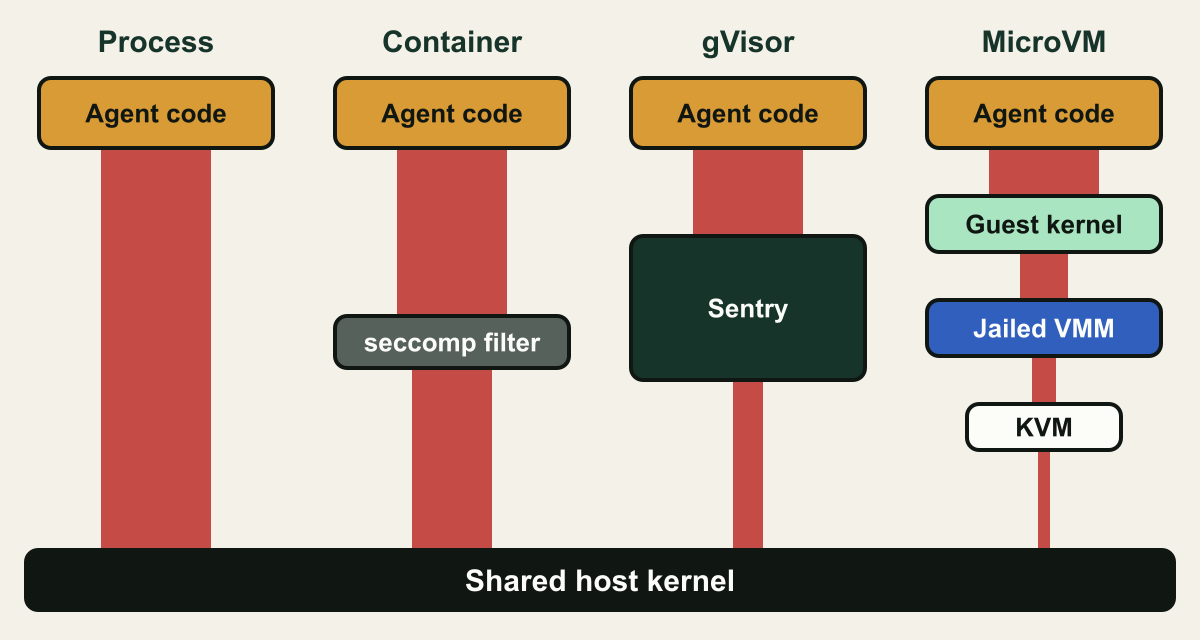
- The boundary decides how much of the host kernel the code can reach: containers call it directly, gVisor reimplements syscalls in a user-space kernel, and Firecracker puts a guest kernel and a jailed VMM in front of it. [2][3][4]
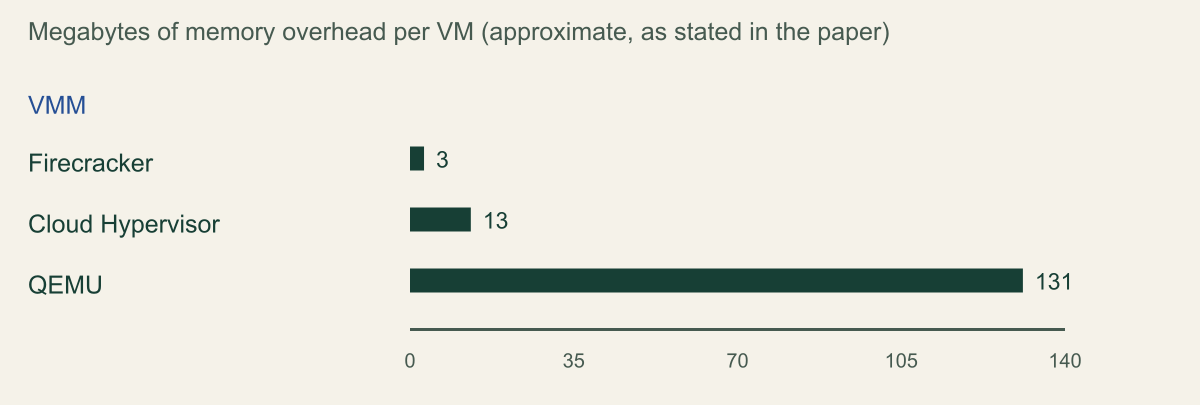
- In the Firecracker paper's tests on an m5d.metal host, per-VM memory overhead was about 3 MB for Firecracker, 13 MB for Cloud Hypervisor and 131 MB for QEMU. [2]
- AWS, Microsoft and Google document managed sandboxes for generated code with microVM, Hyper-V or unnamed isolation, but their network defaults differ, and AgentCore's Sandbox mode was shown to permit DNS-based exfiltration. [5][6][9][10][11][14]
- Credentials and session identifiers decide the blast radius once code runs: scope any execution role or managed identity as if the generated code holds it, and never let end users choose a session identifier. [7][12]
Treat generated code as untrusted input
Run code that an agent writes in a sandbox you would be comfortable handing to an anonymous user. That means a boundary that does not rest on the shared host kernel alone (a microVM or a user-space kernel such as gVisor), no outbound network unless the task needs a named destination, no credentials beyond the files and the one bucket prefix the task touches, and a lifetime of one user or one conversation, after which the environment is destroyed. The language the code is written in matters far less than those four properties.
The reason is that the author of the code is not only your model. Text from a retrieved document, a web page or an uploaded file can steer what the model writes, and the model can produce plausible code that does something nobody asked for. OWASP's Top 10 for Agentic Applications, published in December 2025, treats this as its own risk, ASI05 Unexpected Code Execution. Its examples include prompt injection that leads to attacker-defined code, hallucinated code with exploitable constructs, unsafe deserialization, and package installs whose hostile code runs at install or import time. Its mitigations ask for code to run in sandboxed environments with strict limits including network access, never as root, with per-session isolation and least privilege, and with generation separated from execution. [1]
This guide works through the four properties in order: the isolation boundary, the network, the credentials placed inside the sandbox, and the session lifecycle. It compares the managed services AWS, Microsoft and Google document for this job (Amazon Bedrock AgentCore Code Interpreter, Azure Container Apps dynamic sessions, and Code Execution on Google's Gemini Enterprise Agent Platform) with self-hosted options built on gVisor and Firecracker. Statements about each service are taken from provider documentation and published security research reviewed on October 7 and 8, 2026; no service was deployed for this article.
Isolation boundaries compared
The Firecracker paper from AWS sorts the options into three families: containers, where workloads share one kernel and rely on kernel mechanisms to stay apart; virtualization, where each workload runs in its own VM under a hypervisor; and language VM isolation, where a runtime is responsible for keeping code away from the operating system. In the container model, untrusted code calls the host kernel directly, possibly through a seccomp-bpf filter, and uses host services such as filesystems and the page cache. In the virtualization model, the code gets a full guest kernel, and security rests on the virtual machine monitor and KVM. [2]
Filtering syscalls narrows the container model but runs into compatibility. The paper notes that a trivial Linux program needs 15 unique syscalls, while a cited study found a typical Ubuntu 15.04 installation needed 224 syscalls and 52 unique ioctl calls. [2] Generated data-analysis code tends to sit at the broad end, since it imports scientific libraries, writes files and spawns processes, so a seccomp profile tight enough to matter will often break legitimate runs.
gVisor takes a third route. It is an application kernel written in Go whose Sentry intercepts the application's system calls and implements them itself; no syscall is passed straight through to the host. A separate Gofer process mediates filesystem access, and the Sentry's own host calls exclude opening files and, unless host networking is enabled, creating sockets. The price is reduced application compatibility and higher per-syscall overhead, and the project states that gVisor does not generally protect against hardware side channels. [3][4]
Firecracker keeps KVM but replaces QEMU with a small Rust virtual machine monitor that emulates only a few devices. The code inside a microVM therefore attacks a guest kernel first, then a narrow device model, and then a VMM process that the jailer has already confined: a chroot holding little more than the binary and the VM's resources, pid and network namespaces, dropped privileges, and a seccomp-bpf profile that allows 24 syscalls with argument filtering and 30 ioctls, 22 of them required by the KVM API. [2]
A plain process, or a restricted interpreter that removes dangerous builtins, sits at the weak end for code you did not write. The process shares the user's filesystem, network and credentials unless something outside the interpreter removes them, and interpreter-level restrictions have to anticipate every route to the same capability. Treat those as convenience layers inside a real boundary, not as the boundary.
How far generated code is from the host kernel
Each step from process to microVM adds a layer the code must defeat before it reaches the shared host kernel. [2][3]

Source. Conceptual illustration based on the Firecracker paper's isolation model and the gVisor architecture and security documentation. [2][3][4]
Method. Conceptual hand-authored illustration. Channel widths are ordinal and do not measure attack surface.
Accessible table and figure data
| Element | What it represents |
|---|---|
| Amber block | Code written by the agent |
| Process | Code calls the host kernel directly |
| Container | Seccomp and namespaces filter the same kernel |
| Sentry | gVisor user-space kernel implementing syscalls |
| Guest kernel and VMM | MicroVM kernel above a jailed Firecracker VMM |
| Red channel | Relative reach into the shared host kernel |
| Element | What it represents |
|---|---|
| Amber block | Code written by the agent |
| Process | Code calls the host kernel directly |
| Container | Seccomp and namespaces filter the same kernel |
| Sentry | gVisor user-space kernel implementing syscalls |
| Guest kernel and VMM | MicroVM kernel above a jailed Firecracker VMM |
| Red channel | Relative reach into the shared host kernel |
What a microVM boundary costs
The usual objection to a VM per session is startup time and memory. The Firecracker paper published measurements, and their test conditions matter as much as the numbers. All runs used an EC2 m5d.metal instance with two Intel Xeon Platinum 8175M processors (48 cores with hyper-threading disabled), 384 GB of RAM and local NVMe disks, running Ubuntu 18.04.2 with kernel 4.15.0-1044-aws. These are 2019-era software versions measured by the authors of one of the systems compared. [2]
Memory overhead was measured as the VMM process's non-shared memory, from pmap, minus the configured VM size, excluding the VMM binary. Overhead stayed roughly constant across VM sizes: about 3 MB for Firecracker, 13 MB for Cloud Hypervisor and 131 MB for QEMU, with QEMU slightly higher for a 128 MB VM. For scale, the Lambda team's original target was 10 percent overhead, or 102 MB for a 1024 MB function. [2]
Boot time was measured until the guest kernel started its init process: from forking the VMM process for end-to-end Firecracker, and from the final start API call for pre-configured Firecracker, using a minimal init, a direct-loaded Linux 4.14.94 kernel built with the recommended minimal configuration, one vCPU, 256 MB of memory and no network interface. The paper reports both pre-configured Firecracker, where API setup happened beforehand, and end-to-end Firecracker including process creation and configuration. Kernel choice dominated: in the same setup the stock Ubuntu 18.04 kernel took an additional 900 ms to start. [2]
For an agent, these figures say a per-session VM is affordable in memory and starts in the low hundreds of milliseconds under favorable conditions. Managed services hide even that behind pools of ready sessions. Azure documents subsecond allocation from session pools, and Google states that the GKE Agent Sandbox warm pool can allocate 300 sandboxes per second per cluster, with 90 percent of allocations completing in 200 milliseconds. [13][16]
| Measurement | Reported result | Conditions |
|---|---|---|
| 99th percentile boot, 50 launching concurrently | 146 ms pre-configured Firecracker, 158 ms Cloud Hypervisor | 1,000 microVMs, 1 vCPU, 256 MB, no network |
| 99th percentile boot, 100 launching concurrently | 153 ms pre-configured Firecracker | Same kernel and VM size |
| Static network interface | Adds about 20 ms for Firecracker and Cloud Hypervisor, about 35 ms for QEMU | Added to the boot tests above |
| Serial console logging | Disabling it saves up to 70 ms | Recommended Firecracker kernel command line |
| Stock Ubuntu 18.04 kernel | About 900 ms extra | Compared with the minimal kernel configuration |
Per-VM memory overhead in the Firecracker paper
Firecracker added about 3 MB per VM, against about 131 MB for QEMU, in the authors' 2019 to 2020 tests. [2]

Source. Firecracker paper (Agache et al., NSDI 2020), section 5.2 and Figure 7. EC2 m5d.metal, Ubuntu 18.04.2, kernel 4.15.0-1044-aws. [2]
Method. Values copied from the paper's text, which reports them as approximate. Overhead is VMM process non-shared memory from pmap minus configured VM size, excluding the VMM binary; roughly constant across VM sizes.
Accessible table and figure data
| VMM | Overhead per VM (MB) |
|---|---|
| Firecracker | 3 |
| Cloud Hypervisor | 13 |
| QEMU | 131 |
| VMM | Overhead per VM (MB) |
|---|---|
| Firecracker | 3 |
| Cloud Hypervisor | 13 |
| QEMU | 131 |
Managed code execution services
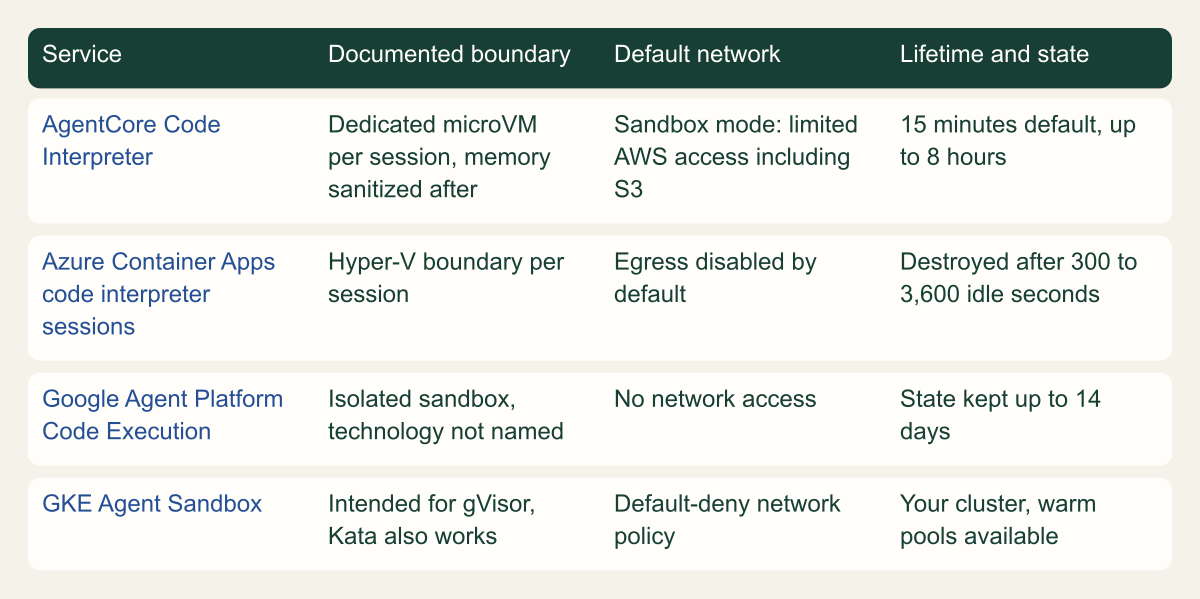
All three large providers now document a managed sandbox for model-generated code. They differ less in whether they isolate than in what the code can reach and how long it lives.
Amazon Bedrock AgentCore Code Interpreter states that each tool session runs in a dedicated microVM with isolated CPU, memory and filesystem, and that when the session completes the microVM is terminated and its memory sanitized. Sessions default to 900 seconds and can be configured up to 8 hours, and several sessions on one interpreter each keep their own state. The same page says files are cleaned up when the session terminates, yet also lists a 30-day TTL retention policy for session data, so ask AWS what that retention covers before uploading regulated data. Network behavior is chosen per interpreter: Sandbox, Public or VPC mode. [5][6]
Azure Container Apps dynamic sessions isolate each code interpreter session with a Hyper-V boundary and are documented as designed for untrusted code, including code generated by an LLM. Built-in pools offer PythonLTS, NodeLTS and Shell; a CustomContainer pool runs your own image. Each code execution is limited to 220 seconds, uploads land in /mnt/data with a 128 MB limit, outbound traffic is disabled by default, and an idle session is destroyed after a cooldown between 300 and 3,600 seconds. Microsoft is explicit that isolation runs between sessions, not within one: anything inside a session, including files and environment variables, is accessible to whoever uses that session. [11][12][13]
Google's Code Execution on the Gemini Enterprise Agent Platform describes an isolated sandbox with a limited filesystem and no network access, creation and execution in under a second, file input and output up to 100 MB per request or response, and execution state that persists for up to 14 days under a configurable TTL. The calling agent can run anywhere. The page does not name the isolation technology, so record that as unknown rather than assuming a VM. [14]
For teams that want the sandbox in their own cluster, Google made GKE Agent Sandbox generally available on May 20, 2026. It adds Sandbox, SandboxTemplate, SandboxClaim and SandboxWarmPool resources, applies a default-deny network posture, and is intended primarily for security-hardened runtimes such as gVisor, while also working with Kata Containers. [15][16]
Managed sandboxes for generated code, as documented
Where a provider names its boundary, it is VM-class or a user-space kernel; network defaults and state lifetimes differ most. [5][6][11][13][14][15]

Source. Conceptual comparison transcribed from AWS, Microsoft and Google documentation reviewed October 7 and 8, 2026. [5][6][11][13][14][15]
Method. Conceptual matrix. Cells paraphrase provider statements; no service was deployed or tested. AgentCore network mode is chosen per interpreter; the cell shows Sandbox mode.
Accessible table and figure data
| Service | Documented boundary | Default network | Lifetime and state |
|---|---|---|---|
| AgentCore Code Interpreter | Dedicated microVM per session, memory sanitized after | Sandbox mode: limited AWS access including S3 | 15 minutes default, up to 8 hours |
| Azure Container Apps code interpreter sessions | Hyper-V boundary per session | Egress disabled by default | Destroyed after 300 to 3,600 idle seconds |
| Google Agent Platform Code Execution | Isolated sandbox, technology not named | No network access | State kept up to 14 days |
| GKE Agent Sandbox | Intended for gVisor, Kata also works | Default-deny network policy | Your cluster, warm pools available |
| Service | Documented boundary | Default network | Lifetime and state |
|---|---|---|---|
| AgentCore Code Interpreter | Dedicated microVM per session, memory sanitized after | Sandbox mode: limited AWS access including S3 | 15 minutes default, up to 8 hours |
| Azure Container Apps code interpreter sessions | Hyper-V boundary per session | Egress disabled by default | Destroyed after 300 to 3,600 idle seconds |
| Google Agent Platform Code Execution | Isolated sandbox, technology not named | No network access | State kept up to 14 days |
| GKE Agent Sandbox | Intended for gVisor, Kata also works | Default-deny network policy | Your cluster, warm pools available |
Network is the boundary that leaks first
A sandbox with your data and a network path can send that data anywhere, and a network path also lets the code fetch packages, reach internal services and receive instructions. Disable egress by default and open only named destinations the task needs.
AgentCore's Sandbox mode is described as limited external network access to AWS services, including Amazon S3 for data operations. Public mode reaches the internet, and VPC mode places the tool in your subnets. [6] BeyondTrust's Phantom Labs showed that a Sandbox-mode interpreter could still make DNS queries, built a bidirectional command channel over DNS answers and query names, and moved data through S3 presigned URLs over HTTPS; it reported the issue through HackerOne. [9] Unit 42 published related research on April 7, 2026. It says AWS's guide had described Sandbox mode as complete isolation with no external access and was changed after disclosure, and that AWS recommends VPC mode for complete network isolation, with Route 53 Resolver DNS Firewall against DNS exfiltration. [10] The current AWS page does not say whether DNS resolution still works in Sandbox mode, so test it rather than assume.
The same Unit 42 report found that the microVM metadata service in AgentCore Runtime answered plain HTTP GET requests without a session token, the IMDSv1 pattern, exposing role credentials. On February 14, 2026, AWS made MMDSv2 the default for new agents in accounts with no prior Runtime, Browser or Code Interpreter microVM usage, added an API to disable v1 on older ones and made v2 available in the tools; the report notes that Browser and Code Interpreter offer both versions by default. [10]
VPC mode creates elastic network interfaces in subnets you choose, governed by your security groups. It has no internet access by default, and placing it in a public subnet does not add any; internet access needs a private subnet with a route to a NAT gateway. AWS recommends VPC endpoints for AWS services and VPC Flow Logs for auditing. [8] It follows that an interpreter which should reach only one bucket belongs in private subnets with no NAT route, an S3 gateway endpoint whose policy names that bucket, and a DNS Firewall rule set that blocks other domains.
The other services start closed. Azure session pools default to EgressDisabled, and Microsoft warns that enabled egress lets untrusted code reach the internet and, for example, take part in denial-of-service attacks. [13] Google's Code Execution sandbox has no network access, and GKE Agent Sandbox starts from default deny. [14][15] Inside the sandbox, assume the code can read everything you placed there: Microsoft's guidance is to treat the code as malicious with full access to the container, including its environment variables, secrets and files. [13] Pass the input files the task needs, not a connection string.
# Example: an Azure Container Apps code interpreter pool for generated code.
# Egress stays disabled and idle sessions are destroyed after five minutes.
az containerapp sessionpool create \
  --name example-agent-pool \
  --resource-group example-rg \
  --location westus2 \
  --container-type PythonLTS \
  --max-sessions 50 \
  --cooldown-period 300 \
  --network-status EgressDisabled
Credentials inside the sandbox
Two identities are involved, and they should never be the same. The caller identity belongs to your application and is allowed to create sessions and submit code. The identity inside the sandbox, if there is one, belongs to whatever code runs there, which is to say to whoever influenced the model.
In AgentCore, a custom interpreter takes an execution role that defines which AWS resources it can reach, and terminal commands such as aws s3 cp run inside the session with that role. AWS's own example grants only s3:GetObject and s3:PutObject on one bucket. [6][7] Unit 42 observed that teams who trust the Sandbox label tend to attach roles they would never give a public-mode interpreter. [10] Scope the role to the prefixes one task needs, split read and write locations, and assume the generated code holds the credentials for the life of the session.
Azure separates the two identities explicitly. Callers need the Azure ContainerApps Session Executor role on the pool and a token whose audience is https://dynamicsessions.io, and Microsoft says end users should never receive those tokens. A custom container pool can carry a managed identity, but code in a session can use it only if managedIdentitySettings.lifecycle is set to Main; the default, None, limits it to image pulls. Microsoft warns that enabling it lets any code in the session mint Microsoft Entra tokens for the pool's identity. [12] Keep it at None unless the code truly must call an Azure API, and then prefer handing the code a file your application fetched.
{
  "Version": "2012-10-17",
  "Statement": [
    {
      "Sid": "ReadTaskInputs",
      "Effect": "Allow",
      "Action": "s3:GetObject",
      "Resource": "arn:aws:s3:::example-bucket/agent-input/*"
    },
    {
      "Sid": "WriteTaskOutputs",
      "Effect": "Allow",
      "Action": "s3:PutObject",
      "Resource": "arn:aws:s3:::example-bucket/agent-output/*"
    }
  ]
}Lifecycle and reuse
Reuse is where one user's data meets another user's code. In Azure, a request carrying a session identifier goes to the running session with that identifier or allocates a new one, and the identifier is a free-form string you choose. Microsoft calls it sensitive, asks for cryptographically generated values rather than sequential ones, and gives two safe patterns: one session per authenticated user, or one per agent conversation with an identifier the end user cannot modify. [11][12] The same discipline applies to AgentCore session IDs and Google sandbox names, even where the API generates them.
Lifetimes range from minutes to two weeks. AgentCore sessions end after their timeout, 15 minutes by default and up to 8 hours. [5] Azure's default Timed lifecycle deletes a session after cooldownPeriodInSeconds without requests, and each request resets the timer; custom container pools can instead use OnContainerExit with a maxAlivePeriodInSeconds cap. [13] Google keeps execution state for up to 14 days. [14] Long-lived state is convenient for iterative analysis, but every earlier turn's downloads, files and any injected instructions remain available to later code.
A hypothetical example shows the tradeoff. A data-analysis agent lets a user upload a spreadsheet and ask follow-up questions for twenty minutes. One session per conversation, created on the first upload and stopped when the conversation closes, keeps the user's state without letting it outlive the conversation or reach another user. A pool shared across users to save warm-up time would trade that boundary for latency the warm pools already hide.
- Stop sessions explicitly when the task ends (
StopCodeInterpreterSessionin AgentCore,DELETEon the session endpoint in Azure) instead of waiting for the timeout. [7][11] - Set the shortest timeout that fits the task; Azure's guidance gives 15 minutes of inactivity as an example ceiling. [12]
- Destroy and recreate a session after an error you cannot explain or a tool output that looks like injected instructions.
- Cap CPU time, memory and output size per execution so a runaway loop ends in a bounded failure, not a bill.
Running the sandbox yourself
Self-hosting makes sense when the managed services' runtimes, packages, regions or data paths do not fit. gVisor ships runsc, an OCI runtime that Docker and Kubernetes can use [3], so generated-code pods can move onto it without rebuilding images. GKE Agent Sandbox packages that pattern with warm pools and default-deny networking. [15][16] Firecracker gives each session a microVM, but you then own the jailer configuration, the guest kernel and image builds, and the API that hands sessions to agents. The paper's operators patch by re-imaging hosts rather than updating them in place, a reasonable model for a fleet whose only job is running hostile code. [2]
On shared nodes, the boundary is only one control. Block pod access to the cloud metadata endpoint and to node credentials, apply default-deny network policy with egress through a proxy that logs destinations, and keep generated-code pods off nodes that run anything sensitive. Neither gVisor nor a VM removes hardware side channels on its own: gVisor says so directly, and AWS disables simultaneous multithreading on its Firecracker fleet as a side-channel mitigation. [2][4] Where tenants are mutually hostile, dedicated nodes per tenant are the conservative choice.
Choosing an approach
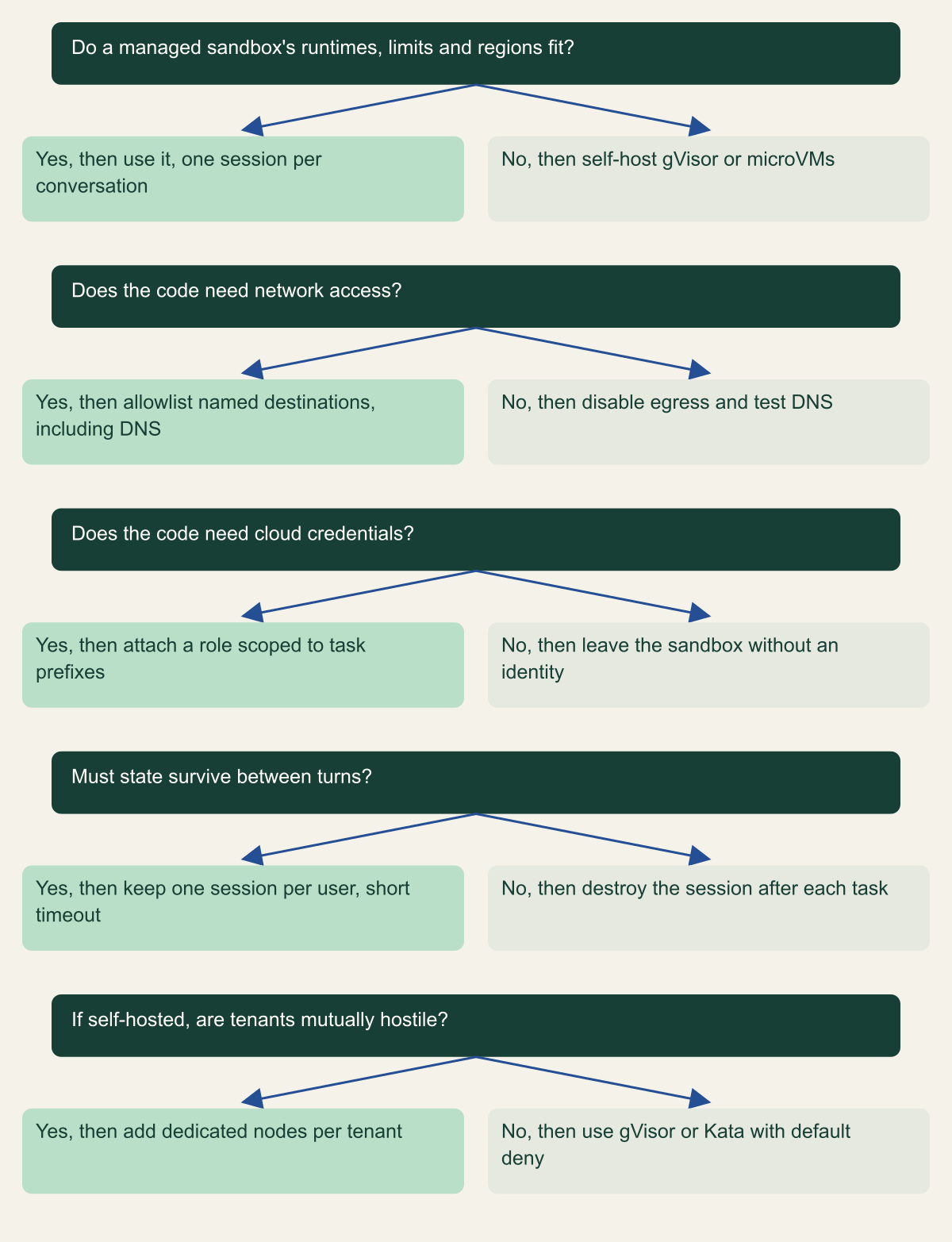
Decide in this order. First the boundary: a managed microVM or Hyper-V session, or gVisor or a microVM you run, never a plain container or the agent's own process. Second the network: off, or a short allowlist enforced outside the sandbox, with DNS treated as egress. Third the identity: none, or a role scoped to the task's prefixes. Fourth the lifetime: one user or conversation, an explicit stop, and the shortest timeout that works.
Then prove the denied paths, because the published research found gaps in exactly the places documentation sounded certain. From inside a test session, resolve an external domain you control and watch for the query, request the metadata endpoint, call a cloud API outside the role's scope, and request another session's identifier from a second user's context. Each should fail. Rerun the checks when the provider changes a network mode or its documentation, and record the date the sandbox last passed them.
Choosing where and how generated code runs
Pick the boundary first, then remove network, credentials and lifetime the task does not need.

Source. Conceptual decision aid based on OWASP ASI05 guidance and the AWS, Microsoft, Google, gVisor and Firecracker sources cited in this article. [1][2][4][6][12][13][15]
Method. Conceptual ordering of documented controls; it does not rank services or measure risk.
Accessible table and figure data
| Question | Yes, then | No, then |
|---|---|---|
| Do a managed sandbox's runtimes, limits and regions fit? | use it, one session per conversation | self-host gVisor or microVMs |
| Does the code need network access? | allowlist named destinations, including DNS | disable egress and test DNS |
| Does the code need cloud credentials? | attach a role scoped to task prefixes | leave the sandbox without an identity |
| Must state survive between turns? | keep one session per user, short timeout | destroy the session after each task |
| If self-hosted, are tenants mutually hostile? | add dedicated nodes per tenant | use gVisor or Kata with default deny |
| Question | Yes, then | No, then |
|---|---|---|
| Do a managed sandbox's runtimes, limits and regions fit? | use it, one session per conversation | self-host gVisor or microVMs |
| Does the code need network access? | allowlist named destinations, including DNS | disable egress and test DNS |
| Does the code need cloud credentials? | attach a role scoped to task prefixes | leave the sandbox without an identity |
| Must state survive between turns? | keep one session per user, short timeout | destroy the session after each task |
| If self-hosted, are tenants mutually hostile? | add dedicated nodes per tenant | use gVisor or Kata with default deny |
Method and provenance
Source-led technical analysis of the Firecracker NSDI 2020 paper, gVisor documentation, AWS, Microsoft and Google service documentation, OWASP guidance and two published security research reports, with original diagrams. Sources were reviewed on October 7 and 8, 2026.
No sandbox service, runtime or cloud account was deployed or tested. Service behavior is bounded to what the cited pages stated on the review dates, and the Firecracker measurements reflect the paper's 2019 to 2020 hardware, kernels and software versions.
AI assistance. AI assisted research synthesis, drafting, diagram planning and visual production, with deterministic editorial checks. No personal deployment experience, independent human review or live test is claimed.
Published under the Cloud Security Desk organizational byline. Read the practitioner guide policy.
References
- OWASP Top 10 for Agentic Applications for 2026 OWASP GenAI Security Project. Published . Accessed .
- Firecracker: Lightweight Virtualization for Serverless Applications (NSDI '20) USENIX. Published . Accessed .
- What is gVisor? gVisor Authors. Accessed .
- gVisor security model gVisor Authors. Accessed .
- AgentCore Code Interpreter session management Amazon Web Services. Accessed .
- AgentCore Code Interpreter resource management and network settings Amazon Web Services. Accessed .
- Using terminal commands with an execution role Amazon Web Services. Accessed .
- Configure Amazon Bedrock AgentCore Runtime and tools for VPC Amazon Web Services. Accessed .
- Pwning AI code interpreters in AWS Bedrock AgentCore (research repository) BeyondTrust Phantom Labs. Accessed .
- Cracks in the Bedrock: Escaping the AWS AgentCore sandbox Palo Alto Networks Unit 42. Published . Accessed .
- Serverless code interpreter sessions in Azure Container Apps Microsoft. Accessed .
- Use dynamic sessions in Azure Container Apps Microsoft. Accessed .
- Use session pools in Azure Container Apps Microsoft. Accessed .
- Code Execution, Gemini Enterprise Agent Platform Google Cloud. Accessed .
- About Agent Sandbox on GKE Google Cloud. Accessed .
- Bringing you Agent Sandbox on GKE and Agent Substrate Google Cloud. Published . Accessed .