
An implementation guide for engineers running AWS WAF, Azure WAF on Application Gateway or Front Door, and Google Cloud Armor, based on provider documentation, API references, changelogs and release notes reviewed October 9, 2026. It compares body inspection limits and oversize defaults, shows the narrow tuning primitive on each platform, budgets AWS capacity and dates the rule set versions to track.
At a glance
Key findings
- AWS WAF reads 8 KB of a request body on Application Load Balancer and AppSync and 16 to 64 KB on CloudFront, API Gateway and the other listed resources; Application Gateway v2 reads 128 KB by default and up to 2 MB with CRS 3.2 or DRS, Front Door 128 KB and Cloud Armor 8 to 64 kB. [1][2][3]
- AWS WAF rules continue past the limit by default, so the uninspected tail reaches the origin unless a size rule with oversize handling Match runs first; Application Gateway blocks oversize bodies in Prevention mode while body enforcement is on. [4][5][6]
- AWS calls a group-wide Count override a poor way even to test a rule group; a single-rule Count override plus a label match block rule keeps every other rule enforcing. [7][8]
- With sensitivity omitted, Cloud Armor evaluates every signature at level 4; level 1 keeps 20 of the 60 SQL injection signatures in CRS 4.22. [9][10]
- AWS WAF silently ignores managed rule overrides whose names do not match, and Azure ends support for CRS 3.1, CRS 3.0 and DRS 1.0 to 1.2 on February 26, 2027. [11][12]
Change one rule for one route
When a managed rule blocks a request your application should accept, change the one rule or signature that fired, for the one route that needs the change, and leave the rest of the rule set enforcing. In AWS WAF that is a rule action override to Count on the single rule, followed by a rule of your own that blocks on that rule's label everywhere except the vetted route. [7][8] In Azure WAF it is a per-rule exclusion of the specific request attribute, held in a policy attached only to the listener, path or route concerned. [13][14][15] In Cloud Armor it is an opt-out of one signature, or a field exclusion aimed at that signature, inside a rule whose expression is limited to the path. [9]
Four changes look like tuning and remove inspection instead. Overriding a whole rule group's result to Count leaves the group evaluating but stops it from blocking anything, and AWS describes that override as a poor way even to test a group. [7] A scope-down statement that leaves a route out of the group exempts that route from every rule in it, and an Allow rule placed ahead of the managed rules ends evaluation before they run. AWS lists both among its mitigations, and Microsoft warns that a matching custom rule stops managed rule processing for the request. [8][15] The fourth is any policy-wide change: a global exclusion, a rule set disabled in full, or a lower Cloud Armor sensitivity applied to every request.
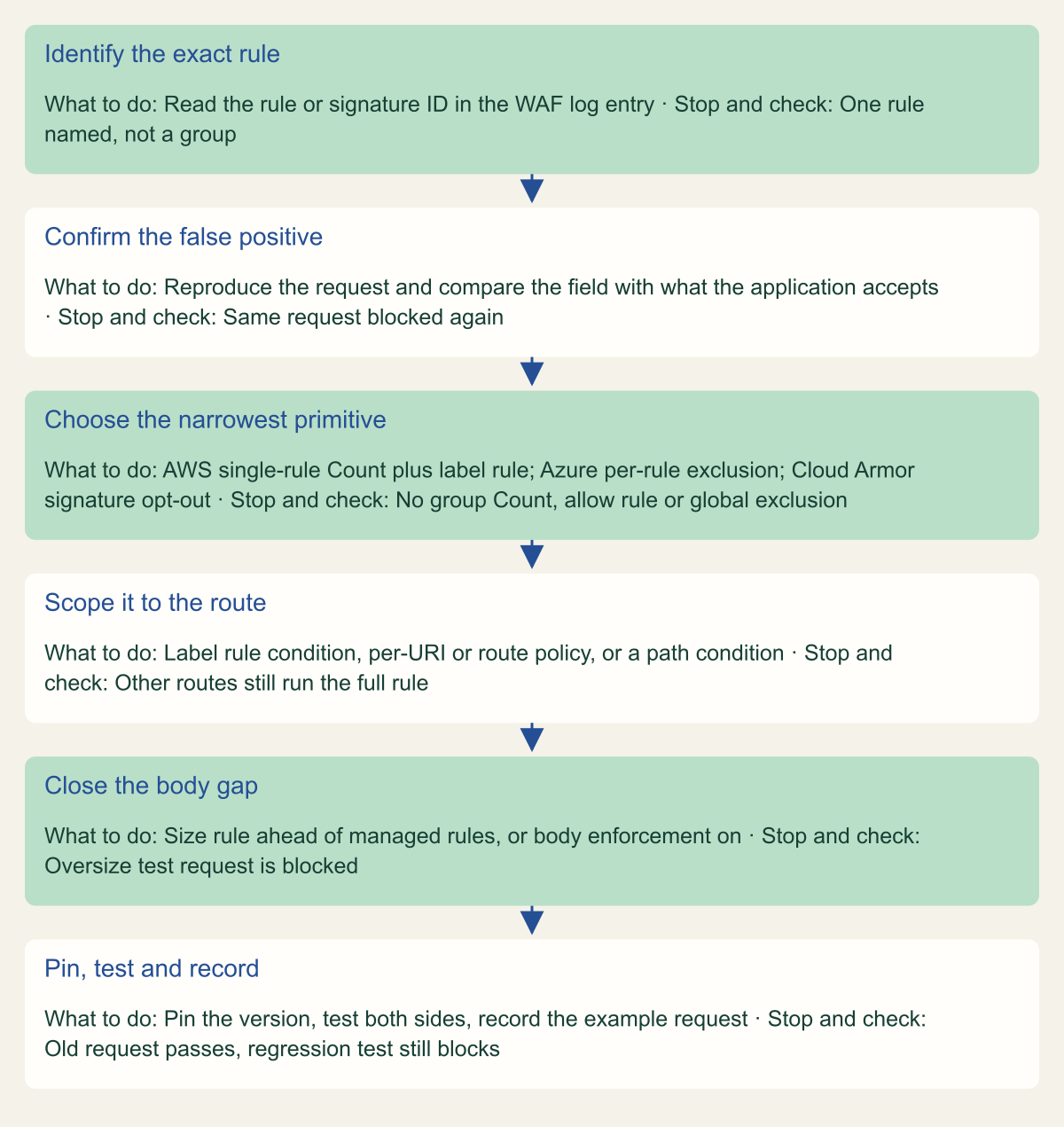
The other half of the question is size. False positives cluster on requests with large bodies, such as uploads, batch APIs and rich JSON documents, and every provider inspects only the first part of a body. A tuning change on those routes has to state what happens to the bytes the WAF never reads. The procedure in the figure applies on all three platforms.
Handle a managed rule false positive without a bypass
Each step narrows the change; a step that widens it to a group, a policy or every large body is the bypass. [8][13][9]

Source. Conceptual procedure based on AWS WAF, Azure WAF and Cloud Armor tuning documentation reviewed October 9, 2026. [8][4][13][15][9][3]
Method. Conceptual ordering of documented tuning guidance; no environment was configured or tested.
Accessible table and figure data
| Step | What to do | Stop and check |
|---|---|---|
| Identify the exact rule | Read the rule or signature ID in the WAF log entry | One rule named, not a group |
| Confirm the false positive | Reproduce the request and compare the field with what the application accepts | Same request blocked again |
| Choose the narrowest primitive | AWS single-rule Count plus label rule; Azure per-rule exclusion; Cloud Armor signature opt-out | No group Count, allow rule or global exclusion |
| Scope it to the route | Label rule condition, per-URI or route policy, or a path condition | Other routes still run the full rule |
| Close the body gap | Size rule ahead of managed rules, or body enforcement on | Oversize test request is blocked |
| Pin, test and record | Pin the version, test both sides, record the example request | Old request passes, regression test still blocks |
| Step | What to do | Stop and check |
|---|---|---|
| Identify the exact rule | Read the rule or signature ID in the WAF log entry | One rule named, not a group |
| Confirm the false positive | Reproduce the request and compare the field with what the application accepts | Same request blocked again |
| Choose the narrowest primitive | AWS single-rule Count plus label rule; Azure per-rule exclusion; Cloud Armor signature opt-out | No group Count, allow rule or global exclusion |
| Scope it to the route | Label rule condition, per-URI or route policy, or a path condition | Other routes still run the full rule |
| Close the body gap | Size rule ahead of managed rules, or body enforcement on | Oversize test request is blocked |
| Pin, test and record | Pin the version, test both sides, record the example request | Old request passes, regression test still blocks |
What a managed rule actually reads
A managed rule matches only what the host service hands to the WAF engine, which is less than the request it later forwards. AWS documents the cut-offs: the first 8 KB of headers or the first 200 headers, whichever comes first, the same limits for cookies, and a body prefix that depends on the resource type. An allowed request reaches the protected resource whole, including the parts never inspected. [4]
Parsing narrows the view further. Cloud Armor decodes URL-encoded and JSON bodies into names and values; for other content types, multipart included, it applies the preconfigured rules to the raw bytes, and it has no decoder for XML, Gzip or UTF-16. [16] Application Gateway exclusions do not support XML bodies. [13] AWS WAF does not apply body inspection rules to gRPC traffic on CloudFront or Application Load Balancer, although its other rules still run. For HTTP/2 targets behind an Application Load Balancer, the default inspects each request immediately with whatever data has arrived; AWS recommends Inspect after sufficient data for most request and response applications. [1]
A managed rule set therefore screens part of each request for known patterns. The Core rule set rule EC2MetaDataSSRF_BODY, for example, reads the body only up to the limit and continues past it. [17] It can catch a careless probe for instance metadata, not replace the application's control over where it fetches from.
Body inspection limits by provider
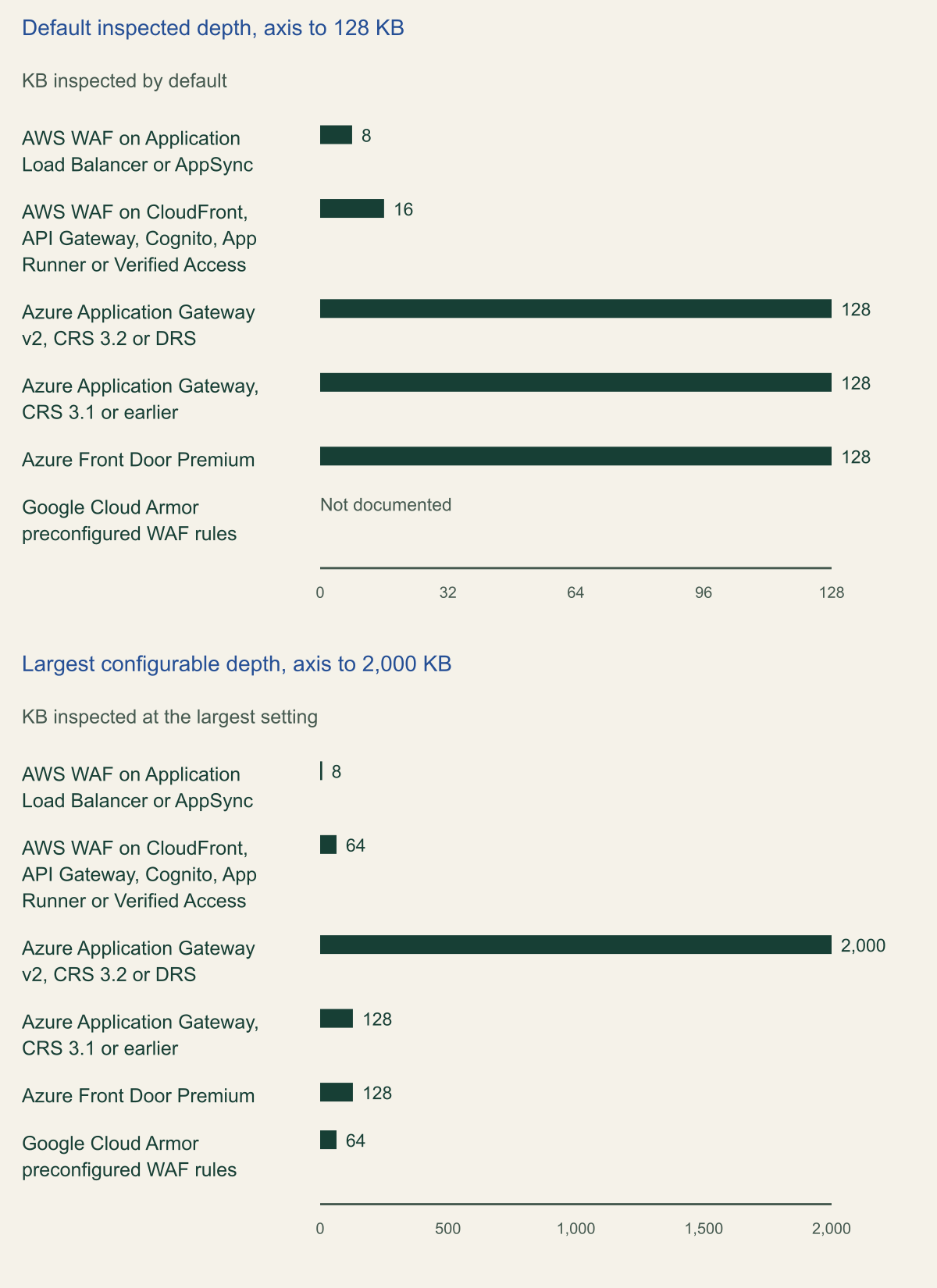
The chart records how many bytes of a request body each platform's managed rules read by default and at the largest setting. AWS WAF reads a fixed 8 KB on Application Load Balancer and AppSync. On CloudFront, API Gateway, Amazon Cognito, App Runner and Verified Access the default is 16 KB, adjustable in 16 KB steps to 64 KB in the web ACL's association configuration, with an extra charge only for requests whose bodies exceed 16 KB. [1] Application Gateway v2 running CRS 3.2 or a DRS version inspects 128 KB by default and accepts an inspection limit from 8 KB to 2 MB; with CRS 3.1 or earlier the ceiling is 128 KB. Front Door Standard, Premium and classic all list a 128 KB inspection limit, and Standard runs no managed rule set. [2][15] Cloud Armor's preconfigured rules read 8, 16, 32, 48 or 64 kB. [3]
Three gaps in the documentation affect the chart. Google's pages list the five Cloud Armor values without saying which applies when the field was never set, so read advancedOptionsConfig.requestBodyInspectionSize back from each policy and set it explicitly. [18] Microsoft's pages do not say what Front Door does with the part of a body beyond 128 KB, so treat that tail as uninspected. AWS's quota table lists Amazon Bedrock AgentCore Gateway under both a 16 KB and a 64 KB maximum, so the chart leaves it out. [19]
Read the chart along a failover path as well as by platform. A reasoned inference from these limits: if traffic that normally enters through CloudFront at the 64 KB setting fails over directly to an Application Load Balancer, the managed rules on the fallback path read 8 KB of each body and continue past it by default. A Front Door to Application Gateway failover keeps a 128 KB default but changes the documented outcome for larger bodies, from unstated to blocked in Prevention mode. Tuning lives in each path's own web ACL or WAF policy, so a change made on one path has to be repeated and retested on the other.
| Platform | Setting | Values |
|---|---|---|
| AWS WAF on CloudFront, API Gateway, Cognito, App Runner, Verified Access | Web ACL association configuration, request body limit | 16, 32, 48 or 64 KB |
| AWS WAF on Application Load Balancer and AppSync | None | Fixed at 8 KB |
| Application Gateway WAF policy | requestBodyInspectLimitInKB, maxRequestBodySizeInKb | 8 KB to 2 MB with CRS 3.2 or DRS |
| Front Door Premium WAF policy | None | Fixed at 128 KB |
| Cloud Armor security policy | requestBodyInspectionSize | 8KB, 16KB, 32KB, 48KB, 64KB |
Managed rules read at most 8 KB to 2 MB of a request body
Default depth runs from 8 KB on an Application Load Balancer to 128 KB on Application Gateway and Front Door; only Application Gateway v2 goes past 128 KB. [1][2][3]

Source. AWS WAF, Microsoft Azure and Google Cloud Armor documentation reviewed October 9, 2026. [1][4][2][5][6][3][16]
Method. Values copied from each provider's limits, except that Application Gateway's 2 MB maximum is plotted as 2,000 KB, the value Microsoft's REST API example uses for that setting. [6] AWS and Google define their KB values as 1,024 bytes; Microsoft does not state a byte count. Amazon Bedrock AgentCore Gateway is excluded because AWS's quota table lists it under two different maximums, and AWS Amplify is excluded. [19]
Accessible table and figure data
| Platform and resource | Default inspected (KB) | Largest setting (KB) | Body past the limit, by default |
|---|---|---|---|
| AWS WAF on Application Load Balancer or AppSync | 8 | 8 | Rules continue on the inspected prefix |
| AWS WAF on CloudFront, API Gateway, Cognito, App Runner or Verified Access | 16 | 64 | Rules continue on the inspected prefix |
| Azure Application Gateway v2, CRS 3.2 or DRS | 128 | 2000 | Prevention mode blocks; Detection mode, the default, ignores the rest |
| Azure Application Gateway, CRS 3.1 or earlier | 128 | 128 | Prevention mode blocks; Detection mode, the default, ignores the rest |
| Azure Front Door Premium | 128 | 128 | Not documented |
| Google Cloud Armor preconfigured WAF rules | Not documented | 64 | Remainder not inspected |
| Platform and resource | Default inspected (KB) | Largest setting (KB) | Body past the limit, by default |
|---|---|---|---|
| AWS WAF on Application Load Balancer or AppSync | 8 | 8 | Rules continue on the inspected prefix |
| AWS WAF on CloudFront, API Gateway, Cognito, App Runner or Verified Access | 16 | 64 | Rules continue on the inspected prefix |
| Azure Application Gateway v2, CRS 3.2 or DRS | 128 | 2000 | Prevention mode blocks; Detection mode, the default, ignores the rest |
| Azure Application Gateway, CRS 3.1 or earlier | 128 | 128 | Prevention mode blocks; Detection mode, the default, ignores the rest |
| Azure Front Door Premium | 128 | 128 | Not documented |
| Google Cloud Armor preconfigured WAF rules | Not documented | 64 | Remainder not inspected |
Decide what happens past the limit
In AWS WAF, every rule statement that inspects the body, headers or cookies carries an oversize handling choice. Continue inspects what fits within the limit, Match treats the request as matching and No match treats it as not matching; outside the console the default is Continue. [4] The managed body rules in the Core rule set and Known bad inputs groups document Continue, so they never block a request merely because its body is too long to read. The one Core rule set rule that reacts to body length is SizeRestrictions_BODY, which blocks bodies over 8 KB. [17] Any upload route with bodies over 8 KB trips it, and switching it to Count removes the only body size gate in the group.
For rule groups you do not own, AWS's guidance is a separate rule placed before them that blocks requests over the limit: a size constraint on the body greater than 8,192 bytes for Application Load Balancer or AppSync, or greater than the configured limit elsewhere, with oversize handling Match and action Block. Requests that legitimately exceed the limit then need a narrow exception that runs before the size rule, and AWS is plain that those requests are never fully inspected. [4]
Application Gateway reaches the safer outcome only in Prevention mode; CRS and DRS start in Detection mode by default, which inspects the body up to the limit and ignores the rest. [21][5] In Prevention mode it logs and blocks requests over the configured size limits; body enforcement defaults to on, and the inspection limit and maximum body size both default to 128 KB. [5][6][2] CRS 3.2 and later separate the two values, and Microsoft notes that a lower inspection limit might let uninspected malicious content through. [5] Keeping requestBodyInspectLimitInKB equal to maxRequestBodySizeInKb preserves the property that a body is either read in full or rejected. Turning enforcement off makes Application Gateway behave much like AWS WAF's Continue.
Cloud Armor states the risk directly: the rest of the body may contain payloads that would match a signature, and the application may accept them. Its documented mitigation is a rule that denies requests whose Content-Length header exceeds the configured inspection limit, for example int(request.headers['content-length']) > 65536 at the 64 kB setting. [16][3]
AWS WAF: count the rule, block by its label
Take a hypothetical API behind an Application Load Balancer running the Core rule set, where legitimate POST requests to /api/v1/uploads carry JSON documents of 40 to 60 KB and SizeRestrictions_BODY blocks them. The fix has two parts. A rule action override sets that one rule to Count, so it still evaluates and still adds its label, awswaf:managed:aws:core-rule-set:SizeRestrictions_Body, but no longer blocks. [7][17] A rule of your own, prioritized after the rule group, blocks any request that carries the label unless it is a POST to the upload path. AWS's tuning guidance describes this pattern and says to keep the problematic rule in Count and the label rule in place once testing ends. [8]
Order matters because a label match statement sees only labels added by rules evaluated earlier in the web ACL. [20] Match the exception on the exact path without text transformations, so that encoded or doubled-slash variants fall through to the block rather than into the exception. Use RuleActionOverrides, not ExcludedRules, the older setting that holds Count overrides saved before October 27, 2022, and copy rule names exactly. [7] For managed rule groups, AWS WAF silently ignores an override whose name does not match a rule, case included. [11]
The exception still leaves a gap, and it should be recorded as one. On the upload route the load balancer forwards only the first 8 KB of each body to AWS WAF, so 32 to 52 KB of every document reaches the application unread. Schema validation, a size cap and file scanning in the application are the compensating controls. Serving the route through CloudFront at the 64 KB setting would put documents of this size inside the inspected prefix. [1]
[
  {
    "Name": "aws-common-rule-set",
    "Priority": 20,
    "Statement": {
      "ManagedRuleGroupStatement": {
        "VendorName": "AWS",
        "Name": "AWSManagedRulesCommonRuleSet",
        "Version": "Version_1.23",
        "RuleActionOverrides": [
          {
            "Name": "SizeRestrictions_BODY",
            "ActionToUse": {
              "Count": {}
            }
          }
        ]
      }
    },
    "OverrideAction": {
      "None": {}
    },
    "VisibilityConfig": {
      "SampledRequestsEnabled": true,
      "CloudWatchMetricsEnabled": true,
      "MetricName": "aws-common-rule-set"
    }
  },
  {
    "Name": "block-large-body-outside-uploads",
    "Priority": 30,
    "Statement": {
      "AndStatement": {
        "Statements": [
          {
            "LabelMatchStatement": {
              "Scope": "LABEL",
              "Key": "awswaf:managed:aws:core-rule-set:SizeRestrictions_Body"
            }
          },
          {
            "NotStatement": {
              "Statement": {
                "AndStatement": {
                  "Statements": [
                    {
                      "ByteMatchStatement": {
                        "SearchString": "/api/v1/uploads",
                        "FieldToMatch": {
                          "UriPath": {}
                        },
                        "TextTransformations": [
                          {
                            "Priority": 0,
                            "Type": "NONE"
                          }
                        ],
                        "PositionalConstraint": "EXACTLY"
                      }
                    },
                    {
                      "ByteMatchStatement": {
                        "SearchString": "POST",
                        "FieldToMatch": {
                          "Method": {}
                        },
                        "TextTransformations": [
                          {
                            "Priority": 0,
                            "Type": "NONE"
                          }
                        ],
                        "PositionalConstraint": "EXACTLY"
                      }
                    }
                  ]
                }
              }
            }
          }
        ]
      }
    },
    "Action": {
      "Block": {}
    },
    "VisibilityConfig": {
      "SampledRequestsEnabled": true,
      "CloudWatchMetricsEnabled": true,
      "MetricName": "block-large-body-outside-uploads"
    }
  }
]
Azure WAF: exclude the attribute, scope the policy
An Azure WAF exclusion removes one request attribute from evaluation and leaves the rest inspected. On Application Gateway, per-rule exclusions need CRS 3.2 or later and can target the keys or values of headers, cookies and arguments; Microsoft recommends attributes by value, such as RequestHeaderValues, over the older attributes by name, and per-rule exclusions wherever possible. [13] An exclusion applies to the whole web application under its policy, so scope comes from the policy association. Application Gateway accepts a global policy, a per-site policy on a listener and a per-URI policy on a path-based rule, and the more specific one wins. [14] On Front Door, a route-level policy takes precedence over a domain-level one, which takes precedence over a profile-level one, and the tuning guide calls exclusions a global setting for whatever traffic the policy covers. [15]
Anomaly scoring changes which rule needs tuning. On Application Gateway with CRS or DRS 2.1 and later, and on Front Door with DRS 2.0 and later, each matching rule adds its severity value, Critical 5, Error 4, Warning 3 or Notice 2, and in Prevention mode a request that reaches 5 is acted on by a separate threshold rule. [21][22] One Critical match blocks on its own; one Warning does not, but two do. The log therefore shows several matched rules before the threshold action, and an exclusion for only the first of them can leave the score at 5 or above. Microsoft's Front Door walkthrough, written against DRS 1.0, shows the general problem: with rule 942110 set to Log, a second SQL injection rule, 942310, blocked the same request. [15]
DRS 2.2 is based on OWASP CRS 3.3.4 and ships at Paranoia Level 1 with every PL2 rule disabled; to raise the level, Microsoft suggests enabling PL2 rules in Log mode, tuning, then enforcing. Paranoia Levels 3 and 4 are not supported. [21] Front Door enables DRS in Detection mode by default. [22] Disabling a rule is defensible only when it cannot apply, such as SQL injection rules in front of a back end with no SQL database, which is the case Microsoft uses. [15]
Cloud Armor: opt out a signature, keep the sensitivity
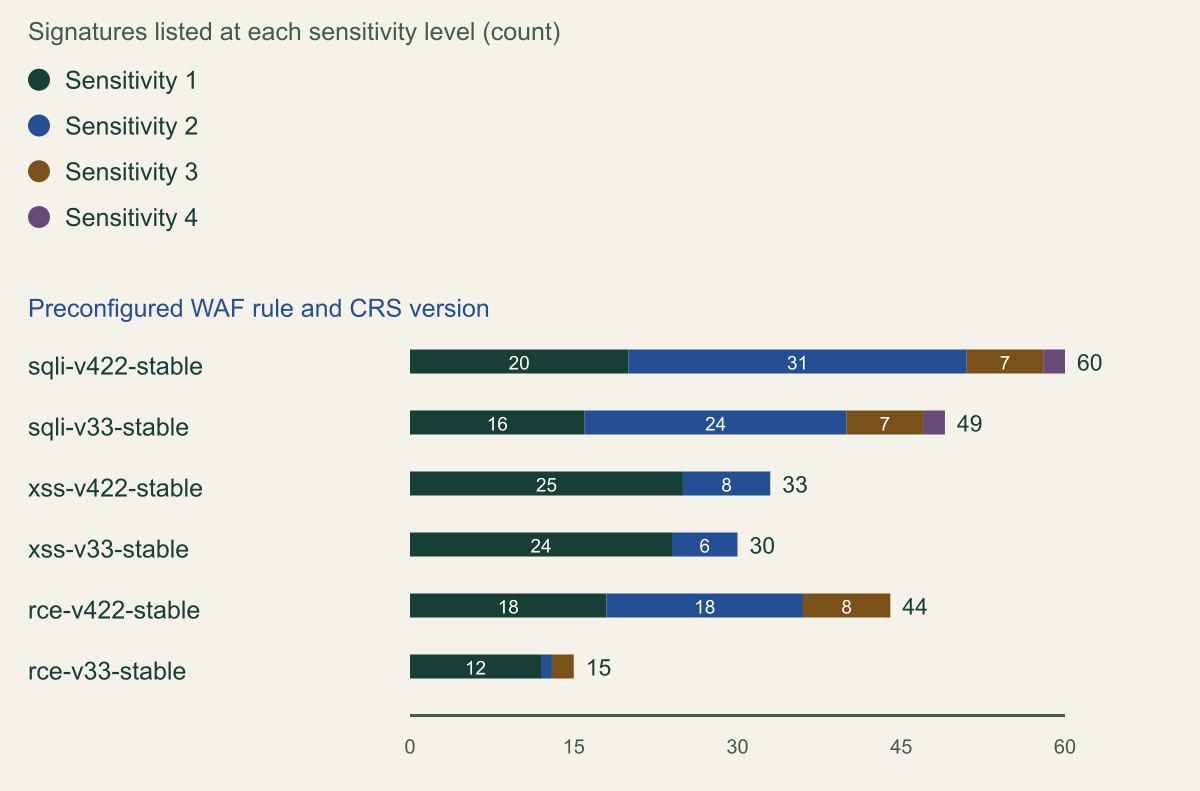
Each Cloud Armor preconfigured WAF rule, such as sqli-v422-stable, bundles OWASP CRS signatures that each carry a sensitivity level from 1 to 4, matching the CRS paranoia levels. Choosing a level enables every signature at or below it, and when the expression omits sensitivity, Cloud Armor evaluates all of them at level 4. [9][10] That default is the reverse of DRS 2.2's Paranoia Level 1 starting point; Google's recommended practices suggest starting a new rule at level 1 in preview. [10] The chart counts what each level contains, tallied from Google's per-signature tables, since Google publishes no totals.
The counts show why lowering sensitivity is a coarse fix: moving sqli-v422-stable from level 4 to level 1 drops 40 of its 60 signatures for every request the rule sees, while one opt_out_rule_ids entry drops one. Request field exclusions are narrower still: they target a rule set or a list of signature IDs and remove the value of a named header, cookie or query parameter, or a matching request URI, from inspection. A query parameter exclusion also covers form parameters in the body, but not signatures that inspect the whole body, and an exclusion cannot be attached to a rule whose action is allow. [9]
Scope comes from the expression. The example splits one rule into two: a higher-priority rule for the affected path with the noisy signature opted out, and a rule for every other path with the full set. The request.path != condition keeps the tuned path out of the untuned copy, and the exact comparison sends unusual spellings of the path to the full set. Watch rule order for requests with bodies: Cloud Armor evaluates header rules before the body arrives, so a lower-priority allow rule matching the headers can forward them before a higher-priority body rule blocks the body. [16]
Google recommends keeping canary rule sets in preview at a higher priority with stable sets enforced below them. [10] Preview results appear in the previewSecurityPolicy log field only when the preview rule would have taken priority over the enforced rule, so a preview copy placed below an enforcing rule that already matches never appears there. [23]
# Example: narrow an XSS false positive to one path instead of lowering sensitivity.
# Placeholder policy and path. Both start in preview, at a higher priority (lower
# number) than the existing untuned XSS rule, which keeps enforcing meanwhile.
gcloud compute security-policies rules create 1000 \
  --security-policy=my-policy \
  --expression="request.path == '/api/comments' && evaluatePreconfiguredWaf('xss-v422-stable', {'sensitivity': 2, 'opt_out_rule_ids': ['owasp-crs-v042200-id941370-xss']})" \
  --action=deny-403 \
  --preview

# Every other path keeps the full signature set at the same sensitivity.
gcloud compute security-policies rules create 1001 \
  --security-policy=my-policy \
  --expression="request.path != '/api/comments' && evaluatePreconfiguredWaf('xss-v422-stable', {'sensitivity': 2})" \
  --action=deny-403 \
  --preview

# After the logs show the expected matches, enforce both, then remove the old rule.
gcloud compute security-policies rules update 1000 --security-policy=my-policy --no-preview
gcloud compute security-policies rules update 1001 --security-policy=my-policy --no-previewSensitivity level 1 keeps a third of the SQL injection signatures
In CRS 4.22, level 1 enables 20 of 60 SQL injection signatures, 25 of 33 XSS signatures and 18 of 44 remote code execution signatures. [10]

Source. Calculated from the per-signature tables in Google's Cloud Armor preconfigured WAF rules overview, reviewed October 9, 2026. [10]
Method. Count of signature IDs listed at each sensitivity level for each rule and CRS version. Google publishes no totals; the counts are tallies of its tables. A rule at sensitivity n evaluates the sum of levels 1 to n. [9]
Accessible table and figure data
| Preconfigured rule | Sensitivity 1 | Sensitivity 2 | Sensitivity 3 | Sensitivity 4 |
|---|---|---|---|---|
| sqli-v422-stable | 20 | 31 | 7 | 2 |
| sqli-v33-stable | 16 | 24 | 7 | 2 |
| xss-v422-stable | 25 | 8 | 0 | 0 |
| xss-v33-stable | 24 | 6 | 0 | 0 |
| rce-v422-stable | 18 | 18 | 8 | 0 |
| rce-v33-stable | 12 | 1 | 2 | 0 |
| Preconfigured rule | Sensitivity 1 | Sensitivity 2 | Sensitivity 3 | Sensitivity 4 |
|---|---|---|---|---|
| sqli-v422-stable | 20 | 31 | 7 | 2 |
| sqli-v33-stable | 16 | 24 | 7 | 2 |
| xss-v422-stable | 25 | 8 | 0 | 0 |
| xss-v33-stable | 24 | 6 | 0 | 0 |
| rce-v422-stable | 18 | 18 | 8 | 0 |
| rce-v33-stable | 12 | 1 | 2 | 0 |
Budget AWS WAF capacity before adding groups
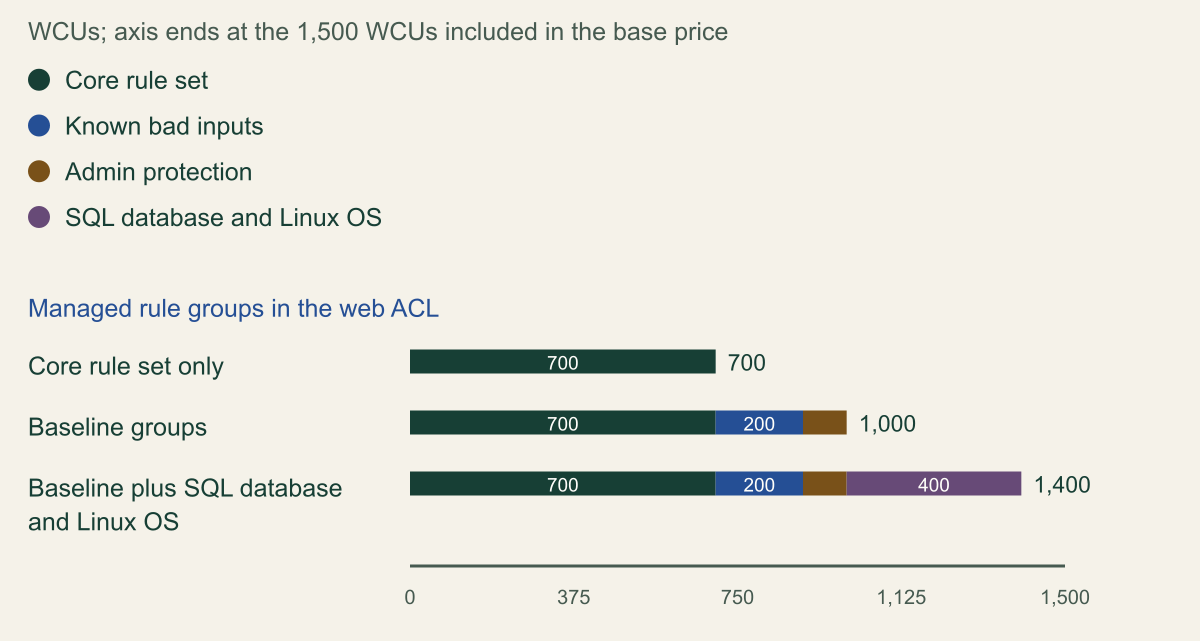
AWS WAF limits and prices a web ACL by web ACL capacity units. The base price covers 1,500 WCUs, a managed rule group costs its fixed capacity setting, and a web ACL can hold at most 5,000; WCUs measure rule processing cost and do not change how traffic is inspected. [24] The three baseline groups use 1,000 of the included 1,500: the Core rule set 700, Known bad inputs 200 and Admin protection 100. Adding the SQL database and Linux operating system groups, 200 each, brings the total to 1,400. [17][25]
Tuning rules are cheap by comparison. A label match statement costs 1 WCU, so the earlier label rule costs that unit plus its path and method conditions, far less than any managed group. [20] Capacity is no reason to set a group to Count instead of tuning one rule. It is a reason to run CheckCapacity on the full rules JSON before adding another managed group, because going past 1,500 moves the web ACL into tiered pricing. [24] Capacity units also say nothing about request volume: a flood of well-formed requests is a problem for a different control.
Five common AWS managed groups use 1,400 of 1,500 included WCUs
The baseline groups take 1,000 WCUs and the SQL database and Linux groups another 400, leaving 100 WCUs before tiered pricing. [17][25][24]

Source. Calculated from WCU values in AWS Managed Rules documentation reviewed October 9, 2026. [17][25][24]
Method. Sum of each rule group's fixed capacity: Core rule set 700, Known bad inputs 200, Admin protection 100, SQL database 200 plus Linux operating system 200. The axis ends at the 1,500 WCUs included in the base web ACL price; the web ACL maximum is 5,000. [24]
Accessible table and figure data
| Web ACL contents | Core rule set | Known bad inputs | Admin protection | SQL database and Linux OS |
|---|---|---|---|---|
| Core rule set only | 700 | 0 | 0 | 0 |
| Baseline groups | 700 | 200 | 100 | 0 |
| Baseline plus SQL database and Linux OS | 700 | 200 | 100 | 400 |
| Web ACL contents | Core rule set | Known bad inputs | Admin protection | SQL database and Linux OS |
|---|---|---|---|---|
| Core rule set only | 700 | 0 | 0 | 0 |
| Baseline groups | 700 | 200 | 100 | 0 |
| Baseline plus SQL database and Linux OS | 700 | 200 | 100 | 400 |
Pin the rule set version and track its end date
Every tuning change is tied to the version it was tested against. In AWS WAF, a managed rule group statement without a Version uses the vendor's default version and moves with it. [11] A pinned static version that expires is evaluated as the default version, and AWS WAF blocks web ACL updates until the version is changed or the group removed. [26] Renames are the quiet failure. On June 1, 2026, static version 2.5 of the Windows operating system group removed WindowsShellCommands_QUERYARGUMENTS and replaced it with WindowsShellCommands_QUERYSTRING. [27] Because overrides naming no existing rule are ignored, a Count override written for the old rule would do nothing on 2.5 while the replacement runs with its own action; that is an inference from the two documents, not a reported incident. [11]
Azure resets tuning when a new rule set is assigned through the portal: rule state, rule actions and rule-level exclusions return to the new version's defaults, while PowerShell, the CLI, the REST API and templates carry them over. [21] Microsoft's support policy, announced on March 17, 2026 with DRS 2.2, covers the three newest managed rule set versions and gives a version that falls to fourth place one final year with critical fixes only. CRS 3.1 and CRS 3.0 on Application Gateway and DRS 1.2, 1.1 and 1.0 on Front Door reach the end of that year on February 26, 2027. [12] CRS 3.2 is not on that list.
Cloud Armor tuning is version-specific by construction. Signature IDs embed the CRS version, owasp-crs-v030301-id942350-sqli in 3.3 against owasp-crs-v042200-id942350-sqli in 4.22, and opt-out IDs must match the rule set version. [9] Moving to 4.22 therefore rewrites every opt-out and exclusion target. CRS 4.22 became generally available on July 8, 2026, and Google recommends it while still supporting 3.3 and 3.0. [28][10] Google's separate Cloud Armor managed rulesets entered Preview on September 17, 2026, so treat them as an evaluation option rather than a production baseline. [28]
| Rule set | State | Date |
|---|---|---|
| AWS Core rule set | Static Version_1.23 released | August 28, 2026 |
| AWS Windows operating system group | Version 2.5 replaced one rule name | June 1, 2026 |
| Azure DRS 2.2, based on OWASP CRS 3.3.4 | Support policy announced after general availability | March 17, 2026 |
| Azure CRS 3.1 and 3.0, DRS 1.0 to 1.2 | Final support year | Ends February 26, 2027 |
| Cloud Armor CRS 4.22 | Generally available | July 8, 2026 |
| Cloud Armor 64 kB body inspection | Generally available | February 18, 2026 |
Test the change from both sides
A tuning change passes two tests: the wrongly blocked request now passes, and the rule still blocks what it should everywhere else. Run both in Count, Log, Detection or preview first, again after enforcement and again after every version change.
- Replay the original false positive on the tuned route. In AWS WAF the overridden rule should appear as a non-terminating match whose configured Block action is shown in
overriddenAction, with its label underlabels; in Front Door the excluded value is no longer evaluated, so it should stop appearing inmatchVariableName. [29][15] - Send the same request to an untuned route and expect a block. If it passes, the change reaches further than intended.
- Send a request from your own regression set of previously blocked traffic to the tuned route, with the detection in a field you did not exclude, and expect a block.
- Send a body just over the inspection limit to an untuned route and expect the size rule to block it. AWS WAF lists
REQUEST_BODYin theoversizeFieldslog field when an inspected body is over the limit. [29] - After a default version change or a pinned upgrade, rerun the set and compare the rule names in the logs with the names in your overrides and exclusions.
When to stop tuning the managed rule
The narrow primitives stop being the right tool in three situations. In the first, the field belongs to the application and is validated strictly: a rich-text field parsed against a schema will keep tripping XSS and SQL injection signatures. Exclude that one attribute from the rules that fire, on that route only, and let the application's validation carry the load.
In the second, the rule family cannot apply. SQL injection rules in front of a service with no SQL back end can be disabled in the policy that covers only that service, which Microsoft's tuning guide allows, with the reason and an example request recorded. [15] Disabling the same family on a shared profile or global policy is a different decision, because it removes the family from every application behind it.
In the third, the route needs bodies larger than any WAF on its path reads: above 8 KB behind an Application Load Balancer, above 64 KB on CloudFront or Cloud Armor, above 128 KB on Front Door. No managed rule set protects that body. Write a custom rule that admits only the methods, content types and sizes the route expects, and make the application the inspection point.
For every other false positive, keep to one order: name the exact rule, reproduce the request, choose the narrowest primitive, scope it to the route, put a size rule or body enforcement in front of the managed rules, pin the version and test from both sides. A fix that touches a whole rule group, a whole policy or every large body is not tuning. It is a decision to stop inspecting, and it needs an owner who accepts that risk in writing.
Method and provenance
Source-led technical analysis of AWS WAF, Azure Web Application Firewall and Google Cloud Armor documentation, API references, changelogs and release notes, with source-derived and calculated charts and an original tuning procedure. Sources were reviewed on October 9, 2026.
No web ACL, WAF policy, security policy or live traffic was configured or tested. Limits, defaults and dates are as documented on the review date; where a provider's pages are silent or inconsistent, the article says so instead of filling the gap.
AI assistance. AI assisted research synthesis, drafting, chart and diagram planning and visual production, with deterministic editorial checks. No personal deployment experience, independent human review or live test is claimed.
Published under the Cloud Security Desk organizational byline. Read the practitioner guide policy.
References
- Considerations for managing body inspection in AWS WAF Amazon Web Services. Accessed .
- Azure subscription and service limits, quotas, and constraints Microsoft. Accessed .
- Set up preconfigured WAF rules (Cloud Armor) Google Cloud. Accessed .
- Oversize web request components in AWS WAF Amazon Web Services. Accessed .
- Web Application Firewall request and file upload size limits Microsoft. Accessed .
- Web Application Firewall Policies - Create Or Update (REST API 2026-01-01) Microsoft. Accessed .
- Overriding rule group actions in AWS WAF Amazon Web Services. Accessed .
- Monitoring and tuning your AWS WAF protections Amazon Web Services. Accessed .
- Tune preconfigured WAF rules (Cloud Armor) Google Cloud. Accessed .
- Preconfigured WAF rules overview (Cloud Armor) Google Cloud. Accessed .
- ManagedRuleGroupStatement (AWS WAFV2 API Reference) Amazon Web Services. Accessed .
- Generally Available: Default Rule Set 2.2 and updates to ruleset support policy (Azure update 558016) Microsoft. Published . Accessed .
- WAF exclusion lists in Azure Application Gateway Microsoft. Accessed .
- WAF policy overview (Application Gateway) Microsoft. Accessed .
- Tune Azure Web Application Firewall for Azure Front Door Microsoft. Accessed .
- Security policy overview (Cloud Armor) Google Cloud. Accessed .
- Baseline rule groups (AWS Managed Rules) Amazon Web Services. Accessed .
- REST Resource: securityPolicies (Compute Engine API) Google Cloud. Accessed .
- AWS WAF quotas Amazon Web Services. Accessed .
- Label match rule statement (AWS WAF) Amazon Web Services. Accessed .
- Application Gateway WAF CRS and DRS rule groups and rules Microsoft. Accessed .
- Azure Front Door WAF DRS rule groups and rules Microsoft. Accessed .
- Per-request logging (Cloud Armor) Google Cloud. Accessed .
- Web ACL capacity units (WCUs) in AWS WAF Amazon Web Services. Accessed .
- Use-case specific rule groups (AWS Managed Rules) Amazon Web Services. Accessed .
- Version life cycle for managed rule groups (AWS WAF) Amazon Web Services. Accessed .
- AWS Managed Rules changelog Amazon Web Services. Accessed .
- Cloud Armor release notes Google Cloud. Accessed .
- Log fields for protection pack (web ACL) traffic (AWS WAF) Amazon Web Services. Accessed .