
An architecture guide for engineers accepting user uploads into S3, Azure Blob Storage or Cloud Storage, based on AWS, Microsoft, Google Cloud and OWASP sources reviewed in October 2026. It gives a quarantine pipeline design, a comparison of documented limits including maximum scannable size, example gate and promotion code, and a decision tree for files without a clean verdict.
At a glance
Key findings
- AWS and Microsoft offer managed scanners for object storage; Google Cloud documents a ClamAV on Cloud Run reference architecture instead of a managed service. [1][8][12]
- Documented maximum object sizes are 100 GB for GuardDuty Malware Protection for S3, 50 GB for Defender for Storage and a 500 MiB default in Google's reference code. [2][8][13]
- GuardDuty tags and reports but does not block or move objects; a bucket policy on the GuardDutyMalwareScanStatus tag turns the result into a read gate. [1][4]
- Defender index tags are not tamper-resistant, and scanning can stop at the 50 GB per minute throughput limit or the monthly cap, 10,000 GB by default. [8][9]
- Every option returns outcomes that are neither clean nor malicious, so the pipeline needs a defined action for unsupported, failed and missing verdicts. [3][11][14]
Uploads stay untrusted until a verdict exists
Put every upload into a location that nothing downstream can read, let a scanner produce a verdict for that exact object version, and promote only objects with a clean verdict to the place where parsers, indexers and users read. Everything else, whether flagged as malware or simply not scanned, stays held. The scanner is one component of that gate. The quarantine layout, the rule that only a clean verdict releases a file, and the handling of files that never receive a clean verdict decide whether the gate works.
Two of the three large providers sell a managed scanner for object storage. Amazon GuardDuty Malware Protection for S3 scans objects as they are created in a protected bucket and can tag each one with its result. Microsoft Defender for Storage scans blobs on upload with Microsoft Defender Antivirus, writes the result to blob index tags, and can raise alerts and send Event Grid events. Google Cloud does not document an equivalent managed feature for Cloud Storage objects; what it publishes is a reference architecture that runs the open source ClamAV engine on Cloud Run and moves files between three buckets. [1][8][12]
Their size limits span more than two orders of magnitude. GuardDuty attempts objects up to 100 GB, Defender scans blobs up to 50 GB, and the Google reference code ignores files above 500,000,000 bytes by default. AWS and Microsoft also document files they cannot judge at any size, such as password-protected files, client-side encrypted data and archives nested beyond a depth limit. A design that only handles clean and malicious outcomes will eventually pass one of those files through or lose it. [2][3][8][11][14]
This guide compares the three options from the documentation as reviewed on October 8, 2026, then turns the differences into a single pipeline design. Scanning complements the other upload defenses rather than replacing them. OWASP's file upload guidance still lists an extension allowlist, file type validation that ignores the client's Content-Type, server-generated file names, a size limit and storage away from the web root alongside antivirus or sandbox checks and content disarm and reconstruction. [15]
The quarantine pattern
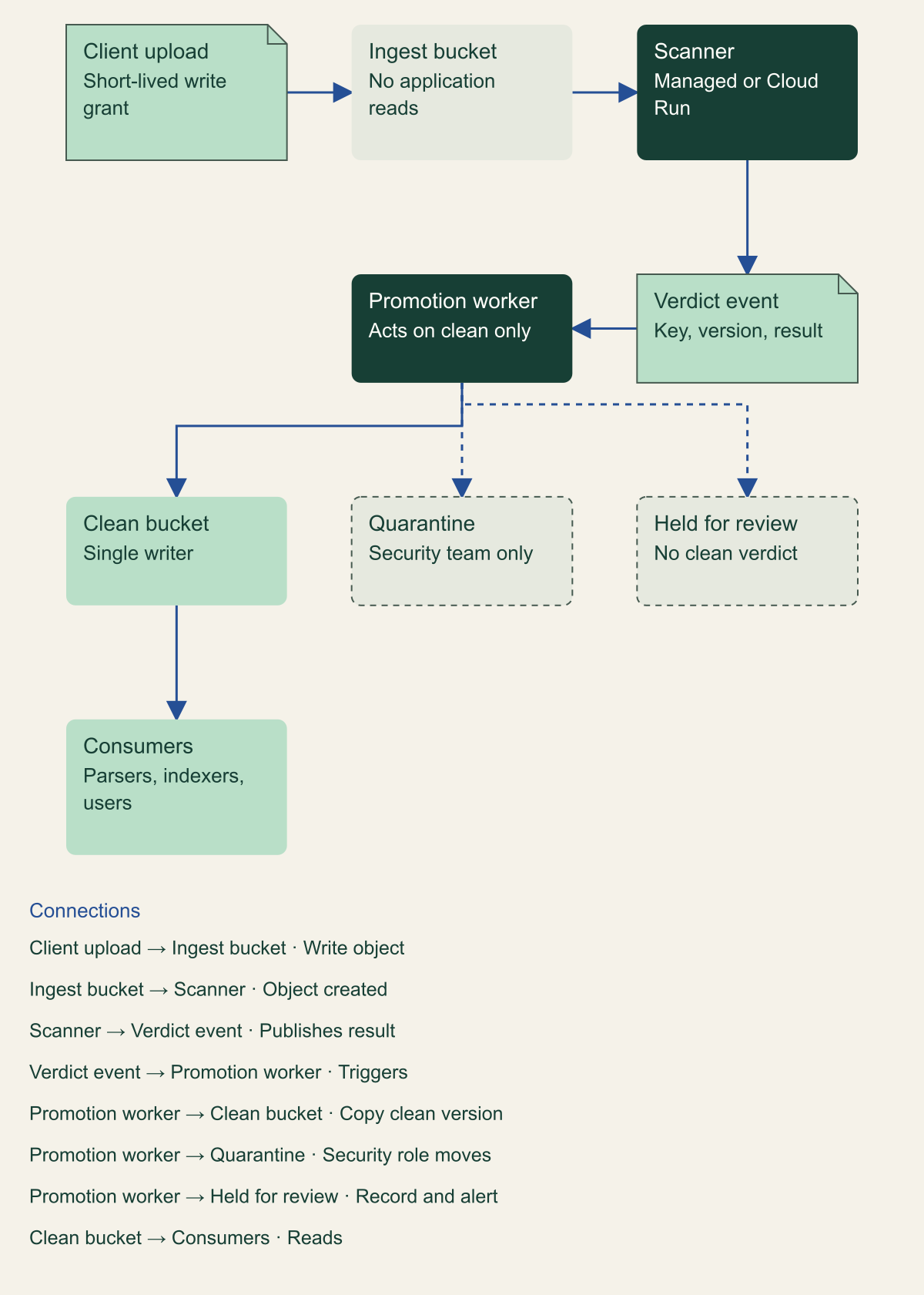
The pattern has three locations and one decision point. The ingest location accepts writes from the upload path and refuses reads from every application principal. The clean location is the only one downstream code can read. The quarantine location holds malicious files and is readable only by the security team. A promotion worker sits between them: it consumes scan results, and it alone can copy into the clean location.
Each provider documents a variant. Google's architecture names unscanned, clean and quarantined buckets and has the scanning service move each file according to the ClamAV result. Microsoft describes an intermediary storage account it calls a DMZ, where malware scanning runs and a Function App moves only blobs with a no threats found result to the destination account. On AWS the same effect comes from a bucket policy that denies reads of any object whose GuardDutyMalwareScanStatus tag is not NO_THREATS_FOUND, which turns the ingest bucket itself into a holding area. [4][10][12]
Bind the verdict to the exact bytes scanned. GuardDuty events carry the object key, eTag and versionId; Defender events carry the blob URI, eTag and the file's SHA-256. If the promotion worker copies whatever currently sits at the key, a client that overwrites the object between scan and copy can slip unscanned content through. Turn on versioning in the ingest bucket and copy the version named in the event, or compare the ETag before promoting. GuardDuty already reports OBJECT_E_TAG_CHANGED when an object changes before it can be read, and scans the newer upload separately. [3][5][10]
Expect duplicate results. GuardDuty states that it uses at-least-once delivery and that you may receive several results for one object. A promotion step that copies a specific version is naturally idempotent; one that sends a notification, charges a customer or starts a workflow needs its own deduplication key, such as bucket, key and version. [1][3]
Promotion is the only way into the clean location
Applications read only the clean location; a worker copies a version there only after a clean verdict for that version.

Source. Conceptual architecture synthesized from AWS tag-based access control, Microsoft's DMZ storage account pattern and Google's three-bucket reference architecture. [4][10][12]
Method. Conceptual diagram. Component names are generic; each provider implements the ingest gate differently, as described in the text.
Accessible table and figure data
| Component | Role | Who can read it |
|---|---|---|
| Ingest bucket | Receives uploads; source for scanning | Scanner and promotion worker only |
| Scanner | Managed service or Cloud Run with ClamAV | Not applicable |
| Verdict event | Key, version or ETag, result | Promotion worker and alerting |
| Promotion worker | Copies clean versions only | Not applicable |
| Clean bucket | Only source for downstream code | Applications |
| Quarantine | Malicious files kept for analysis | Security team only |
| Held for review | Unsupported, failed or timed-out files | Operators |
| Component | Role | Who can read it |
|---|---|---|
| Ingest bucket | Receives uploads; source for scanning | Scanner and promotion worker only |
| Scanner | Managed service or Cloud Run with ClamAV | Not applicable |
| Verdict event | Key, version or ETag, result | Promotion worker and alerting |
| Promotion worker | Copies clean versions only | Not applicable |
| Clean bucket | Only source for downstream code | Applications |
| Quarantine | Malicious files kept for analysis | Security team only |
| Held for review | Unsupported, failed or timed-out files | Operators |
AWS GuardDuty Malware Protection for S3
Malware Protection for S3 is enabled per bucket, for the whole bucket or for up to five object prefixes. GuardDuty uses an IAM role you supply to receive object-created notifications, read the object and optionally tag it. Every S3 API in the Object Created event type starts a scan, including PutObject, POST Object, CopyObject and CompleteMultipartUpload. GuardDuty downloads the object over AWS PrivateLink, scans it in an isolated environment in the same Region with no internet access, and deletes its copy afterward. Results go to the default EventBridge bus as GuardDuty Malware Protection Object Scan Result events and to CloudWatch metrics. [1][5]
Tagging is an option on the protection plan, and GuardDuty can only tag objects uploaded after it is enabled. The tag values are NO_THREATS_FOUND, THREATS_FOUND, UNSUPPORTED, ACCESS_DENIED and FAILED. S3 allows ten tags per object, and when all ten are in use GuardDuty cannot add its tag and emits a GuardDuty Malware Protection Post Scan Action Failed event with MAX_TAG_LIMIT_EXCEEDED instead. If your read gate depends on the tag, that object stays unreadable, which is the safe failure, but someone has to notice it. [1][4][5]
You can run the feature without enabling GuardDuty itself. In that mode the account has no detector ID, so a detected threat produces no GuardDuty finding; the EventBridge event, the CloudWatch metrics and the tag are the only signals. Decide which of those your alerting reads before choosing the mode. [1]
GuardDuty does not delete or move a malicious object. Enforcement comes from the tag-based access control policy AWS publishes: one statement denies s3:GetObject and s3:GetObjectVersion to everyone except the scanning role unless the tag equals NO_THREATS_FOUND, and another stops anyone else from writing that tag key. AWS's example applies the second statement to s3:PutObjectTagging only. S3 also accepts tags at upload through the x-amz-tagging header, and it requires s3:PutObjectTagging permission for that request, so AWS's statement should already catch upload-time tags. Adding s3:PutObject to the same deny, as in the fragment below, makes that intent explicit for anyone reading the policy later. AWS also advises organizations to restrict tag modification with a service control policy. [4][7]
Protection covers new writes only. For objects that existed before the plan, or to rescan after a signature update or an incident, call SendObjectMalwareScan with the bucket, key and optionally a version ID. The on-demand scan uses the plan's IAM role, ignores the plan's prefix filter and is subject to the same quotas. Each account can protect at most 25 buckets per Region, and that quota is not adjustable, so a design with one ingest bucket per tenant will reach it quickly. [2][6]
{
  "Version": "2012-10-17",
  "Statement": [
    {
      "Sid": "NoReadUnlessClean",
      "Effect": "Deny",
      "NotPrincipal": {
        "AWS": [
          "arn:aws:sts::111122223333:assumed-role/example-malware-scan-role/GuardDutyMalwareProtection",
          "arn:aws:iam::111122223333:role/example-malware-scan-role"
        ]
      },
      "Action": [
        "s3:GetObject",
        "s3:GetObjectVersion"
      ],
      "Resource": "arn:aws:s3:::example-ingest-bucket/*",
      "Condition": {
        "StringNotEquals": {
          "s3:ExistingObjectTag/GuardDutyMalwareScanStatus": "NO_THREATS_FOUND"
        }
      }
    },
    {
      "Sid": "OnlyGuardDutyWritesScanStatus",
      "Effect": "Deny",
      "NotPrincipal": {
        "AWS": [
          "arn:aws:sts::111122223333:assumed-role/example-malware-scan-role/GuardDutyMalwareProtection",
          "arn:aws:iam::111122223333:role/example-malware-scan-role"
        ]
      },
      "Action": [
        "s3:PutObjectTagging",
        "s3:PutObject"
      ],
      "Resource": "arn:aws:s3:::example-ingest-bucket/*",
      "Condition": {
        "ForAnyValue:StringEquals": {
          "s3:RequestObjectTagKeys": "GuardDutyMalwareScanStatus"
        }
      }
    }
  ]
}Microsoft Defender for Storage
Defender for Storage offers on-upload scanning, triggered by any operation that produces a BlobCreated or BlobRenamed event, and on-demand scanning of an account, container, prefix or single blob. Block staging calls such as PutBlock and ADLS AppendFile do not trigger a scan; the commit (PutBlockList or FlushWithClose) does, and each commit can start a new scan. The service reads the blob in the same region, scans it in memory with Microsoft Defender Antivirus and does not retain the content. [8][9]
Results arrive four ways: blob index tags (on by default), Defender for Cloud security alerts for malicious files, Event Grid events and a StorageMalwareScanningResults table in Log Analytics. The index tag key is Malware scanning scan result with values No threats found, Malicious, Error or Not scanned. Microsoft states that index tags are not tamper-resistant, because anyone permitted to modify tags can change them, and recommends alerts, Event Grid or Log Analytics for security-sensitive workflows. An attribute-based access condition on the tag is still a useful read gate, but the promotion decision should come from the Event Grid event, which an uploader cannot write. [8][11]
Event Grid delivery needs a custom topic in the same region as the storage account with public network access enabled; topics reachable only through private endpoints cannot receive scan results. Each event carries scanResultType, the blob URI, its ETag and a scanResultDetails object with malware names and the SHA-256, or a notScannedReason such as SAM259206 for an oversized blob. [8][10]
Unlike GuardDuty, Defender has a built-in remediation option: soft delete malicious blobs. It is off by default, turns on blob soft delete if needed, keeps the blob recoverable in its container for a default of seven days (configurable from 1 to 365), and raises an alert if deletion fails. That removes malicious blobs from normal reads, but a soft-deleted blob is not a quarantine with its own access boundary. The DMZ account pattern, where only clean blobs are ever copied to the account applications read, is still the stronger default. [10]
Two cost and capacity controls change what "every upload is scanned" means. On-upload scanning processes up to 50 GB per minute per storage account, and if uploads consistently exceed that rate some blobs might not be scanned. A monthly cap per storage account, 10,000 GB by default, halts scanning once reached, with up to 20 GB of deviation, until the cap resets at midnight UTC at month end. Exclusion filters by prefix, suffix or blob size (up to 24 values) reduce cost but also define files that will never get a verdict. Pipelines that wait for a result must treat each of these as a reason a file may stay unscanned. [9]
Google Cloud offers an architecture, not a service
Google Cloud's documented answer is an architecture you deploy and run. As of the October 8, 2026 review, Google's documentation describes no managed malware scanning feature for Cloud Storage objects. The architecture, last reviewed in July 2024, uses an Eventarc trigger on the google.cloud.storage.object.v1.finalized event to call a Cloud Run service that runs ClamAV. Clean files move from the unscanned bucket to the clean bucket and infected files to the quarantined bucket. A Cloud Scheduler job refreshes a private mirror of the ClamAV signature database in Cloud Storage every two hours, because many instances pulling full databases from the public mirror can trigger rate limiting. [12][13]
The deployment guide sets the service to 1 vCPU, 4 GiB of memory, a concurrency of 20, between one and five instances and a 300-second request timeout. It states a default maximum scan size of 500 MiB because a file of that size takes about five minutes to scan, and sets ClamAV's StreamMaxLength, MaxScanSize and MaxFileSize to 512 MB. The code expresses the cap as 500,000,000 bytes. Larger files are logged as ignored, counted in the ignored-files metric and left in the unscanned bucket, which is the right default as long as someone watches that bucket. [13][14]
Because you operate the scanner, its failures are yours too. In the sample code, a 403 or 404 while reading or moving a file is logged and acknowledged without retry, and other exceptions increment scans-failed and are rethrown, so the request returns an error. Files whose reported size does not match the stored object are ignored as possibly incomplete uploads. The guide notes the design accepts any Linux on-demand scanning engine in place of ClamAV, and that is where a commercial engine would go if ClamAV's detection rate does not meet your requirement. [12][14]
Compare the documented limits
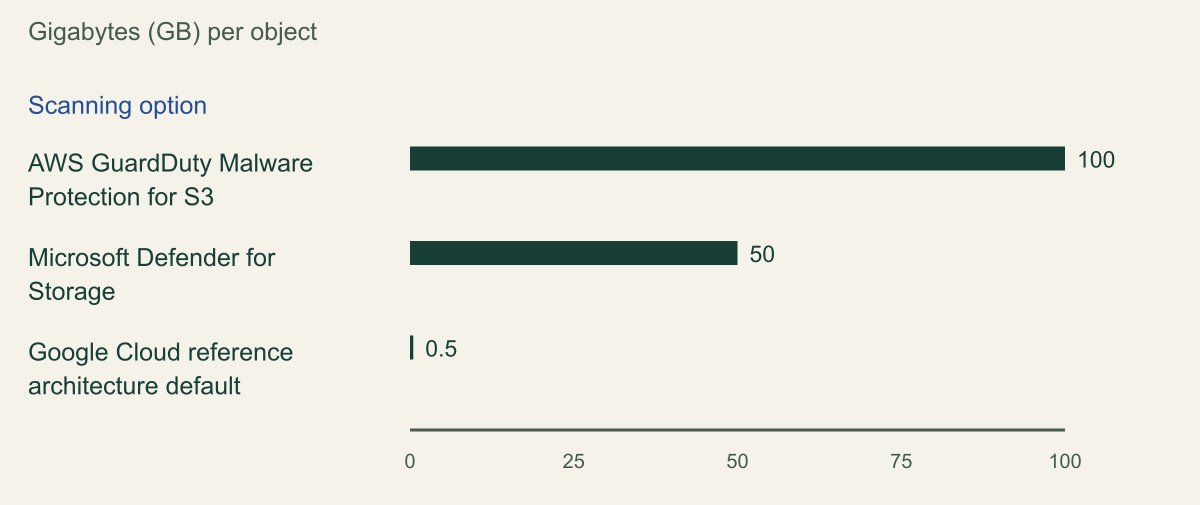
Maximum object size is the limit most likely to matter for media, backups and data exports. The chart puts all three in gigabytes as the providers publish them. The Google value is a default in sample code you can change, but raising it means also raising ClamAV's limits, the Cloud Run timeout and the memory budget, so treat it as the practical ceiling until you have measured otherwise.
Other limits shape the design as much as size does. GuardDuty extracts at most 100,000 files from one object and follows at most 100 levels of nesting, and it can also skip archives with an extremely high compression ratio. Defender's scan timeout ranges from 30 minutes to three hours depending on blob size and structure. None of the reviewed pages documents a latency guarantee, and Microsoft explicitly tells applications to allow for variable scan times. [2][8][9]
| Limit | GuardDuty for S3 | Defender for Storage | Google reference |
|---|---|---|---|
| Maximum object size | 100 GB | 50 GB | 500 MiB default |
| Scope per account | 25 buckets per Region | Per storage account | Buckets in config |
| Path scoping | Up to 5 prefixes | Up to 24 exclusion filters | Exclusion patterns |
| Throughput or cap | No quota published | 50 GB per minute; 10,000 GB monthly cap | Up to 5 Cloud Run instances |
| Existing objects | SendObjectMalwareScan | On-demand scan | Not described |
Documented maximum scannable object size
GuardDuty attempts objects up to 100 GB and Defender up to 50 GB; Google's reference code ignores files above 0.5 GB by default.

Source. GuardDuty Malware Protection for S3 quotas; Defender for Storage malware scanning limitations; Google reference deployment and scanner source. [2][8][13][14]
Method. AWS and Microsoft values copied as published in GB. Google value is the reference code constant of 500,000,000 bytes expressed as 0.5 GB (decimal); the deployment guide describes it as 500 MiB, about 0.52 GB. It is a changeable default, not a service quota.
Accessible table and figure data
| Scanning option | Maximum object size (GB) |
|---|---|
| AWS GuardDuty Malware Protection for S3 | 100 |
| Microsoft Defender for Storage | 50 |
| Google Cloud reference architecture default | 0.5 |
| Scanning option | Maximum object size (GB) |
|---|---|
| AWS GuardDuty Malware Protection for S3 | 100 |
| Microsoft Defender for Storage | 50 |
| Google Cloud reference architecture default | 0.5 |
Files a scanner cannot judge
Every service returns some outcome that is neither clean nor malicious, and the reason determines the next step. Transient failures deserve a retry: GuardDuty's FAILED is an internal error, and Microsoft describes SAM259201 internal errors and SAM259207 timeouts as usually temporary, with a re-upload generally succeeding. Configuration failures need an operator: GuardDuty's ACCESS_DENIED with UNAUTHORIZED_TO_GET_OBJECT usually means the role or a KMS key policy is wrong, and Defender's SAM259203 means the scanner lost read permission. [3][11]
Some files are structurally unscannable. GuardDuty skips password-protected files, objects over its size and extraction limits, unsupported storage classes and SSE-C objects. Defender cannot scan client-side encrypted blobs, archive tier blobs, append and page blobs or blobs uploaded over NFS 3.0, and it does not scan Azure Files on upload. Microsoft adds that detection can fail for files uploaded in separate fragments, and that password protection is not always detected, for example in some PDFs. [3][8][11]
Microsoft's guidance on nesting is pointed: archive nesting is a known evasion method, so a blob that exceeds the maximum nesting depth should be handled with caution. The same logic applies to an oversized or password-protected upload from an anonymous user. For most applications the right response to an unscannable file is rejection with a clear message, or a slower path with a named approver, not silent promotion. [11]
Size and type limits belong at the front of the pipeline. If the upload grant or API already refuses files larger than the scanner's limit, and the application refuses encrypted archives it has no business accepting, most unscannable outcomes never occur. What remains is a short list of exceptions that a person can review.
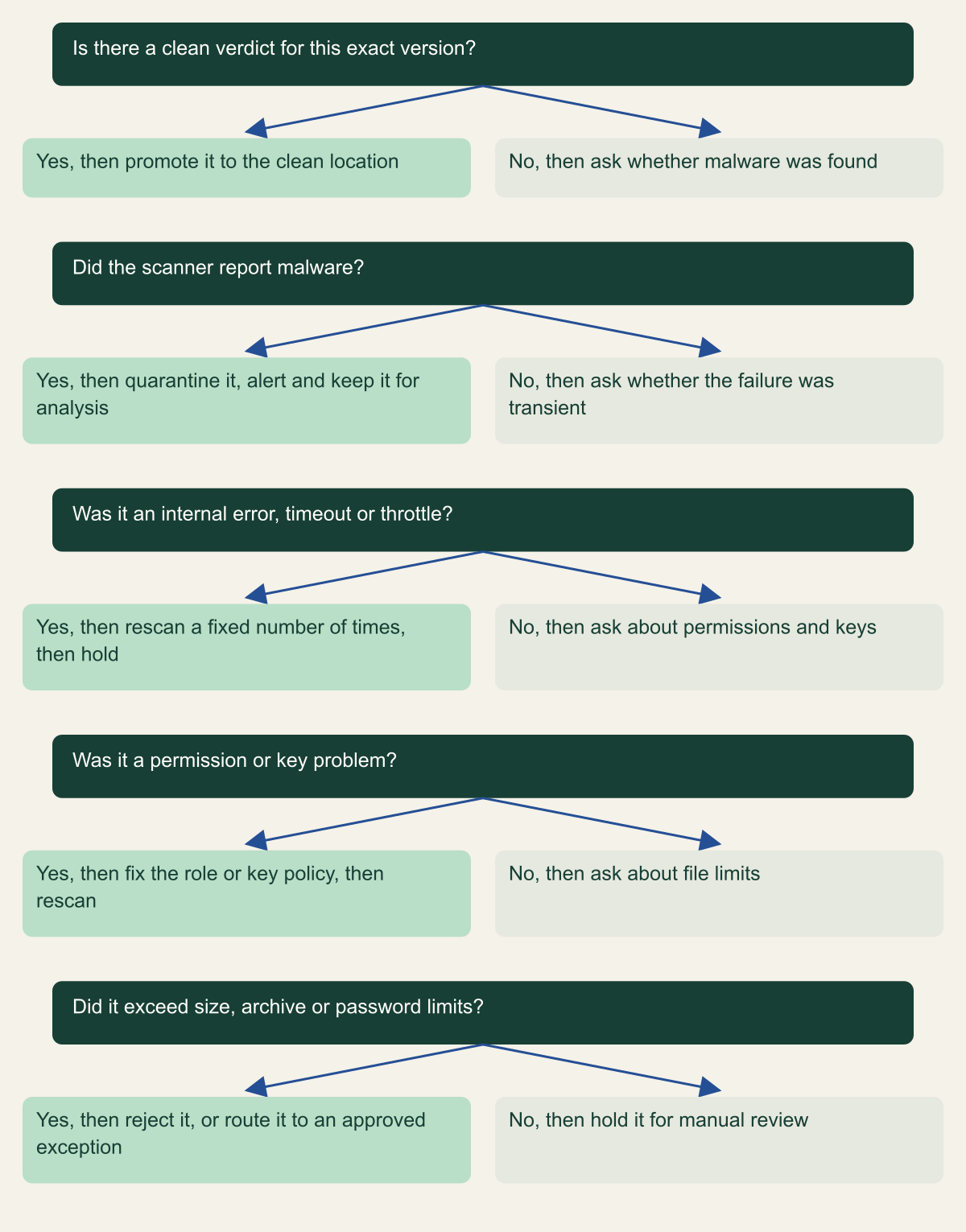
What to do with a file that has no clean verdict
Only a clean verdict for the exact version promotes a file; every other path ends in quarantine, a retry, a fix or a person.

Source. Conceptual decision aid based on GuardDuty scan status values and Defender for Storage error states. [3][11]
Method. Conceptual ordering of documented result categories. Retry counts and review queues are design choices, not provider requirements.
Accessible table and figure data
| Question | Yes, then | No, then |
|---|---|---|
| Is there a clean verdict for this exact version? | promote it to the clean location | ask whether malware was found |
| Did the scanner report malware? | quarantine it, alert and keep it for analysis | ask whether the failure was transient |
| Was it an internal error, timeout or throttle? | rescan a fixed number of times, then hold | ask about permissions and keys |
| Was it a permission or key problem? | fix the role or key policy, then rescan | ask about file limits |
| Did it exceed size, archive or password limits? | reject it, or route it to an approved exception | hold it for manual review |
| Question | Yes, then | No, then |
|---|---|---|
| Is there a clean verdict for this exact version? | promote it to the clean location | ask whether malware was found |
| Did the scanner report malware? | quarantine it, alert and keep it for analysis | ask whether the failure was transient |
| Was it an internal error, timeout or throttle? | rescan a fixed number of times, then hold | ask about permissions and keys |
| Was it a permission or key problem? | fix the role or key policy, then rescan | ask about file limits |
| Did it exceed size, archive or password limits? | reject it, or route it to an approved exception | hold it for manual review |
Operating the pipeline
The promotion worker is where the gate is enforced, so keep it small. The fragment below shows the AWS shape: an EventBridge rule on the GuardDuty result event invokes a function that copies only NO_THREATS_FOUND versions to the clean bucket and records everything else. It deliberately does not move malicious objects. Under the read-deny policy above, the worker cannot read them, and moving malware should be done by a separate security-owned role that is the only exception to that policy.
Alert on absence as well as on detections. Every object in the ingest location should receive a result within a bound you choose, for example fifteen minutes for documents; a scheduled job that lists objects older than that bound without a result catches lost events, disabled plans, deleted IAM roles and Defender's monthly cap. GuardDuty also emits resource status events when a protected bucket's plan moves to a warning or error state, and Microsoft notes that Defender stops scanning if its Event Grid system topic or StorageDataScanner resource is removed. [5][8]
Plan for rescans and false positives. Signatures improve after upload, so a file that was clean last month may be flagged today; GuardDuty's SendObjectMalwareScan and Defender's on-demand scanning let you rescan stored files after an incident or before an archive is shared. For a false positive, Microsoft directs users to its sample submission portal and suppression rules. Release a quarantined file only through a recorded manual decision, never by re-uploading it until it passes. [6][8]
Test with a harmless detection string, never real malware. Both AWS and Microsoft use the EICAR test file in their sample result events. A useful test plan uploads an EICAR file, a clean file, a password-protected archive and an object above your size limit, and confirms that only the clean file reaches the clean location and that each of the other three appears in the right queue with an alert. [5][10]
If the product also accepts a URL and fetches the file on the user's behalf, the fetched content enters the same ingest location and gets the same treatment. The fetch itself is a separate risk with its own controls.
# Example fragment: a Lambda function behind an EventBridge rule matching
# detail-type "GuardDuty Malware Protection Object Scan Result".
# Placeholder names; the ingest bucket has versioning enabled.
import boto3

s3 = boto3.client("s3")
CLEAN_BUCKET = "example-clean-bucket"


def handler(event, context):
    detail = event["detail"]
    obj = detail["s3ObjectDetails"]
    result = detail["scanResultDetails"]
    status = result["scanResultStatus"]
    source = {"Bucket": obj["bucketName"], "Key": obj["objectKey"]}
    if obj.get("versionId"):
        source["VersionId"] = obj["versionId"]

    if status != "NO_THREATS_FOUND":
        # THREATS_FOUND, UNSUPPORTED, ACCESS_DENIED and FAILED all stay in
        # the ingest bucket. Record them for the hold queue and alerting.
        print({"held": source, "status": status,
               "reasons": result.get("statusReasons")})
        return

    # Copy the exact scanned version. A duplicate event copies the same
    # bytes again, so at-least-once delivery is harmless. If the read is
    # denied because the tag is not visible yet, let the invocation fail
    # and retry.
    s3.copy(source, CLEAN_BUCKET, obj["objectKey"])
Building the pipeline in order
The read boundary comes before the engine. Make the ingest location unreadable to applications and give the clean location a single writer. Then choose the scanner by platform and file size: GuardDuty for S3 objects up to 100 GB, Defender for blobs up to 50 GB within its throughput and monthly cap, and on Google Cloud the ClamAV reference deployment or a commercial engine in the same slot, sized for your largest accepted file.
Wire promotion to the result event, bound to the object version or ETag, and make it idempotent. Write down the action for each non-clean outcome before go-live: retry transient errors a fixed number of times, page an operator for permission and key failures, reject structurally unscannable files at the API, and send everything else to a human queue. Finally, alert on any object that has no verdict past your deadline. A pipeline that does those things fails closed when the scanner is slow, misconfigured or out of its depth, and that matters more than which engine produced the verdict.
Method and provenance
Source-led technical analysis of AWS, Microsoft and Google Cloud documentation, Google's reference scanner source code and OWASP guidance, with original diagrams and an explicitly labeled example design. Sources were reviewed on October 7 and 8, 2026.
No cloud account, bucket, storage account or scanner was deployed or tested. Limits, result values and feature behavior are bounded to the cited documentation as of the review date, and detection quality of the engines was not assessed.
AI assistance. AI assisted research synthesis, drafting, diagram planning and visual production, with deterministic editorial checks. No personal deployment experience, independent human review or live test is claimed.
Published under the Cloud Security Desk organizational byline. Read the practitioner guide policy.
References
- How does Malware Protection for S3 work? Amazon Web Services. Accessed .
- Quotas in Malware Protection for S3 Amazon Web Services. Accessed .
- Monitoring S3 object scans in Malware Protection for S3 Amazon Web Services. Accessed .
- Using tag-based access control (TBAC) with Malware Protection for S3 Amazon Web Services. Accessed .
- Monitoring S3 object scans with Amazon EventBridge Amazon Web Services. Accessed .
- On-demand S3 malware scan in GuardDuty Amazon Web Services. Accessed .
- PutObject (Amazon S3 API Reference) Amazon Web Services. Accessed .
- Introduction to Defender for Storage malware scanning Microsoft. Accessed .
- On-upload malware scanning in Microsoft Defender for Storage Microsoft. Accessed .
- Set up automated remediation for malware detection Microsoft. Accessed .
- Understand malware scanning results Microsoft. Accessed .
- Automate malware scanning for files uploaded to Cloud Storage Google Cloud. Accessed .
- Deploy automated malware scanning for files uploaded to Cloud Storage Google Cloud. Accessed .
- docker-clamav-malware-scanner: cloudrun-malware-scanner/scanner.ts Google Cloud Platform on GitHub. Accessed .
- File Upload Cheat Sheet OWASP Cheat Sheet Series. Accessed .