
Review the effective Azure NSG rules for SSH or RDP, identify the intended management source and replace broad access carefully. Verify fresh allowed and denied connections while preserving an authorized recovery route.
At a glance
Key findings
- Inspect effective rules, preserve the approved management path and test a fresh connection.
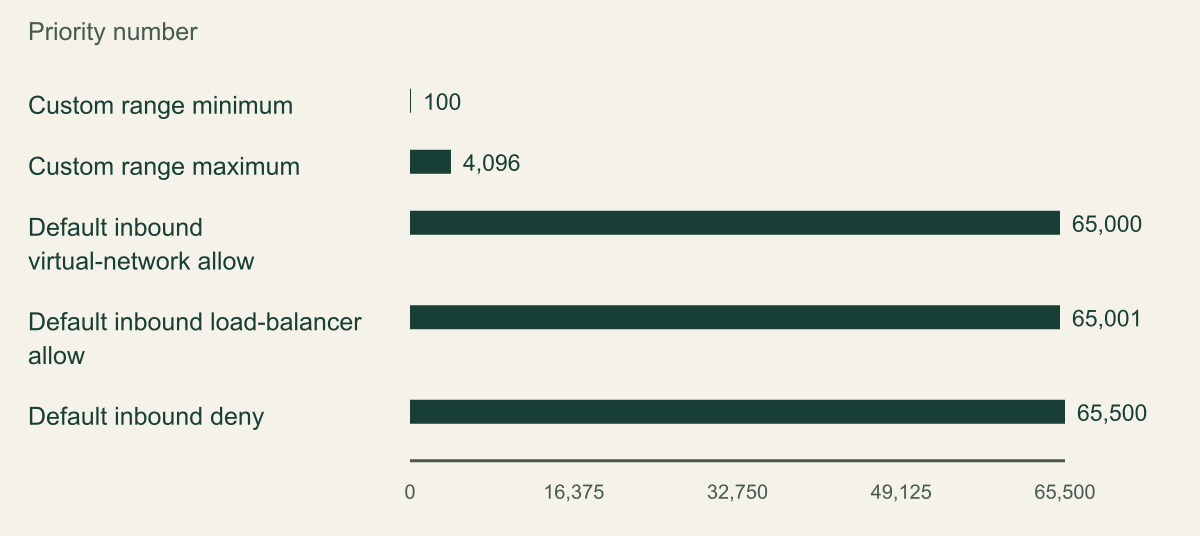
- Documented NSG priority values on a zero-based axis. Smaller numbers are evaluated earlier; length is not a risk or exposure score.
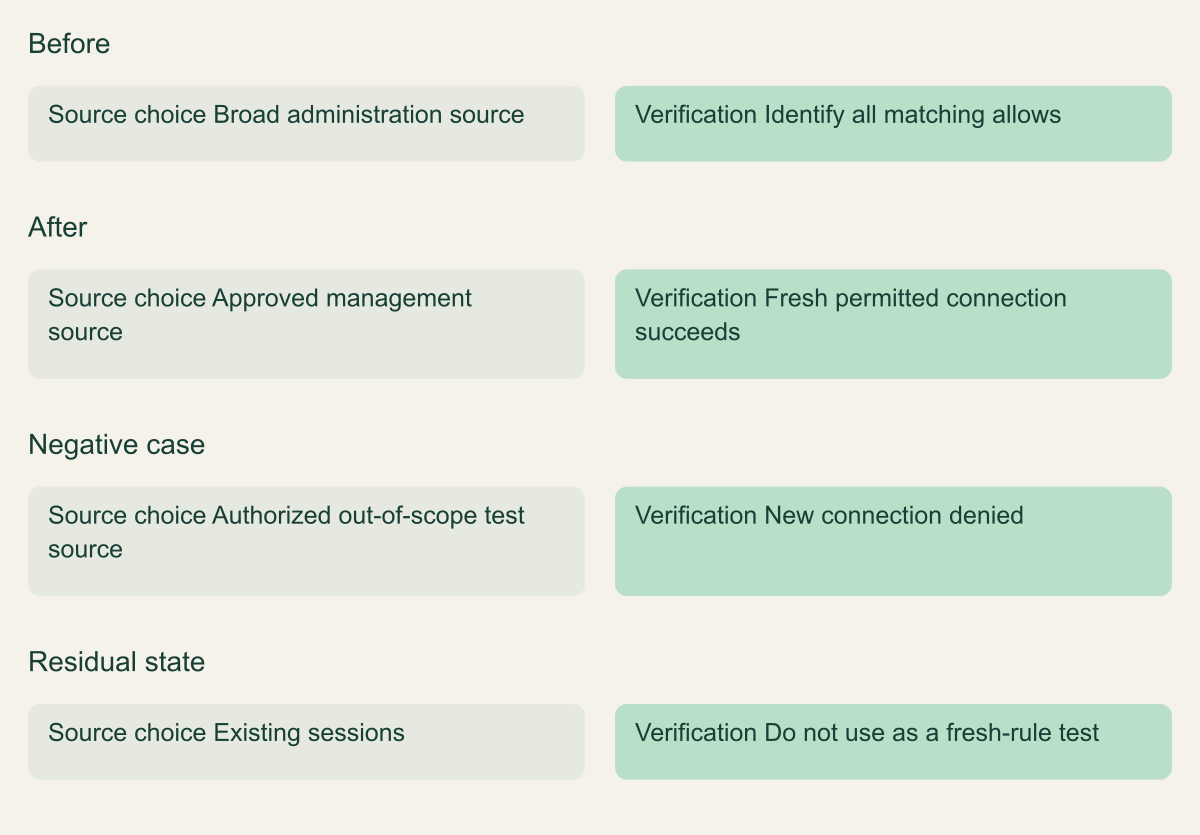
- Conceptual management-path comparison includes rule precedence and the distinction between existing flows and new connections.
Name the management path before changing a rule
To restrict SSH or RDP with an Azure network security group, identify the rule that currently permits the connection, replace an unnecessarily broad source with the approved administration source and test a new connection. Check all effective rules on the VM's network interface, including subnet-level rules. A narrow-looking entry does not help if another applicable rule still permits the same traffic. [1] [4]
Start by recording how administrators are supposed to reach the VM. That might be an approved VPN address range, a jump host or Azure Bastion. The source seen by the VM's network controls may differ from the administrator laptop's local address because of routing or address translation. Confirm the relevant source with the network owner before entering a guessed address into a rule.
This guide concerns Azure NSG filtering for a known VM. It does not review every firewall, public endpoint or guest-account control in a subscription. Restricting a port does not make an old SSH key or weak Windows account safe. Keep host authentication, patching and the permitted network path as separate parts of the administration design.
Plan a recovery route before narrowing the rule. A change intended to remove broad access can also remove your own connection if the approved source was identified incorrectly. Use a sandbox or a maintenance procedure with an independent authorized route. An existing interactive session is useful during a change, but it should not be the only way to recover from a mistaken network rule.
Read the full effective rule set
Open the VM's network interface and inspect its effective security rules. This view brings together the rules that apply through the interface and subnet associations. Note the relevant NSG IDs, direction, protocol, source, destination, ports, action and priority. Do not review only the NSG whose name resembles the VM. [4]
Look for broad inbound allows covering the administration port. A rule might name a single port, a range containing it or a broad Any value. Likewise, a permissive source can appear as an address range or a service tag rather than the literal word Any. Review the rule's meaning, not only its label. A name such as office-access does not prove the current source still represents the office.
The command reference for az network nsg rule can support an inventory or an automated review. Keep the resource group and NSG name explicit and use read-only listing before considering an update. When a rule uses plural source or port fields, inspect those fields too. A simplified query that omits them can make a multi-range rule appear narrower than it is. [7]
Record other consumers of the NSG. A subnet-level rule can affect several VMs, and an interface-level rule can coexist with additional subnet restrictions. The intended task is to correct the approved administration path, not to rewrite an entire shared network policy. If the rule serves several systems, coordinate its replacement with their owners.
CSD_AZ_GROUP='example-network-rg'
CSD_NSG_NAME='example-app-nsg'
az network nsg rule list --resource-group "$CSD_AZ_GROUP" --nsg-name "$CSD_NSG_NAME" --include-default --output json
Understand priority without treating it as a risk score
Custom NSG rules use priority values from 100 through 4096. Lower numbers are evaluated first, and the first matching rule determines the result within that NSG. Azure's built-in defaults have larger priority numbers, including the default inbound virtual-network allow at 65000 and the default inbound deny at 65500. These numbers express evaluation order, not severity or exposure. [1]
The priority chart reproduces documented configuration values. Its axis is a priority number, and smaller values mean earlier evaluation. A bar that extends farther is not more dangerous. The large gap between the custom range and default values is part of the service's numbering system, not a measured difference in security quality.
Consider a hypothetical custom allow that matches the administration connection before a later custom deny. The deny may be clearly named and visually prominent, but it will not win for that matching packet. Review the complete tuple and order together. A rule's action, priority and match conditions only make sense as a combination.
Leave room between custom priorities when maintaining rules, following Microsoft's management guidance. This makes later insertion easier, but spacing is an administrative convention rather than a security control. Do not renumber a shared NSG merely for neatness during a narrow access fix. Change the entries needed for the approved outcome and retain their rationale. [2]
Lower priority numbers are evaluated first
Documented NSG priority values on a zero-based axis. Smaller numbers are evaluated earlier; length is not a risk or exposure score.

Source. Microsoft documentation: Azure network security groups overview [1]; Create, Change, or Delete Azure Network Security Groups [2].
Method. Values transcribed from Microsoft NSG overview and management documentation. These are ordering values, not measured security results. Custom minimum and maximum bound a configuration range. Reviewed 2026-09-12.
Accessible table and figure data
| Documented value | Priority number |
|---|---|
| Custom range minimum | 100 |
| Custom range maximum | 4096 |
| Default inbound virtual-network allow | 65000 |
| Default inbound load-balancer allow | 65001 |
| Default inbound deny | 65500 |
| Documented value | Priority number |
|---|---|
| Custom range minimum | 100 |
| Custom range maximum | 4096 |
| Default inbound virtual-network allow | 65000 |
| Default inbound load-balancer allow | 65001 |
| Default inbound deny | 65500 |
Replace a broad source with an approved source
Prepare the replacement rule using the approved source range, required protocol and actual destination port. SSH commonly uses TCP 22 and RDP commonly uses TCP 3389, but use the service configuration that applies to the VM. Changing an SSH listener to another port does not remove the need for source restrictions and proper authentication.
Use the portal's NSG rule editor or a reviewed configuration source. Compare the before and after values before saving. If the resource is managed through infrastructure as code, update that source so that a later deployment does not restore the broad rule. A portal-only correction may be temporary even when it appears successful immediately after the change.
Do not add the narrow allow and assume the old broad allow has been neutralized. If both remain and the broad one still matches other sources, those sources can remain permitted. Review the original entry and any overlapping allows. The before-and-after figure illustrates replacing a broad permitted path with a defined administration path, not merely adding a better-named rule alongside the old one.
Avoid a universal command that deletes every inbound rule for port 22 or 3389. Shared rules can have legitimate consumers, and a rule may contain more than one port. The safe unit of change is the reviewed entry or infrastructure definition. Keep the original configuration in the authorized change record so that recovery is deliberate rather than improvised.
Review IPv4 and IPv6 exposure separately where the VM and application support both. An IPv4 source restriction does not automatically describe an IPv6 rule. Likewise, a broad service tag or address range should be interpreted using its actual definition in the environment. The rule review should name the address family and source representation that were checked, rather than treating one successful IPv4 test as a complete network-access audit.
Pay attention to source ports as well as destination ports. Client source ports are often selected dynamically, so a rule that guesses the administrator's source port can be brittle. The destination port identifies the management listener, while the source address or approved range identifies the intended network origin. Match the rule to the real connection instead of copying every field from a sample packet without understanding which values vary.
For a shared NSG, write down which other resources depend on the rule before editing it. If a single entry combines administration and application ports, consider a reviewed separation into clearer rules. Do that only when needed for the change, and validate every affected path. Splitting a shared entry is a functional change, not merely a cosmetic cleanup.
Replace the broad path and test a fresh connection
Conceptual management-path comparison includes rule precedence and the distinction between existing flows and new connections.

Source. Microsoft documentation: Azure network security groups overview [1]; How Network Security Groups Filter Network Traffic in Azure [3]; Effective Security Rules Overview - Azure Network Watcher [4]; IP Flow Verify Overview - Azure Network Watcher [5].
Method. Original conceptual synthesis of the cited Microsoft documentation. No deployment measurements or risk scores. Reviewed 2026-09-12.
Accessible table and figure data
| State | Source choice | Verification |
|---|---|---|
| Before | Broad administration source | Identify all matching allows |
| After | Approved management source | Fresh permitted connection succeeds |
| Negative case | Authorized out-of-scope test source | New connection denied |
| Residual state | Existing sessions | Do not use as a fresh-rule test |
| State | Source choice | Verification |
|---|---|---|
| Before | Broad administration source | Identify all matching allows |
| After | Approved management source | Fresh permitted connection succeeds |
| Negative case | Authorized out-of-scope test source | New connection denied |
| Residual state | Existing sessions | Do not use as a fresh-rule test |
Check both subnet and network interface rules
When NSGs are associated with both a subnet and a network interface, traffic must satisfy the applicable rules at both locations. For inbound traffic, Azure evaluates the subnet NSG before the interface NSG; outbound processing follows the opposite direction. An allow in one NSG does not override a denial in another. [3]
This matters when a narrow interface rule appears correct but the connection still fails. The subnet policy may block it, or the path may be affected by a separate firewall or route. Conversely, reviewing only the subnet can miss an interface-level exception. Use the effective-rule view and identify the origin of each relevant decision.
IP flow verify can test whether a specified packet is allowed or denied by the applicable NSG rules and report the matching rule. Supply the correct direction, protocol, local address and port, and remote address and port. The result is a rule decision for that packet description; it does not establish that the guest service is listening or that the end user can authenticate. [5]
If the approved source is a VPN or jump host, confirm the address that reaches this point in the network. Do not substitute the administrator's current home address unless that is the approved design. A narrowly written rule can still express the wrong trust decision if the source was chosen for convenience rather than from the actual management path.
Test a fresh permitted connection
After the change, open a new SSH or RDP connection from the approved source. Use the normal hostname or address and the intended user account. Verify that the administrator can perform a harmless approved task. A successful connection made with a different source or privileged fallback account does not prove that the regular path still works.
NSGs are stateful. Microsoft's overview explains that changes affect new connections while existing connections may continue under the flow state established earlier. An already-open session therefore cannot prove that the new rule allows a fresh connection, and its continued operation does not necessarily mean the restriction failed. [1]
Retain the successful fresh-session result and the relevant rule decision. If the new session fails, inspect source addressing, effective rules and the guest service before broadening access. The failure may be caused by an incorrect approved range or another existing control. Change one identified cause at a time so that the final explanation remains clear.
A positive test should be practical. An administrator can confirm a basic read-only host fact rather than restarting a service or changing production data. The test's purpose is to establish that the approved management path remains usable. More invasive maintenance belongs to the original operational task and should not be added merely to validate network access.
Choose a better long-term administration path
Azure Bastion provides managed RDP and SSH access to VMs through their private addresses, with connection options depending on the selected SKU. It can remove the need to expose each VM's management port through a public IP address. It still requires an appropriate deployment, permissions and network configuration, and it has cost and feature considerations. [6]
A VPN or established jump-host arrangement may also fit the organization's needs. Compare the choices against who administers the VM, where they work, how access is approved and how recovery is handled. Include the team's ability to operate and support the chosen path. Select a management arrangement that can be maintained without recurring broad public exceptions, and document its approved fallback.
If Bastion or a private route is already the intended path, investigate why a direct public administration rule remains. It may be an old migration exception or a deliberate emergency arrangement. Remove it only after the owner confirms its purpose and the replacement path is tested. A historical rule should have an explanation, not immunity from review.
Keep emergency access specific and governed. An undocumented Any-source allow left behind in case something breaks is difficult to distinguish from an accidental exposure. An approved recovery procedure should state who can activate it, what scope it affects and how it is removed afterward. The same fresh-connection tests can verify that the normal path works before the exception is withdrawn.
If the management source is represented by a maintained range, record its owning service and how updates are communicated. An address copied from a one-time support message is difficult to maintain. The network rule should point to an approved operational source, and the change process should identify who checks it when that source moves. This gives future operators an alternative to reopening access broadly when the original address stops working.
Remove the temporary exception and preserve the reason
When the review is complete, remove the temporary rule or source range created for the test. Confirm the saved effective rules and the expected administration path again. Preserve shared NSGs and unrelated rules. Cleanup should target the exact exception, not delete a resource group containing other systems.
Write a short change record with the VM and NSG IDs, old and new match conditions, priority, approved source, test results and owner. Explain why that source is appropriate. This is more useful than a rule name alone, especially when a future operator sees an unfamiliar address range and considers broadening it.
Review the source range when the VPN, jump host, office egress or Bastion configuration changes. A source restriction can become stale even when nobody edits the NSG. If a future administration failure is caused by an address change, update the approved path rather than restoring Any access as the permanent fix.
The completed task should leave a clear answer to who can open a new administration connection and through which path. It should also leave a way to recover if the path changes. That is a more useful operating result than a screenshot showing port 22 or 3389 attached to a rule whose scope and precedence nobody has checked.
Method and provenance
Microsoft primary documentation was reviewed on September 12, 2026. The guide combines documented service behavior with original implementation guidance, conceptual figures and clearly identified hypothetical examples.
No Azure tenant, production application or customer deployment was executed or measured. Commands were checked against the cited references and locally parsed where applicable; the reader must verify permissions, service support and outcomes in the intended environment.
AI assistance. AI-assisted source research, drafting, original visual planning and consistency review. No firsthand deployment experience or human review is claimed.
Published under the Cloud Security Desk organizational byline. Read the practitioner guide policy.
References
- Azure network security groups overview Microsoft. Accessed .
- Create, Change, or Delete Azure Network Security Groups Microsoft. Accessed .
- How Network Security Groups Filter Network Traffic in Azure Microsoft. Accessed .
- Effective Security Rules Overview - Azure Network Watcher Microsoft. Accessed .
- IP Flow Verify Overview - Azure Network Watcher Microsoft. Accessed .
- What is Azure Bastion? Microsoft. Accessed .
- az network nsg rule Microsoft. Accessed .