
A comprehensive change-authority review for Terraform. The guide separates sensitive-value redaction from omission, provider locks from module selection, state locking from authorization and saved-plan approval from execution, with recovery decisions for partial apply and backend failure.
At a glance
Key findings
- Sensitive marking can hide display output while the value remains in a plan or state file.
- Passing a saved plan to terraform apply is treated as approval of the actions in that artifact.
- State locks coordinate writers but do not prove that a plan was reviewed or an apply identity is appropriately authorized.
The plan and state are part of change authority
Keep Terraform configuration, saved plans, dependency selections and state inside the production change boundary. Protect them as data, and control who can use them to exercise infrastructure authority. A reviewed source commit is not enough if the saved plan can be replaced afterward, and encrypted state is not enough if an unrelated identity can rewrite it. Approval should identify the artifact, target workspace and execution identity that together define the intended change. [3][4][5]
Terraform's artifacts have different roles. Configuration describes the desired resources. State records Terraform's relationship with remote objects and their attributes. A saved plan captures selected changes and the information needed to apply them later. Treating all three as ordinary repository files hides differences in sensitivity and authority. The state and plan may contain values that do not appear openly in a code review, and the plan can be executed without repeating the interactive approval step. [1][3][4][5]
This guide proposes an artifact-custody model, not a new Terraform service or a claimed deployment architecture. Connect the reviewed configuration and selected dependencies to the produced plan, connect approval to that exact plan and connect execution to the intended infrastructure target. Retain enough non-secret evidence to reconstruct those relationships after a change. The same model can be implemented in different CI systems or controlled operator workflows.
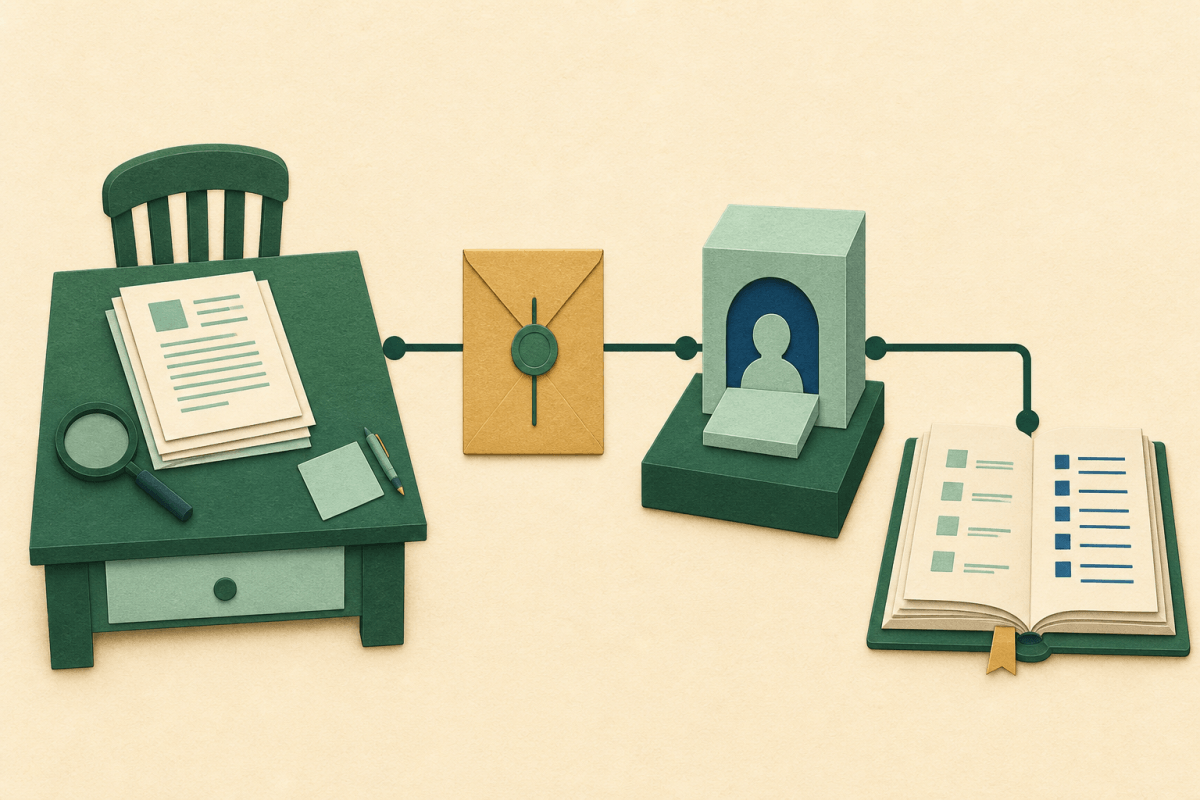
The illustration separates the change packet from the state archive. A plan can need restricted access because it contains secrets; it also needs integrity protection because replacing it can change what an authorized apply performs. State needs confidentiality and controlled writes for different reasons. Calling both files encrypted does not explain who may read them, replace them or restore an older version.
Cloud credentials remain an independent authority boundary. Terraform does not make an overprivileged deployment role narrow merely because the reviewed configuration is narrow. Likewise, a scoped role does not prove that every action it permits was approved for this release. Combine artifact approval with appropriately scoped execution credentials, and review the workflow that obtains those credentials as part of the same change path.
Avoid describing this as a complete supply-chain assurance simply because it uses a checksum or a lock. Each control establishes a limited fact: artifact bytes match, a provider package matches recorded checksums, or a state writer holds a lock. The useful design specifies which fact is needed at each boundary and what still depends on trusted code, correct configuration or an authorized operator.
Configuration, plan and state need distinct custody rules
Configuration, the reviewed plan and resulting state have different custody and authorization requirements. Conceptual illustration, not a measured result.

Source. HashiCorp, Terraform plan command, Saved plans, sensitive content and planning modes [4]; HashiCorp, Terraform apply command, Saved-plan mode and approval behavior [5]; HashiCorp, Terraform state storage and locking, Backend state storage, locking and serial safeguards. [2].
Method. Original conceptual illustration synthesizing the cited documentation. It represents design relationships, not observed test results. Reviewed 2026-09-02.
Accessible table and figure data
| Artifact or boundary | Purpose | Custody question |
|---|---|---|
| Configuration and dependencies | Inputs used to calculate change | Which versions and sources were selected? |
| Reviewed saved plan | Specific proposed infrastructure actions | Can the approved artifact be replaced? |
| Apply gate | Authority to execute the plan | Which identity and target are allowed? |
| State archive | Recorded resource mapping and attributes | Who can read, write or recover it? |
| Artifact or boundary | Purpose | Custody question |
|---|---|---|
| Configuration and dependencies | Inputs used to calculate change | Which versions and sources were selected? |
| Reviewed saved plan | Specific proposed infrastructure actions | Can the approved artifact be replaced? |
| Apply gate | Authority to execute the plan | Which identity and target are allowed? |
| State archive | Recorded resource mapping and attributes | Who can read, write or recover it? |
Choose omission or redaction deliberately
Terraform's sensitive marking controls how a value appears in ordinary display output. HashiCorp explicitly documents that marked values can remain in state and plan files. A redacted terminal line is therefore not evidence that the underlying artifact contains no secret. Decide whether the workflow needs only display protection or actual omission from persisted artifacts before selecting the language feature. [1]
Ephemeral values serve a different purpose. Terraform 1.10 or later supports ephemeral variables, child-module outputs and ephemeral resources, while write-only arguments on managed resources require Terraform 1.11 or later. Provider support determines which ephemeral resources or write-only arguments are available. These version gates and provider constraints matter: replacing a sensitive variable with an ephemeral declaration is not a universally compatible mechanical edit. [1]
Ephemeral references are limited to permitted contexts. The configuration must be designed so values omitted from state and plans are used where Terraform supports their absence from persistent evaluation data. A provider may expose an appropriate write-only argument for a credential, but another resource may still require a value that becomes part of normal state. Review the actual schema and provider documentation rather than inferring support from a similar resource name. [1]
Omission also changes what the retained artifact can explain later. The operator may need a non-secret identifier for the credential source or rotation generation without retaining the value itself. Design that evidence deliberately, with a meaning the consuming resource actually supports. A record that says latest was requested does not prove which value was used, while storing the secret to make the record more complete defeats the purpose of omitting it from state.
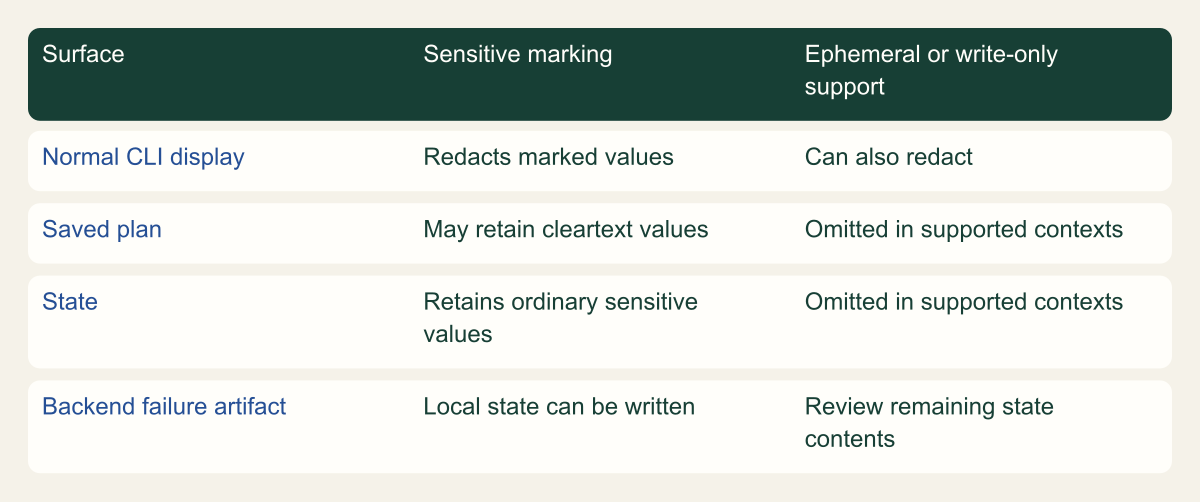
The matrix separates normal CLI output, saved plans, state and emergency local state. It is a conceptual data-handling comparison, not an experiment measuring leakage. The important distinction is whether the value is hidden from a display or absent from a particular artifact. Access to raw state or a saved plan can defeat the confidentiality expectation of someone who saw only redacted terminal output. [1][4]
Saved plans deserve particular care. The plan command reference states that sensitive data can be stored in cleartext in the plan file even when Terraform's terminal output obscures it. Do not publish a saved plan as an ordinary build attachment, paste its decoded contents into a broad review channel or grant artifact access solely because the original source repository is public. The artifact's contents, not the repository's visibility, should determine its audience. [4]
Backend configuration can introduce a separate credential path. The S3 backend documentation warns that credentials placed directly in configuration or supplied through backend-config can be written into local metadata and plan files. Prefer supported environment or standard credential mechanisms instead of embedding secret values in the backend declaration. This does not make all environment handling automatically safe; the surrounding process, logs and artifact capture still require review. [8]
Inventory secondary copies. A troubleshooting archive, a failed-job workspace, a locally pulled state file or a machine-readable plan representation can have a different retention policy from the primary backend. Encryption of the primary object does not protect a copy written elsewhere. The design should say which outputs are retained, who may inspect them and how an operator can investigate without distributing raw secrets to every person reviewing the change.
If a secret is found in an artifact, treat cleanup and credential replacement as separate questions. Removing a visible file does not establish that every copy disappeared or that nobody accessed it. Follow the affected service's authorized incident process to decide whether revocation or rotation is needed, and preserve appropriate evidence about the artifact's distribution. This guide does not prescribe a blind purge of state history, which could also remove recovery information.
Redaction is not omission from persisted artifacts
Display redaction differs from omission from plan and state; omission depends on supported ephemeral or write-only contexts. Conceptual matrix, not a measured result.

Source. HashiCorp, Managing sensitive Terraform data, Redaction versus omission, ephemeral values and version/provider requirements. [1]; HashiCorp, Terraform plan command, Saved plans, sensitive content and planning modes [4]; HashiCorp, Terraform state storage and locking, Backend state storage, locking and serial safeguards. [2]; HashiCorp, Terraform S3 backend, State, lockfile permissions and credential leakage warnings [8].
Method. Original conceptual matrix synthesizing the cited documentation. It represents design relationships, not observed test results. Reviewed 2026-09-02.
Accessible table and figure data
| Surface | Sensitive marking | Ephemeral or write-only support |
|---|---|---|
| Normal CLI display | Redacts marked values | Can also redact |
| Saved plan | May retain cleartext values | Omitted in supported contexts |
| State | Retains ordinary sensitive values | Omitted in supported contexts |
| Backend failure artifact | Local state can be written | Review remaining state contents |
| Surface | Sensitive marking | Ephemeral or write-only support |
|---|---|---|
| Normal CLI display | Redacts marked values | Can also redact |
| Saved plan | May retain cleartext values | Omitted in supported contexts |
| State | Retains ordinary sensitive values | Omitted in supported contexts |
| Backend failure artifact | Local state can be written | Review remaining state contents |
Fix the dependency selection you actually review
Terraform's dependency lock file records provider selections and package checksums. HashiCorp documents that it does not record remote module version selections in the same way. A checked-in lock file therefore should not be presented as a complete lock of every dependency used by the configuration. Review provider versions and module version constraints separately when producing a release plan. [6]
For remote modules, the guidance explains that Terraform selects a version satisfying the configured constraint and that an exact constraint can keep that selection fixed. Choose the constraint deliberately for the release workflow. A broad permitted range may be appropriate in an update process, but it means a later initialization can select something different from the version a reviewer had in mind. The approval record needs to identify the selected input, not only the text of a permissive constraint. [6]
Provider checksums establish consistency with recorded package expectations; they are not a review of provider behavior. A trusted package can still perform powerful operations under the credentials supplied to Terraform. Keep package integrity, publisher trust, provider functionality and cloud permissions as separate decisions. This framing avoids claiming that a matching checksum proves the configuration is safe to run against production.
Treat changes to the lock file as reviewable changes rather than generated noise. Ask why the provider selection changed and whether the configuration was evaluated with that selection. An unrelated dependency update can alter behavior at the same time as a resource change, making failures harder to attribute. Where practical, preserve a narrow change scope so reviewers can distinguish a business infrastructure modification from a provider migration.
The machine that produces the plan and the machine that applies it need compatible, controlled tooling. Record the Terraform version and the selected provider and module inputs used to create the artifact. Do not assume that a shared repository path guarantees identical execution context across two CI jobs. The custody model should identify how dependencies are obtained and how unexpected replacements or unsupported versions are detected before execution.
This is also where build credential handling connects to Terraform. A workflow can protect cloud credentials while exposing credentials used to fetch dependencies, or can preserve dependency identity while retaining secrets in an artifact. Trace each credential through the tool that consumes it rather than extending one tool's protection claim across the entire pipeline. The dependency review and secret review intersect, but neither makes the other unnecessary.
Bind approval to the saved plan
Terraform distinguishes speculative planning from a saved plan intended for later application. The plan documentation warns that changes to the target system can make an earlier speculative result differ from the final effect, so the non-speculative plan should be reviewed before applying it. A pull-request comment describing an earlier plan is therefore not necessarily approval of the artifact that a later job will execute. [4]
Passing a saved plan file to terraform apply is treated as approval. Terraform does not ask for the same interactive confirmation in that mode, including when the plan contains destructive operations. The workflow must provide any required review gate before that invocation. A script that relies on Terraform to pause for confirmation after supplying the plan has misunderstood the documented execution contract. [5]
Bind approval to a specific artifact identity. A proposed release record can include the source commit, selected dependency information, target workspace, plan digest and approved execution identity. The digest helps establish that the bytes presented to apply match the reviewed artifact. It does not establish that the review was competent, that the reviewer saw every sensitive value or that the artifact is free of malicious behavior. Those are separate trust assumptions.
Protect the artifact location and the approval record from substitution. If a job retrieves whatever file currently occupies a mutable path, a previously approved digest is useful only if the job checks it. Similarly, approval of a job name is weak if the job can silently select a different workspace or credential source. Connect the recorded identity to the actual input checks performed immediately before execution.
Review who can change the gate itself. An approval requirement is less meaningful if the same unreviewed workflow edit can replace the artifact check, select a broader role or skip the approval step. The authority to maintain the pipeline belongs in the trust model alongside the authority to propose infrastructure configuration. This is a proposed workflow-security review, not a claim that Terraform independently enforces separation between those administrators.
Re-planning after approval creates a new artifact and can change the selected actions. If the workflow deliberately does that, define what must be reviewed again and why the earlier approval remains relevant. Do not present the new plan as the old one merely because the configuration commit is unchanged. Refreshing remote state or resolving inputs under a changed environment can make the resulting plan a different production change.
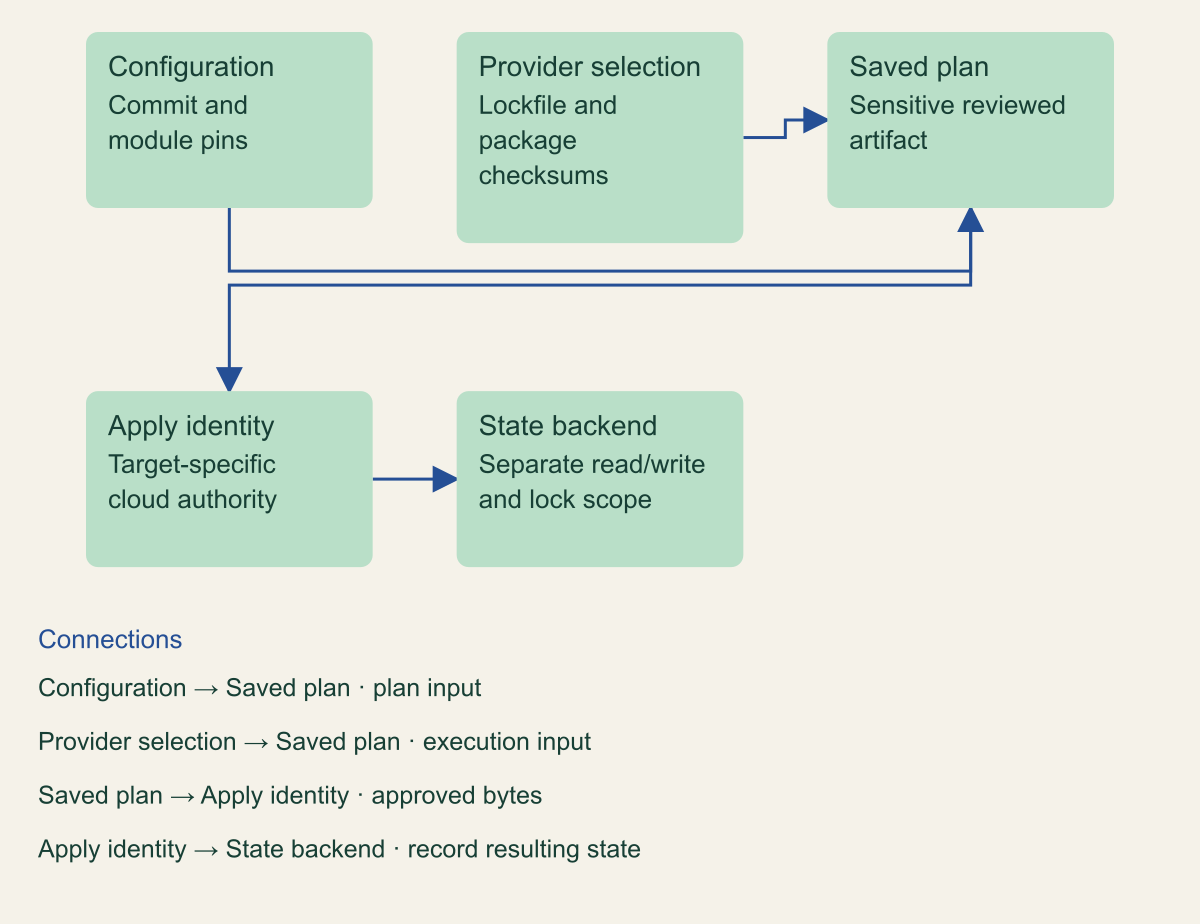
The graph shows a proposed custody relationship, not a Terraform-native authorization subsystem. Configuration and dependencies feed the plan; a controlled apply identity consumes approved plan bytes; the resulting state is written through a separate backend access boundary. This model is useful precisely because the workflow must implement the connections. An artifact digest sitting unused in a log does not prevent substitution.
Keep review evidence readable without leaking the full artifact. A reviewer may need a controlled plan view and a summary of affected resources, while only the execution system needs access to the raw saved plan. State the access levels and retention purpose. A broad audience for change summaries should not automatically imply a broad audience for the sensitive bytes used to perform the change. [4]
Approval binds to the artifact an apply identity uses
Selected configuration and provider dependencies produce the saved plan that an authorized apply identity executes against a separately controlled state backend. Conceptual architecture, not a measured result.

Source. HashiCorp, Terraform plan command, Saved plans, sensitive content and planning modes [4]; HashiCorp, Terraform apply command, Saved-plan mode and approval behavior [5]; HashiCorp, Terraform dependency lock file, Provider selection and checksums; not module version locking [6]; HashiCorp, Terraform S3 backend, State, lockfile permissions and credential leakage warnings [8].
Method. Original conceptual architecture synthesizing the cited documentation. It represents design relationships, not observed test results. Reviewed 2026-09-02.
Accessible table and figure data
| Component | Role |
|---|---|
| Configuration | Commit and module pins |
| Provider selection | Lockfile and package checksums |
| Saved plan | Sensitive reviewed artifact |
| Apply identity | Target-specific cloud authority |
| State backend | Separate read/write and lock scope |
| Component | Role |
|---|---|
| Configuration | Commit and module pins |
| Provider selection | Lockfile and package checksums |
| Saved plan | Sensitive reviewed artifact |
| Apply identity | Target-specific cloud authority |
| State backend | Separate read/write and lock scope |
Separate backend authority from apply authority
State contains Terraform's mapping between configuration and remote objects. HashiCorp recommends storage that supports secure access and appropriate coordination, rather than treating state as an ordinary version-controlled file. State readers can learn sensitive resource attributes, while state writers can alter the information Terraform uses to manage infrastructure. Review these capabilities explicitly instead of granting them to every person who can propose a configuration change. [3]
Backend authority and cloud API authority are different. A role that can update an S3 state object does not automatically have permission to change the represented infrastructure, and a deployment role can have infrastructure permissions without needing broad access to every team's state. Scope both sides to the intended workspace and operating task. The separation should remain visible when one automation identity legitimately needs both sets of permissions.
The S3 backend offers a concrete least-privilege distinction. Its documented lockfile mechanism needs GetObject, PutObject and DeleteObject on the lock object. DeleteObject is not required for the default state object, but managing non-default workspaces requires deletion permission on their workspace state files. Granting broad delete access to a whole state prefix merely because the lock requires deletion would erase this distinction. Use the documented object paths, actual workspace layout and authorized workspace-management operations when reviewing the permissions. [8]
HashiCorp currently documents use_lockfile for S3 locking and marks DynamoDB-based locking as deprecated. Do not copy an older backend template without checking the current supported mechanism and the installed Terraform version. A migration between lock arrangements deserves its own compatibility review so concurrent workflows do not end up coordinating through different locks while writing the same state. [8]
State storage and lock behavior are backend-specific. Terraform's general locking guidance says that not every backend supports locking. The absence of a visible lock message does not prove locking is absent, and the presence of a backend block does not prove the chosen backend has the expected coordination behavior. Inspect the actual backend configuration and documented contract rather than inferring it from a successful initialization. [2][7]
Include recovery readers and writers in the permission review. A break-glass operator who can restore state or change backend access can exercise authority that is broader than routine plan review. That access may be necessary, but it should have a clear owner and an auditable purpose. Encrypting the state object does not replace control of the identities authorized to read or recover it.
Organization guardrails remain relevant to the apply identity. A planned operation may be blocked by an SCP, resource policy or another control despite looking valid in configuration. Treat that outcome as a reason to investigate the intended authority boundary, not automatically as a reason to weaken the guardrail. The plan, backend and organization policies describe different parts of the request path.
Do not ask locking to solve a review problem
State locking coordinates operations that could write state when the backend supports it. If Terraform cannot acquire the required lock, it does not continue normally with the operation. That mechanism addresses concurrent state modification. It does not determine whether the planned action was approved, whether the operator is trustworthy or whether another system changed the infrastructure outside Terraform. [7]
A lock and an immutable plan digest therefore answer different questions. The lock concerns coordination at execution time. The digest concerns the identity of an artifact. Neither establishes that the target workspace is the one the reviewer intended. Keep all three checks visible so an incident investigation can distinguish an unauthorized plan, an incorrect target and a concurrent writer instead of calling each failure a locking problem.
Avoid disabling locking as a routine response to contention. Terraform exposes a lock=false option, but its documentation discourages bypassing the coordination mechanism. Investigate the current operation and lock ownership before deciding whether intervention is justified. A queued change can often wait; bypassing a legitimate writer can create a more complex state problem than the original delay. [5][7]
Force-unlock is a recovery action with consequences, not a general performance switch. The locking documentation cautions that it should be used carefully for one's own failed lock situation. An operator needs evidence that the relevant operation is no longer active and that removing the lock will not permit overlapping writers. This article intentionally provides no blind force-unlock command or automatic retry loop. [7]
Out-of-band changes need their own review. A console operation, another automation system or an emergency repair can change the target environment while Terraform's recorded state and a previously produced plan remain available. The appropriate response depends on the change and the supported Terraform workflow. Do not assume that a lock on the state object prevented all external infrastructure mutation or preserved the assumptions of an earlier speculative plan. [4]
Targeted planning is another scope decision to retain. HashiCorp recommends resource targeting for exceptional circumstances rather than routine use. A targeted plan can be useful during a bounded recovery, but it should not be described as evidence that the entire configuration is reconciled. Name the selected resources, why targeting was necessary and what broader reconciliation remains after the repair. The convenience of a smaller plan does not redefine the application's complete dependency state. [4]
Plan the incomplete apply and backend outage
Terraform does not automatically roll back a partially completed apply. HashiCorp's apply guidance explains that infrastructure may be in an invalid state after failure and that the configuration must be applied again after resolving the error. This is a material operating property: a failed command is not proof that no resource changed, and a retry is not an automatic restoration of the earlier environment. [5]
Before execution, identify which planned actions are difficult to reverse or depend on external systems. A resource deletion, credential change or data migration can have consequences beyond the state file. The release owner should understand the recovery route for those effects. A source-control revert changes desired configuration; it does not by itself restore deleted data, revive an invalidated credential or undo an application-side migration.
A remote backend introduces another failure boundary. HashiCorp documents that if Terraform cannot persist state to the remote backend after an unrecoverable storage error, it can write state locally to prevent data loss. A workflow that assumes remote state means no local sensitive state under any condition can therefore mishandle the most important failure artifact. Protect the failed runner and preserve the recovery information under controlled access. [2]
In a hypothetical failed deployment, some remote resources changed before the backend write failed. The operator sees a nonzero job result and a local state artifact. Deleting the workspace immediately could remove evidence needed for reconciliation; blindly re-running against older remote state could introduce another error. The next step is to establish what completed, what state was preserved and which authorized recovery procedure applies. This is a conceptual scenario, not an observed incident or a tested recovery sequence.
Manual state push and related recovery operations can overwrite important records. HashiCorp describes manual state replacement as dangerous and documents safeguards, including checks related to lineage and serial state. Do not treat those safeguards as permission to ignore the target or force through a mismatch. Resolve the discrepancy with an authorized owner and retain the evidence supporting the recovery decision. [2]
Separate state recovery from application rollback. A restored state record can help Terraform understand resources without making an application version compatible with the current database or secret configuration. Conversely, an application rollback can succeed while Terraform's state remains unresolved. The recovery plan should identify these dependencies so a green application health check does not prematurely close an infrastructure-state incident.
After recovery, verify the intended workspace and affected resources using the supported tooling. Record what was restored, what was deliberately left changed and what remains unknown. The evidence should distinguish successful persistence of state from successful operation of the application. This prevents the recovery report from inheriting the same overly broad success label that obscured the original partial failure.
Assemble the minimum change record
A useful release record connects the reviewed configuration, selected dependencies, Terraform version, saved-plan identity, target workspace and apply identity. It also identifies state and lock permissions, sensitive-data handling and the owner of partial-failure recovery. These are proposed review fields, not a requirement to build a complicated control platform. The record should help a reviewer explain the change and help an operator recover it safely.
Test the boundaries that the workflow claims to enforce. A substituted plan should fail the artifact-identity check. An unauthorized workspace or credential context should not be accepted merely because the plan filename matches. Missing backend permissions should produce an understood failure, and a failed operation should preserve required recovery evidence without exposing it broadly. These are suggested acceptance cases for an authorized environment; no such execution was performed for this guide.
Keep syntax and runtime evidence separate. A valid configuration or a successful static policy check cannot establish that backend locking, secret omission, approval binding and recovery behavior work under failure. Provider and Terraform version changes can also alter supported features. Re-run the relevant checks when the toolchain or workflow contract changes rather than treating a previous approval as permanent coverage.
The secure outcome is not a pipeline with the greatest number of gates. It is one in which every meaningful gate has a defined input, owner and result. A plan review controls the proposed action, artifact custody preserves what was approved, scoped credentials limit execution authority and state controls preserve the management record. Their value comes from the relationship between them, not from using the words encrypted, locked or approved in isolation.
When a change fails, that same record should reveal the next responsible decision: investigate the provider result, resolve the backend state, recover an application dependency or obtain authority for a specific repair. Keeping Terraform's sensitive data and change authority inside one explicit boundary makes those decisions more defensible without pretending that a plan file is itself a security policy or a rollback guarantee.
Method and provenance
Primary documentation and standards were reviewed on September 2, 2026. The guide combines source-supported behavior with explicitly framed implementation recommendations and hypothetical examples.
No customer deployment, production environment or live cloud configuration was tested. Product behavior is limited to the cited documentation and stated scope; actual versions, policies and application behavior require verification.
AI assistance. AI-assisted research synthesis, drafting and consistency checks. No human review or firsthand deployment experience is claimed.
Published under the Cloud Security Desk organizational byline. Read the practitioner guide policy.
References
- Managing sensitive Terraform data HashiCorp. Accessed .
- Terraform state storage and locking HashiCorp. Accessed .
- Terraform state HashiCorp. Accessed .
- Terraform plan command HashiCorp. Accessed .
- Terraform apply command HashiCorp. Accessed .
- Terraform dependency lock file HashiCorp. Accessed .
- Terraform state locking HashiCorp. Accessed .
- Terraform S3 backend HashiCorp. Accessed .