
A migration and operations guide for RDS IAM authentication with connection pools. It explains database-user grants, endpoint identity, direct and proxy authentication modes, token handling, memory guidance and the authentication telemetry documented in current AWS guidance.
At a glance
Key findings
- The fifteen-minute token lifetime governs new authentication, not the duration of an already-established database session.
- Standard RDS Proxy IAM and end-to-end IAM use different authentication on the proxy-to-database leg.
- Current RDS documentation provides authentication error-log export and metrics; token-generation audit events are a different evidence surface.
Refresh credentials for the connection that is being opened
Generate a valid RDS IAM authentication token when a new physical database connection needs to authenticate. Do not assume that a token generated once at application startup will remain suitable for every later connection the pool creates. AWS documents a fifteen-minute token lifetime and explicitly states that the token does not affect a session after it has been established. Authentication expiry and database-session lifetime are different clocks. [1][4]
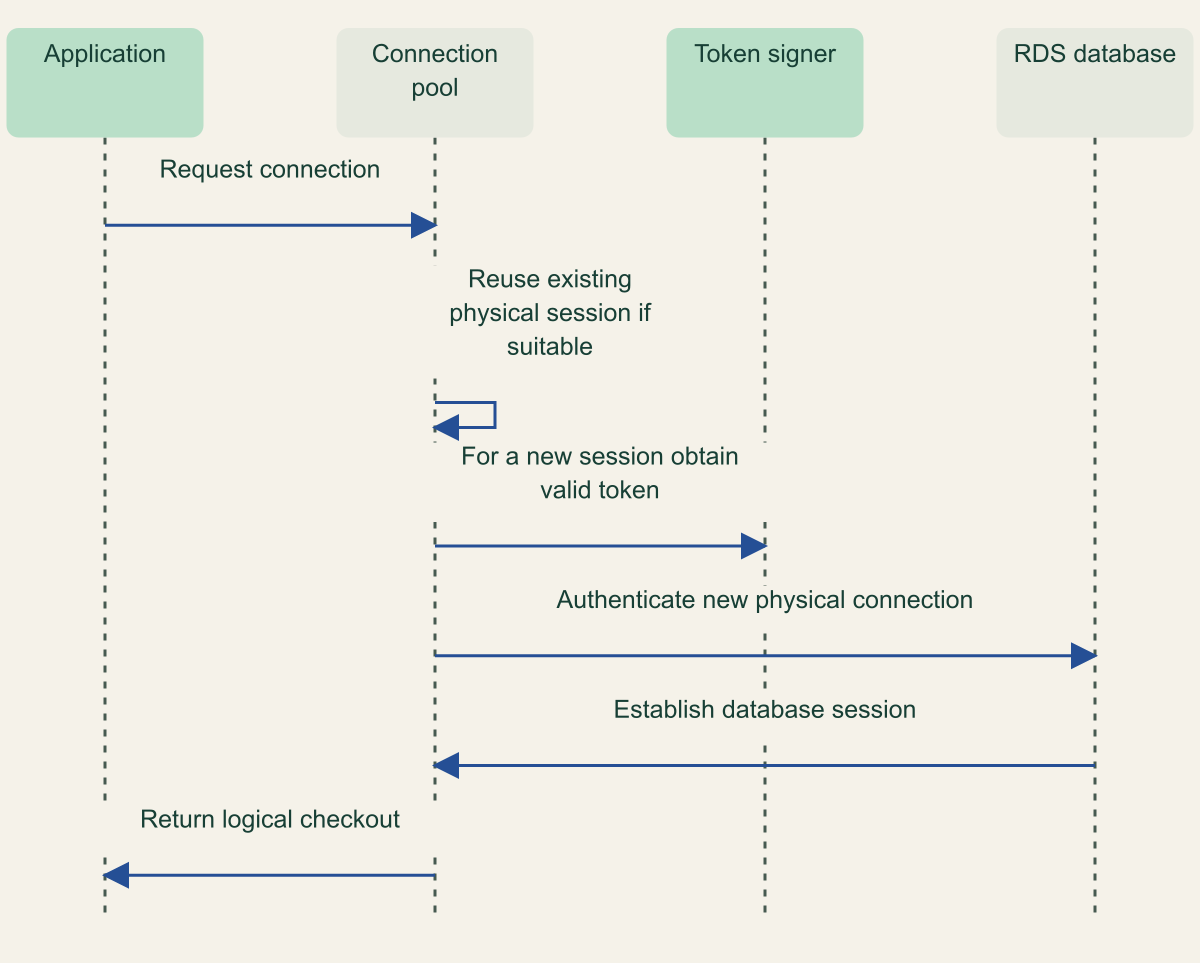
A logical pool checkout is not necessarily a new authentication attempt. The pool may return an existing physical connection, or it may create another connection because of load, recycling, failure or configuration. The application's token-generation mechanism needs to align with the latter event. A health check that repeatedly borrows an established session can remain successful while the next new connection would use an expired startup token.
Consider a hypothetical service that stores its generated token in a long-lived connection factory. Initial connections succeed and continue serving queries. Later, the pool needs another physical connection and reuses the expired token as its password value. The new authentication fails even though existing queries continue to work. This example describes a possible integration error, not a measured incident or a claim about every driver's default behavior.
Use the supported credential callback or connection-creation mechanism for the actual driver and pool. Verify when it runs, whether its result is cached and what happens when generation fails. This guide does not provide a universal pool configuration because libraries differ in how they construct and replace physical connections. The integration record should identify the driver version and the exact hook responsible for obtaining the token.
Temporary AWS credentials introduce an additional validity requirement. AWS states that temporary credentials used to generate an IAM database token must still be valid when that token is used to make the connection request. A token whose own fifteen-minute interval has not elapsed can therefore still fail if its underlying credential context is no longer valid. Record the application's credential source and refresh behavior separately from the database token. [1]
Do not use the token interval as a forced pool-recycling rule without an application requirement. An established session is not invalidated merely because the token used to create it expires. The pool's maximum lifetime and reuse policy should be chosen for its database and application behavior, while new authentication must use valid credentials. Conflating the two can cause unnecessary churn without proving better access control. [1]
Only a new physical connection needs fresh authentication
An existing physical database session can be reused without re-authentication; a new connection requires a valid token. Conceptual sequence, not a measured result.

Source. AWS, RDS IAM database authentication, Token lifetime, supported engine behavior, resource overhead and token-size constraints. [1]; AWS, Connect with RDS IAM authentication, Fresh tokens and connection behavior [4]; AWS, IAM policies for database access, rds-db connect grants tied to database resource and database-user identity. [2].
Method. Original conceptual sequence synthesizing the cited documentation. It represents design relationships, not observed test results. Reviewed 2026-09-02.
Accessible table and figure data
| From | To | Message |
|---|---|---|
| Application | Connection pool | Request connection |
| Connection pool | Connection pool | Reuse existing physical session if suitable |
| Connection pool | Token signer | For a new session obtain valid token |
| Connection pool | RDS database | Authenticate new physical connection |
| RDS database | Connection pool | Establish database session |
| Connection pool | Application | Return logical checkout |
| From | To | Message |
|---|---|---|
| Application | Connection pool | Request connection |
| Connection pool | Connection pool | Reuse existing physical session if suitable |
| Connection pool | Token signer | For a new session obtain valid token |
| Connection pool | RDS database | Authenticate new physical connection |
| RDS database | Connection pool | Establish database session |
| Connection pool | Application | Return logical checkout |
Grant one database user on the correct resource
RDS IAM authentication needs both AWS-side permission and a database user configured for the mechanism. The IAM action is rds-db:connect, with a resource ARN identifying the database resource and database username. AWS warns not to confuse the rds-db prefix with ordinary rds management API actions. Permission to describe or modify an RDS instance is not the same grant as permission to authenticate as a particular database user. [2]
The resource identifier in that ARN is also important. The policy guidance uses the database's resource ID rather than simply substituting a friendly instance name or endpoint hostname. Review the account, Region, resource ID and username together. A role that is correct for one database user or instance can still fail against another even when the network endpoint is reachable and the application has otherwise valid AWS credentials. [2]
Configure the database account using the supported engine-specific procedure. AWS documents the required authentication setup for MariaDB, MySQL and PostgreSQL. That setup does not grant every SQL privilege the application might request. The application should receive only its intended database permissions, with administrative account management separated from routine connection authority. Authentication answers who connected; database authorization still governs what the session may do. [5]
PostgreSQL has a particularly consequential behavior: adding the rds_iam role to a user makes IAM authentication take precedence over password authentication for that user. Plan migration and rollback around that documented behavior instead of assuming both methods remain interchangeable. A fallback that simply retries the same user with an old password may not provide the recovery path the operator expects. [1][5]
Endpoint and transport identity must remain explicit. The token is generated for the intended database connection parameters, and AWS documents that a custom Route 53 DNS record cannot replace the DB instance endpoint for token generation. Use the supported endpoint and TLS verification procedure for the actual client. A convenient alias that resolves to the right address does not establish that token generation and certificate validation use the required identity. [1][4]
Enable the feature only on a compatible instance and verify the actual Region and engine-version support. The enabling guide makes compatibility a prerequisite and describes the relevant instance configuration. This article does not generalize support to every RDS engine, edition or deployment model. Keep the direct IAM database scope distinct from proxy-specific behavior and from separate authentication mechanisms such as Kerberos. [3]
Name both authentication legs of the proxy
RDS Proxy introduces two connections whose authentication can differ: the application to the proxy, and the proxy to the database. Under standard proxy IAM, the client authenticates to the proxy using IAM while the proxy retrieves database credentials from Secrets Manager. Under end-to-end IAM, IAM authentication is used on both legs. Calling both arrangements IAM authentication without naming the second leg conceals an important credential-management decision. [6][9]
The current end-to-end setup guide describes configuring the proxy's default authentication scheme as IAM_AUTH and giving the proxy role rds-db:connect permissions for the database users it will use. That mode removes the need to register those database credentials as Secrets Manager secrets for the proxy's authentication path. It still requires the appropriate database-user configuration and supported engine/version combination. [9]
Read legacy wording in context. The proxy connection page includes a PostgreSQL paragraph saying the proxy always connects through Secrets Manager passwords, while the same page and dedicated setup guidance also describe end-to-end IAM. The defensible approach is to name the configured mode and use its specific setup contract. Do not repeat the always-password statement as a universal limitation of current RDS Proxy. [6][9]
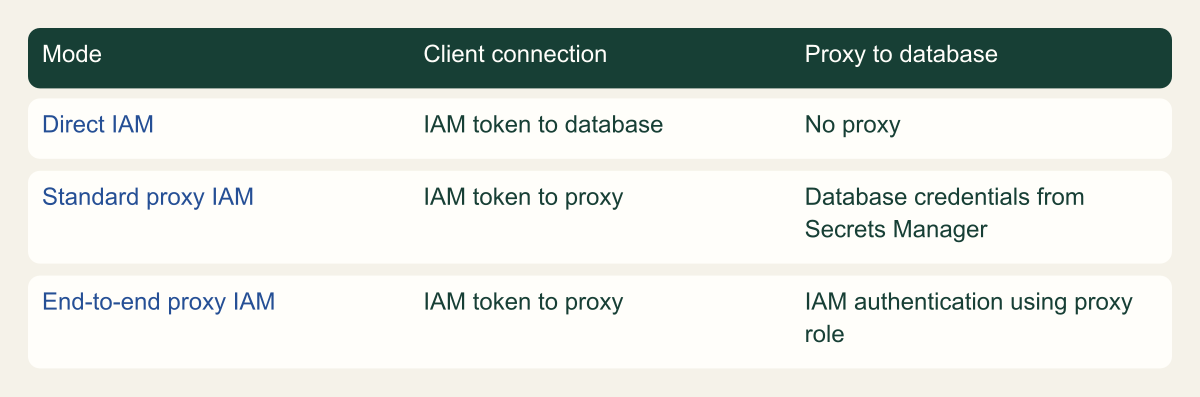
The matrix makes this distinction visible without ranking the modes. Direct IAM has no proxy leg. Standard proxy IAM combines client IAM with stored database credentials. End-to-end proxy IAM uses the proxy's IAM role for the database connection as well. Each has different dependencies and recovery questions. The choice should reflect supported functionality and the application's needs, not an assumption that the word end-to-end eliminates every credential or permission decision.
Proxy connections also use the proxy endpoint rather than the database endpoint for the client's connection. The RDS Proxy guide explains the corresponding differences in IAM usage. Verify the endpoint, policy resource and database username appropriate to that mode. Reusing direct-connection configuration without checking these fields can produce a failure that is incorrectly attributed to token expiry or the connection pool. [6]
A migration record should identify the intended authentication mode for each application, not only a global proxy setting. Mixed clients, old connection strings or a partial database-user change can create confusing behavior. Use controlled tests to establish which route a client actually takes and which identity authenticates each leg. No live proxy or database was configured or tested while preparing this guide.
Name the credential on each proxy connection leg
Standard proxy IAM uses database passwords on the second leg, while end-to-end IAM uses IAM authentication on both legs. Conceptual matrix, not a measured result.

Source. AWS, RDS IAM database authentication, Token lifetime, supported engine behavior, resource overhead and token-size constraints. [1]; AWS, Connecting through RDS Proxy, Client and database authentication legs [6]; AWS, Configure end-to-end IAM authentication for RDS Proxy, IAM_AUTH default scheme and proxy rds-db connect role [9].
Method. Original conceptual matrix synthesizing the cited documentation. It represents design relationships, not observed test results. Reviewed 2026-09-02.
Accessible table and figure data
| Mode | Client connection | Proxy to database |
|---|---|---|
| Direct IAM | IAM token to database | No proxy |
| Standard proxy IAM | IAM token to proxy | Database credentials from Secrets Manager |
| End-to-end proxy IAM | IAM token to proxy | IAM authentication using proxy role |
| Mode | Client connection | Proxy to database |
|---|---|---|
| Direct IAM | IAM token to database | No proxy |
| Standard proxy IAM | IAM token to proxy | Database credentials from Secrets Manager |
| End-to-end proxy IAM | IAM token to proxy | IAM authentication using proxy role |
Budget for authentication and connection reuse
IAM database authentication consumes database resources. AWS documents an additional memory requirement in the range of 300 to 1000 MiB and recommends comparing RDS process RES values in Enhanced Monitoring before and after enabling the feature. Treat that range as published planning guidance, not a measured overhead distribution for your workload or a fixed service reservation. The actual deployment needs its own capacity evidence. [1]
The guide deliberately does not turn the memory range into a throughput chart. It also does not repeat an older numerical recommendation for new connections per second without current supporting documentation. Authentication load, pool behavior and instance capacity interact, but the cited memory bounds do not determine a universal safe connection rate. Observe the relevant system under an authorized test and use the actual instance and driver configuration.
Token length is another practical constraint. AWS says IAM database authentication tokens are generally at least about one kilobyte and can be larger depending on credential and policy context. A driver, configuration field or intermediate tool must not truncate the token. Do not use the approximate minimum as a safe fixed buffer size. Verify the full value can reach the authentication interface without writing it into ordinary diagnostic logs. [1]
For RDS Proxy, session pinning can limit connection sharing. AWS describes a pinned client connection as tied to a particular underlying database connection until the session ends, preventing other clients from sharing it during that period. SQL and session-state behavior determine when pinning occurs under the supported engine. A proxy does not guarantee that every application will achieve the same degree of connection reuse. [7]
Inspect the actual session behavior before blaming IAM for a capacity change. A client that creates many new connections, retains session state or triggers pinning can behave differently from a client that reuses suitable connections efficiently. These observations need separate evidence: authentication outcomes, connection creation, pool waits and proxy session behavior. One rising counter cannot establish the full cause of an application slowdown.
Failure recovery can increase connection creation at an inconvenient moment. A database or network disruption may cause a pool to replace several physical sessions, requiring fresh authentication and current AWS credentials. The acceptance plan should include this reconnect path, not only ordinary steady-state borrowing. Keep retries and connection creation bounded according to the application's design so a recovery attempt does not become uncontrolled pressure on the same dependency.
Use the authentication telemetry that now exists
Current RDS documentation provides more specific authentication evidence than a broad reading of the overview might suggest. The troubleshooting guide documents IAM database authentication error logs on the database host, optional export to CloudWatch Logs and named success and failure metrics. The enabling guide also describes configuring IAM authentication log export. These are useful supported surfaces for diagnosing failed connections. [3][8]
The overview states that CloudWatch and CloudTrail do not track generate-db-auth-token calls as authentication events. That should not be generalized into no IAM database authentication telemetry. Token generation, a database authentication attempt and a SQL operation are different events. Use the specific logging and metrics guidance for connection failures, while keeping the absence of a token-generation audit event distinct. [1][8]
AWS documents metrics and error categories for conditions including invalid tokens, insufficient permissions and throttling. Those categories can help distinguish token formatting or age problems from an incorrect policy or excessive authentication pressure. Use the documented field and metric names for the engine and feature version in operation; do not infer that a generic connection failure always means the token expired. [8]
Application pool evidence supplies another part of the story. Identify whether the failed operation was a logical checkout, an attempt to create a new physical connection or a query on an existing session. A pool timeout can occur without a new authentication attempt, while a failed reconnect can be hidden until the pool needs additional capacity. The instrumentation should make that distinction without retaining passwords, generated tokens or full credential-bearing connection strings.
Consider a hypothetical failure after a credential refresh change. New database connections fail while old sessions still execute queries. That pattern is consistent with an authentication-path problem, but it does not by itself identify the cause. Correlate the current role and database user, token generation result, token transport and database error category. The purpose of the evidence is to narrow the cause rather than assign one from a familiar symptom.
Protect authentication logs according to their actual contents and operational purpose. Even without secret values, database usernames, resource identifiers and error patterns can reveal sensitive relationships. Retain the evidence needed to investigate and demonstrate adoption, and make broad dashboards less detailed where appropriate. Observability should clarify the boundary, not create an unnecessary parallel store of authentication material.
Test reconnects and denial after the happy path
Accept the migration only after the real connection factory creates new physical sessions with valid tokens. Include a later reconnect after the initially generated token would no longer be valid, and verify that an already-established session is understood separately. These are proposed tests for an authorized environment, not claims of runtime behavior observed during this research. Record the actual engine, driver, pool and endpoint used.
Exercise wrong-user and wrong-resource cases as well as expiry. A valid token-generation operation under the wrong role can still fail database authorization. Verify the rds-db:connect target, database-user setup and SQL privileges with safe allowed and denied operations. The policy should be narrow enough that a successful connection to one intended user does not imply access as every database account. [2][5]
Test credential refresh and recovery dependencies. An application that can reconnect only while its original AWS credentials remain valid has not completed the migration contract. A recovery deployment may use another role or an older connection path. Check that intended path explicitly rather than treating a healthy primary deployment as proof that failover and restoration will authenticate correctly.
Keep cryptographic data protection separate from connection authentication. An encrypted database or a correctly governed KMS key does not establish that the application opened the intended session under the intended database user. Likewise, IAM authentication does not determine every storage or backup encryption decision. The acceptance record should identify these as complementary controls with different evidence.
The final result should identify where tokens are generated, which physical connections use them, how each proxy leg authenticates and which evidence explains failure. That is a useful operating contract for both routine pool behavior and recovery. It avoids the common mistake of applying a short token timer to the wrong object while leaving the actual connection-creation path unexamined.
Method and provenance
Primary documentation and standards were reviewed on September 2, 2026. The guide combines source-supported behavior with explicitly framed implementation recommendations and hypothetical examples.
No customer deployment, production environment or live cloud configuration was tested. Product behavior is limited to the cited documentation and stated scope; actual versions, policies and application behavior require verification.
AI assistance. AI-assisted research synthesis, drafting and consistency checks. No human review or firsthand deployment experience is claimed.
Published under the Cloud Security Desk organizational byline. Read the practitioner guide policy.
References
- RDS IAM database authentication AWS. Accessed .
- IAM policies for database access AWS. Accessed .
- Enable RDS IAM authentication AWS. Accessed .
- Connect with RDS IAM authentication AWS. Accessed .
- Create a database account for IAM authentication AWS. Accessed .
- Connecting through RDS Proxy AWS. Accessed .
- Avoiding RDS Proxy pinning AWS. Accessed .
- Monitoring RDS IAM authentication AWS. Accessed .
- Configure end-to-end IAM authentication for RDS Proxy AWS. Accessed .