
Diagnose Azure OpenAI 429 responses using deployment scope, request and token limits, current quota tiers and response headers. Apply bounded retries and queues, then verify whether the workload needs a different capacity decision.
At a glance
Key findings
- Separate deployment quota, short request bursts and bounded client retry behavior.
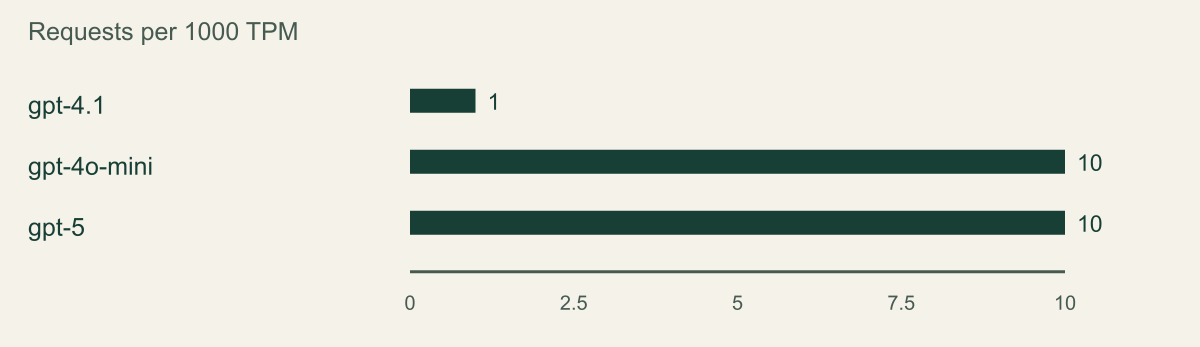
- A documented Tier 1 Global Standard quota comparison normalized to requests per 1000 TPM. It is not a model-performance or quality ranking.
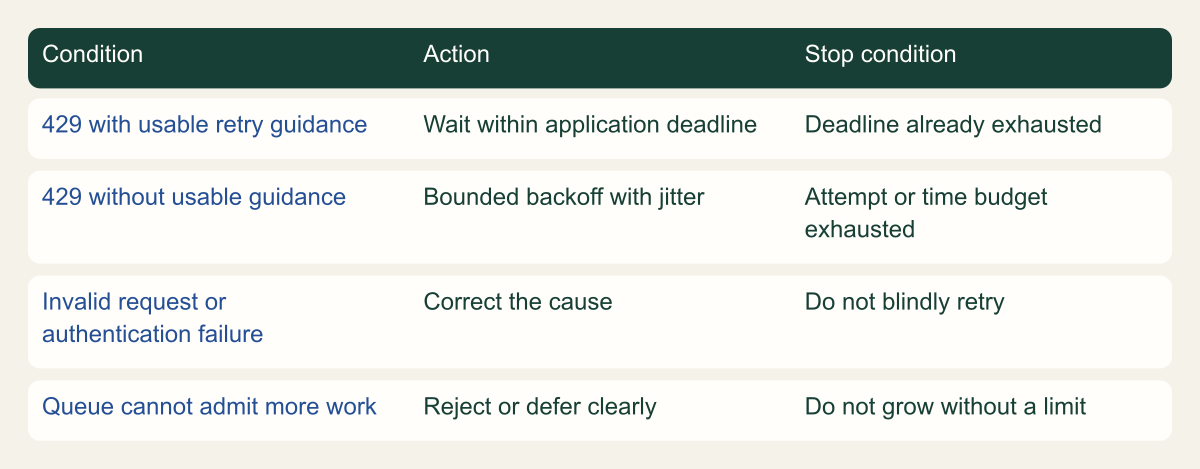
- Conceptual client flow separates service-guided waiting, bounded fallback and failures that need correction.
Start with the deployment that returned 429
When Azure OpenAI returns HTTP 429, first identify the resource, deployment, model version and request that produced it. Read the available rate-limit and retry headers, then slow or queue the work before retrying. Do not immediately move the application to another region or increase its retry count. The problem may be a short request burst, a token estimate, a shared quota pool or a workload that exceeds the selected deployment's capacity. [1] [2]
This guide focuses on a small application using a standard Azure OpenAI deployment. Provisioned throughput, batch processing and newer Foundry access experiences have different operating models. Record the deployment type instead of assuming all model endpoints use the same admission rules. The service name alone does not identify the quota or processing arrangement. [8]
Keep a sanitized failure record with the time, deployment, HTTP status, request identifier when available, relevant headers and the application's attempt count. Do not record the full prompt or generated answer just to investigate throttling. The useful question is how work arrived at the endpoint and what the service said about that request.
A hypothetical document helper may work for one user but fail when a scheduled job submits many documents simultaneously. The fix might be a bounded queue rather than a larger model allocation. Start with the shape of the workload so that the eventual change addresses the source of the burst instead of merely postponing the next failure.
Separate the quota pool from deployment admission
Quota describes an allocation available to the subscription and applicable model or deployment scope. Deployment admission determines whether a particular request is accepted at a particular moment. Microsoft's quota-management guide explains TPM allocation and the associated request rate. Its performance guidance also distinguishes admitted quota from the throughput an application actually achieves. A quota number is not a promise that every workload can sustain that rate. [1] [5]
Current quota documentation describes a transition beginning after May 7, 2026, with subscription-level pooling introduced for specified models and expanding further. It distinguishes Global Standard pools from Data Zone Standard pools. Because rollout and model support matter, inspect the current quota page and the actual subscription's allocation instead of assuming that a second region provides an independent pool. [2]
Record the effective pool and deployment allocation in the runbook. Include the model version and deployment type, because a similarly named deployment can operate under different limits. If the portal and an older guide disagree, preserve the discrepancy and use the current service documentation and resource read-back to resolve it. Do not build an automatic regional failover policy on an unverified quota assumption.
Quota changes also have an ownership question. A second team may use another deployment drawing from the same relevant allocation. Before reducing one deployment's allocation to help another, identify the affected consumers. A successful configuration change can still create a new outage if it quietly takes capacity away from an application that was not included in the review.
Check the request and token dimensions
Standard deployment limits include both requests and tokens. Microsoft's guidance explains that token admission uses an estimate made when the request arrives, rather than the final billable token count. It also evaluates request arrival over short intervals, so a burst can be throttled even when a one-minute average looks acceptable. Use the response details and current allocation to determine which dimension is under pressure. [1]
This distinction explains a common confusing result: the application counts the tokens returned in completed answers and concludes that it should be below the limit. That count may omit rejected requests, prompt size or the requested generation allowance relevant to admission. Keep the application's usage accounting, the service's admission estimate and the final billing record conceptually separate.
Review the output limit accepted by the exact model and API you use. Set it to a value that serves the application, with enough room for a complete useful response. Do not copy a large legacy parameter from an unrelated model example. Parameter names and model behavior vary, and reducing an output bound is only helpful if it preserves the intended result.
Also inspect request fan-out. One user action may create a summary call, a classification call and several retries. If the application reports only user actions, its apparent request rate can understate endpoint traffic. The useful control point is where actual inference requests are scheduled. Count attempts and logical jobs separately so that retries do not disappear inside a misleading success metric.
Read current quota numbers in their exact scope
The chart uses documented Tier 1 Global Standard quota entries to illustrate that request-to-token ratios can differ across models. It normalizes the published RPM and TPM values to requests per 1,000 TPM. This is arithmetic applied to a dated configuration table, not a throughput benchmark, quality ranking or recommendation to choose a model. The underlying values and calculation are included with the figure. [2]
A model with a larger request-to-token ratio is not necessarily faster, cheaper or more suitable for the application. Its useful output, context requirements and latency can differ. The chart answers a narrower question: why a deployment change can alter the request-rate constraint even when a developer focuses on token allocation alone.
Check the subscription's current tier and any approved exceptions before using a documentation example for planning. Microsoft's current reference describes multiple quota tiers and automatic changes tied to usage. A table copied into a runbook should have a review date and a link to the original reference. It should not become a permanent hardcoded assumption about what every customer receives. [2]
If the exact model is absent from the example, do not interpolate from a nearby name. Read the corresponding current entry or resource configuration. A small operational guide is more useful when it tells the reader which facts must come from their deployment than when it offers a universal number that is wrong for part of the audience.
Read header units explicitly. A millisecond retry value and a second-based value are not interchangeable. Parse the documented format for the header actually returned by the selected API, and cap the wait according to the application's deadline. If a malformed or missing header prevents safe interpretation, use the defined fallback policy rather than treating the value as zero and retrying immediately.
Keep reset guidance scoped to the response that supplied it. Concurrent callers can consume remaining allowance while another request is waiting, so a remaining-token value is not a reservation for the next job. Use it as an observation alongside the local scheduler. This is another reason to coordinate requests at the application level instead of giving every worker an independent optimistic view of shared capacity.
A support record should include whether the response came directly from Azure OpenAI or from an application gateway in front of it. A gateway can impose its own rate policy and return the same HTTP status. Inspect the service-specific headers and sanitized error body before changing Azure quota. Otherwise the team may increase a provider allocation while the actual bottleneck remains in its own API layer.
Token allocation does not imply one request ratio
A documented Tier 1 Global Standard quota comparison normalized to requests per 1000 TPM. It is not a model-performance or quality ranking.

Source. Microsoft documentation: Azure OpenAI in Microsoft Foundry Models Quotas and Limits - Microsoft Foundry [2].
Method. Each plotted value equals published RPM divided by published TPM and multiplied by 1000. Source is the current Tier 1 Global Standard table reviewed 2026-09-12, last updated 2026-08-20. Actual subscription tiers, exceptions, versions and rollout can differ.
Accessible table and figure data
| Tier 1 Global Standard model | Published RPM | Published TPM | Requests per 1000 TPM |
|---|---|---|---|
| gpt-4.1 | 1000 | 1000000 | 1 |
| gpt-4o-mini | 20000 | 2000000 | 10 |
| gpt-5 | 10000 | 1000000 | 10 |
| Tier 1 Global Standard model | Published RPM | Published TPM | Requests per 1000 TPM |
|---|---|---|---|
| gpt-4.1 | 1000 | 1000000 | 1 |
| gpt-4o-mini | 20000 | 2000000 | 10 |
| gpt-5 | 10000 | 1000000 | 10 |
Make retries finite and spaced
Use the service's retry guidance when present, including the documented millisecond retry header for throttled requests. If suitable guidance is unavailable, apply a bounded backoff policy with jitter. Put a limit on attempts and total elapsed time. The Azure Retry pattern emphasizes selecting retry behavior for transient failures and considering the operation's context, rather than retrying every error indiscriminately. [1] [6]
Choose one layer to own retries. The SDK, application wrapper, job runner and API gateway may each have their own policy. If all retry independently, a single logical request can create many service calls. Inspect the installed SDK's configured retry behavior before adding another loop. The runbook should state which layer retries and how the other layers report or defer the failure.
A user-facing request needs a response deadline. When that deadline is reached, return an honest temporary-unavailability result or move the work into an explicitly supported asynchronous workflow. Do not keep the connection open indefinitely while silently spending more attempts. A background job can often wait longer, but it still needs a limit, cancellation behavior and a way to resume without duplicating completed work.
Treat authentication errors, invalid input and unsupported model parameters separately from 429. Repeating an invalid request does not make it valid. If the client receives a response whose cause is unclear, retain the sanitized error and stop according to the defined policy. A generic catch-all retry can hide the original problem while making the service busier.
For each logical job:
  reject or defer if the bounded queue cannot admit it
  attempt the approved inference operation
  if successful, complete the job once
  if 429, inspect service retry guidance and remaining deadline
  wait within the deadline using bounded backoff and jitter
  stop when attempt count or elapsed-time budget is exhausted
send non-transient failures for correction, not blind retryGive each request a bounded next step
Conceptual client flow separates service-guided waiting, bounded fallback and failures that need correction.

Source. Microsoft documentation: Manage Azure OpenAI in Microsoft Foundry Models quota - Microsoft Foundry [1]; Retry pattern - Azure Architecture Center [6].
Method. Original conceptual synthesis of the cited Microsoft documentation. No deployment measurements or risk scores. Reviewed 2026-09-12.
Accessible table and figure data
| Condition | Action | Stop condition |
|---|---|---|
| 429 with usable retry guidance | Wait within application deadline | Deadline already exhausted |
| 429 without usable guidance | Bounded backoff with jitter | Attempt or time budget exhausted |
| Invalid request or authentication failure | Correct the cause | Do not blindly retry |
| Queue cannot admit more work | Reject or defer clearly | Do not grow without a limit |
| Condition | Action | Stop condition |
|---|---|---|
| 429 with usable retry guidance | Wait within application deadline | Deadline already exhausted |
| 429 without usable guidance | Bounded backoff with jitter | Attempt or time budget exhausted |
| Invalid request or authentication failure | Correct the cause | Do not blindly retry |
| Queue cannot admit more work | Reject or defer clearly | Do not grow without a limit |
Control the work before it reaches Azure
Put a bounded queue or concurrency limit in front of the inference calls. Choose its size from the workload, acceptable waiting time and the application's capacity to hold pending work. Define a maximum queue depth and an explicit response when new work cannot be accepted. Otherwise, throttling at the provider simply becomes unbounded memory use or latency inside the application.
Separate interactive work from large scheduled jobs when their service expectations differ. A hypothetical overnight summarization job should not consume every available request slot while an operator waits for a small response. The application can reserve or prioritize work according to its own requirements, but those choices need an owner and a clear policy rather than an accidental order of arrival.
Dynamic quota can allow a standard deployment to use extra capacity when it is available, and those additional requests are still billed. It is opportunistic capacity rather than a guarantee or a spending ceiling. Check whether it is applicable and enabled for the deployment before using observed excess throughput as a planning assumption. [3]
Do not treat quota as the application's complete cost control. Current quota behavior can change, and a throughput allowance does not express how much money the organization intends to spend over a month. Keep budget monitoring, job admission and per-request limits as separate decisions. Increasing quota should be reviewed together with the work the application will now be able to submit.
Observe throttling without recording prompts
Use Azure Monitor's relevant request and token metrics, filtered to the deployment and dimensions that the current metric supports. Microsoft's monitoring reference identifies available metrics and dimensions. Choose the appropriate aggregation and interval for the question. A total count over a long period can hide the short bursts that caused users to see errors. [4] [7]
Compare accepted requests, throttled responses, attempt counts and queue behavior over the same period. If the application's queue grows while throttling remains high, an aggressive retry loop may be keeping pressure on the endpoint. If only one deployment is affected, a subscription-wide aggregate can obscure that fact. Label each observation with its scope.
For response timing, use Azure OpenAI-specific latency metrics rather than a legacy generic latency metric. Microsoft's current guidance distinguishes time to response, time to last byte and token timing. A streaming application and a nonstreaming application can care about different points in the response lifecycle. The metric should reflect the user experience being investigated. [5] [7]
Application telemetry can remain useful without retaining content. Record deployment identifiers, status categories, bounded request sizes, elapsed time and retry decisions where appropriate. Avoid placing raw prompts, responses or credentials in exception logs. The team needs enough evidence to explain admission and retry behavior, not a second repository of everything users submitted.
Decide whether more quota solves the problem
Ask what would change if the deployment could admit more work. If the problem is a sharp burst from an unbounded batch, more quota may only increase the size of the next burst. If the application has a steady, justified workload that exceeds the current allocation, additional quota or a different supported deployment arrangement may be appropriate. The choice should follow the observed constraint.
Review the request's useful work before changing the model. Repeatedly sending the same unnecessary context or asking for an excessive response can consume capacity without helping the reader. Reduce waste where the task permits, but do not truncate required information merely to make a dashboard look better. Validate output quality and completeness after any request-shape change.
If more quota is needed, use the current request process and retain the approved scope. A request is not an approval, and an approval is not proof that the application now performs acceptably. Read back the allocation, run a controlled workload and observe both rate behavior and end-to-end response quality. The practical outcome is a service that meets its stated workload, not simply a larger number in the portal.
Changing regions or deployment types also raises data-processing and operational questions. Use the deployment-type documentation to understand the relevant processing scope and model availability. Do not move sensitive application traffic solely to escape a rate limit without reviewing those requirements. Capacity planning should preserve the application's existing data-handling commitments. [8]
Test a controlled release and leave a usable runbook
Test the policy with a small authorized workload and clear stop conditions. Verify that the client respects service retry guidance, limits attempts and surfaces a final failure when its deadline is exhausted. You can test retry scheduling with simulated responses before using a live endpoint. Such a local simulation validates client behavior, not Azure capacity.
For a live check, record the exact deployment and current allocation, then observe a representative bounded workload. Do not deliberately overwhelm a production endpoint shared with other teams. The purpose is to verify the application's response to the conditions it encounters, not to discover an undocumented maximum by force.
The runbook should identify the retry owner, queue limit, user deadline, deployment scope, relevant metrics and the process for requesting more quota. Include the sanitized fields needed for a support case and the conditions under which operators should pause a batch job. These details make the next 429 a diagnosable event instead of an invitation to add another retry loop.
A useful result is a small application that slows down predictably, preserves accepted work and tells users when it cannot complete a request. Azure quota provides part of that behavior, while the application controls admission, retries and deadlines around it. Keep those responsibilities visible as model versions, quota tiers and deployment arrangements change.
Method and provenance
Microsoft primary documentation was reviewed on September 12, 2026. The guide combines documented service behavior with original implementation guidance, conceptual figures and clearly identified hypothetical examples.
No Azure tenant, production application or customer deployment was executed or measured. Commands were checked against the cited references and locally parsed where applicable; the reader must verify permissions, service support and outcomes in the intended environment.
AI assistance. AI-assisted source research, drafting, original visual planning and consistency review. No firsthand deployment experience or human review is claimed.
Published under the Cloud Security Desk organizational byline. Read the practitioner guide policy.
References
- Manage Azure OpenAI in Microsoft Foundry Models quota - Microsoft Foundry Microsoft. Accessed .
- Azure OpenAI in Microsoft Foundry Models Quotas and Limits - Microsoft Foundry Microsoft. Accessed .
- Azure OpenAI in Microsoft Foundry Models performance & latency - Microsoft Foundry Microsoft. Accessed .
- Retry pattern - Azure Architecture Center Microsoft. Accessed .
- Monitoring data reference for Azure OpenAI - Microsoft Foundry Microsoft. Accessed .
- Understanding deployment types in Microsoft Foundry Models - Microsoft Foundry Microsoft. Accessed .