
A comparison of the managed prompt attack filters in Amazon Bedrock Guardrails, Azure AI Content Safety with Microsoft Foundry, and Google Cloud Model Armor, based on vendor documentation reviewed in October 2026. It gives a scope and limits matrix, a placement sequence, configuration fragments and placement tests to run before trusting any filter.
At a glance
Key findings
- Bedrock's prompt attack filter requires input tags on InvokeModel calls, and a guardrail on Converse does not evaluate tool results, tool definitions or model-generated tool arguments. [1][3]
- Azure Prompt Shields separates user prompt attacks from document attacks, and Foundry agents can scan tool responses only for a listed set of tools. [8][11]
- Model Armor screens each request as a single turn, does not decode Base64 or similar encodings, and returns EXECUTION_SKIPPED past 65,536 tokens. [15][16]
- Bedrock's InvokeGuardrailChecks API is detect-only and can be called after a tool returns, so the application owns both the threshold and the action. [5]
- The reviewed documentation publishes no accuracy figures comparable across vendors, and a 2025 study evaded six detectors including Azure Prompt Shield. [22]
What the three filters actually do
All three services are classifiers that score text for instructions meant to override a model's intended behavior, and all three judge only the text your application routes to them. Amazon Bedrock Guardrails runs a prompt attack filter inside a guardrail attached to model calls, or as a standalone check. Azure Prompt Shields, part of Azure AI Content Safety and of the guardrails system in Microsoft Foundry, separates attacks typed by the user from attacks hidden in documents. Google Cloud Model Armor screens prompts and responses through templates, either through its own API or inline in Gemini Enterprise Agent Platform, the name Google now uses for what was Vertex AI. [1][8][14][15]
The useful differences are placement and scope. Bedrock's filter scores only content you mark as user input and, by AWS's own documentation, does not evaluate tool results or tool definitions. Prompt Shields is the only one of the three with a separately named detector for third-party documents, and in Foundry agents it can scan tool responses, but only for a listed set of tools. Model Armor treats each request as a single turn, does not decode Base64 or other encodings, and screens tool calls and responses for Google and Google Cloud MCP servers. [1][3][11][15][18]
What they miss follows from that design. None of them sees content you do not send, none tracks conversation state the way the model does, and researchers have shown that this class of detector can be evaded with character manipulation and adversarial rewriting. Treat any of them as a tripwire that removes easy attacks and produces evidence, then contain the rest with architecture. The documentation reviewed here publishes no accuracy figures that could be compared across vendors, so this guide compares documented scope, modes, placement and limits as reviewed on October 7, 2026. [21][22]
Where a filter can sit in the request path
Each service offers two placements. Inline, the platform calls the classifier as part of the model invocation: a guardrail attached to Converse or InvokeModel in Bedrock, a guardrail assigned to a model deployment or agent in Foundry, or a template or floor setting applied to generateContent calls in Agent Platform. Standalone, your code calls a screening API and acts on the verdict itself: ApplyGuardrail or the newer InvokeGuardrailChecks in Bedrock, text:shieldPrompt in Azure AI Content Safety, and sanitizeUserPrompt or sanitizeModelResponse in Model Armor. [3][5][10][13][17][19]
Inline placement is easier to enforce and harder for one team to forget. Bedrock can apply a guardrail to every model invocation in an account or across AWS Organizations units, and Model Armor floor settings apply a baseline to every generateContent call in a project even when the request names no template. The price is that an inline filter sees the request in the shape the model sees it, so your application must mark which parts are untrusted. Standalone calls let you screen content at the moment it enters your system, such as a retrieved page before it joins the context, which is where indirect injection arrives. [7][17]
Placement also fixes failure behavior. Google documents that Agent Platform skips Model Armor sanitization and continues processing when Model Armor is unavailable in the region, temporarily unreachable or returns an error. A standalone call lets you fail closed instead. Make that choice deliberately and write it down before production traffic depends on it. [17]
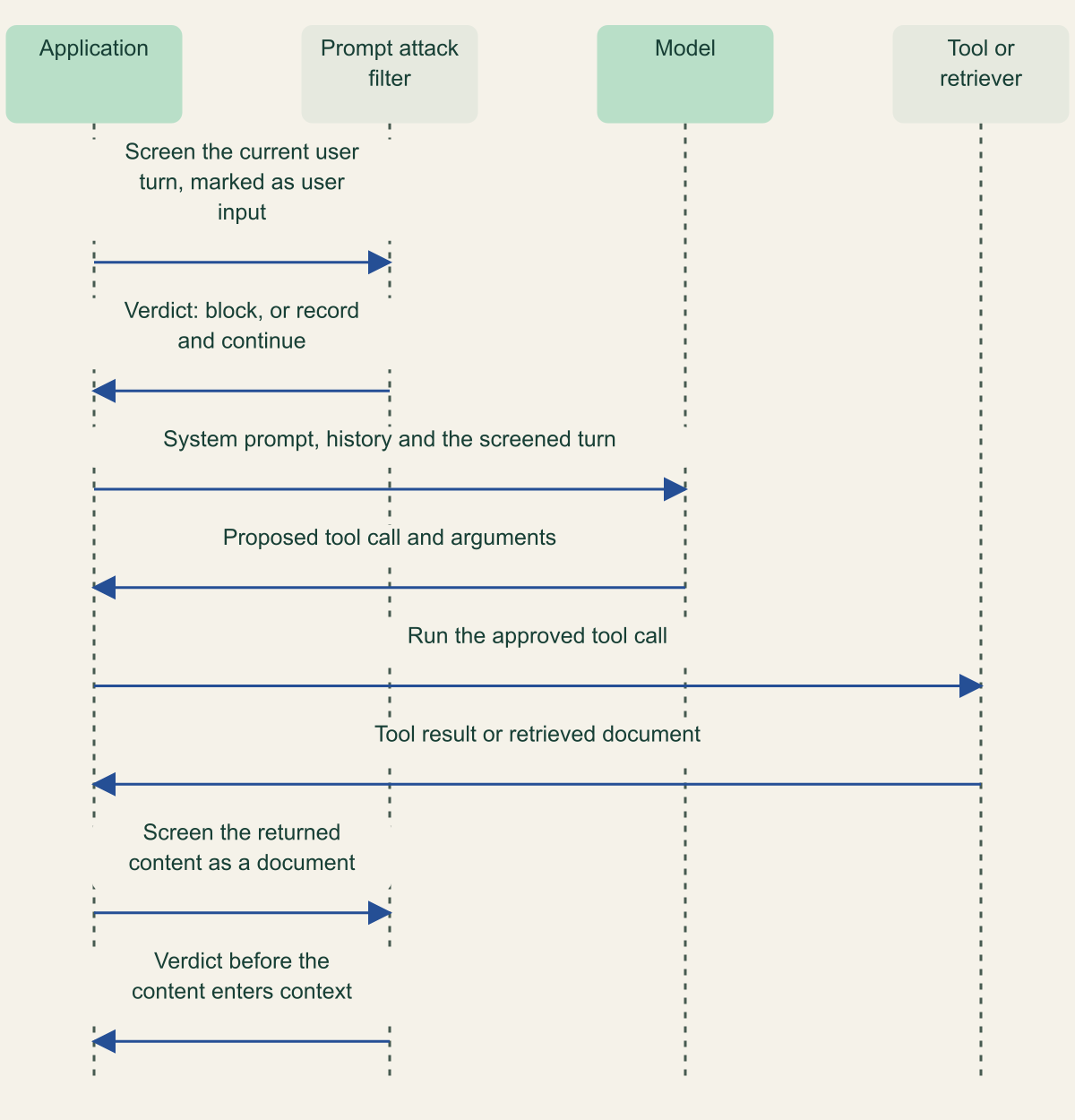
Two moments to screen: the user turn and third-party content
Inline filters see the user turn; content returned by tools usually needs a separate check. [3][11][18]

Source. Conceptual sequence based on Bedrock Converse guardrail evaluation rules, Foundry intervention points and Model Armor MCP integration documentation. [3][11][18]
Method. Conceptual and vendor-neutral. Steps 1 and 2 correspond to inline user input screening; steps 7 and 8 correspond to Foundry tool response scanning, Model Armor MCP sanitization or a standalone API call, depending on platform.
Accessible table and figure data
| Step | From | To | Message |
|---|---|---|---|
| 1 | Application | Prompt attack filter | Screen the current user turn, marked as user input |
| 2 | Prompt attack filter | Application | Verdict: block, or record and continue |
| 3 | Application | Model | System prompt, history and the screened turn |
| 4 | Model | Application | Proposed tool call and arguments |
| 5 | Application | Tool or retriever | Run the approved tool call |
| 6 | Tool or retriever | Application | Tool result or retrieved document |
| 7 | Application | Prompt attack filter | Screen the returned content as a document |
| 8 | Prompt attack filter | Application | Verdict before the content enters context |
| Step | From | To | Message |
|---|---|---|---|
| 1 | Application | Prompt attack filter | Screen the current user turn, marked as user input |
| 2 | Prompt attack filter | Application | Verdict: block, or record and continue |
| 3 | Application | Model | System prompt, history and the screened turn |
| 4 | Model | Application | Proposed tool call and arguments |
| 5 | Application | Tool or retriever | Run the approved tool call |
| 6 | Tool or retriever | Application | Tool result or retrieved document |
| 7 | Application | Prompt attack filter | Screen the returned content as a document |
| 8 | Prompt attack filter | Application | Verdict before the content enters context |
Amazon Bedrock Guardrails
The prompt attack filter is a content filter of type PROMPT_ATTACK in a guardrail's contentPolicyConfig. AWS defines three categories: jailbreaks that try to bypass the model's safety training, prompt injection that tries to override developer instructions, and prompt leakage that tries to extract the system prompt or configuration. Prompt leakage detection exists only on the Standard safeguard tier. You set an inputStrength of NONE, LOW, MEDIUM or HIGH, and an inputAction of BLOCK, or NONE to record the detection in the trace without acting, which the console calls Detect. [1]
The tier decides language coverage. Classic supports English, French and Spanish. Standard adds wider language support, prompt leakage detection and better handling of prompts that contain code, and guardrails on Standard use cross-Region inference, which routes guardrail processing to the Regions in a guardrail profile. If data residency rules constrain that routing, review the profile before you choose Standard. [4][1]
Input tagging is the part most likely to be misconfigured. A prompt attack can read much like a legitimate system instruction, so AWS asks you to mark the user's text and keep your own system prompt out of scoring. With InvokeModel and InvokeModelWithResponseStream, you wrap user input in <amazon-bedrock-guardrails-guardContent_xyz> tags and pass the suffix in amazon-bedrock-guardrailConfig as tagSuffix. The prompt attack filter depends on those tags: AWS states that without them, prompt attacks are not filtered for those calls. Generate a new random alphanumeric suffix of 1 to 20 characters for each request, because a static suffix lets an attacker close the tag and append text outside it. [1][2]
With Converse, the equivalent is a guardContent block. Once any message contains one, the guardrail evaluates only guardContent blocks, and it evaluates a system prompt only when the system prompt is itself wrapped in guardContent. AWS also lists what a guardrail on Converse never evaluates in a tool-using conversation: tool results in toolResult, tool definitions in toolSpec, and the tool call arguments the model generates in toolUse.input. For agent builders, that list is the most important limit in this guide. [3]
Content that arrives from somewhere other than the user needs a standalone call. ApplyGuardrail evaluates any text against a stored guardrail, without invoking a model, with source set to INPUT or OUTPUT [23]. InvokeGuardrailChecks, a newer API, needs no stored guardrail: you name checks inline, including promptAttack with the categories JAILBREAK, PROMPT_INJECTION and PROMPT_LEAKAGE, and it returns a score between 0 and 1 for each. It is detect-only, so your code applies the threshold, and AWS describes calling it before a tool runs or after a tool returns. Its message roles are system, user and assistant, with no separate tool role, and it was listed in seven Regions at review. [5][6]
Organization and account enforcement add a governance setting. When a guardrail is enforced centrally, administrators choose whether to honor callers' tags for system prompts and messages: selective evaluates only tagged content, while comprehensive, the default, evaluates everything regardless of tags. The enforcement page does not say how comprehensive mode interacts with the prompt attack filter's tag requirement or with scoring a system prompt, so check that combination in detect mode before relying on it. [7]
{
  "system": [
    {
      "text": "You answer questions about invoices for example-bucket customers only."
    }
  ],
  "messages": [
    {
      "role": "user",
      "content": [
        {
          "text": "Which invoices are overdue?"
        }
      ]
    },
    {
      "role": "assistant",
      "content": [
        {
          "text": "Two invoices are overdue."
        }
      ]
    },
    {
      "role": "user",
      "content": [
        {
          "guardContent": {
            "text": {
              "text": "Summarize the newest one for me."
            }
          }
        }
      ]
    }
  ],
  "guardrailConfig": {
    "guardrailIdentifier": "example-guardrail-id",
    "guardrailVersion": "1",
    "trace": "enabled"
  }
}
Azure Prompt Shields
Prompt Shields has two detectors. The user prompt shield, formerly called jailbreak risk detection, looks for attempts to change system rules, embedded conversation mockups, role-play personas and encoding attacks. The document shield looks for instructions planted in third-party content such as emails, documents and web pages, with classes for manipulated content, access to system infrastructure, information gathering, availability, fraud and malware, plus the four user prompt classes. The documentation exposes no sensitivity threshold for either: the standalone API returns a Boolean attackDetected, Foundry annotations return detected and filtered, and Foundry describes its severity thresholds for the hate, sexual, self-harm and violence risks. [8][10]
You can call it two ways. The Azure AI Content Safety operation text:shieldPrompt, at API version 2024-09-01, takes one userPrompt and a documents array, up to five documents. Microsoft's service limits page sets the prompt at 10,000 characters and the documents at a combined 10,000. In Microsoft Foundry, Prompt Shields is a control inside a guardrail that you assign to a model deployment or agent, with an action of annotate or annotate and block; agents support only annotate and block. [8][12][13][10]
Foundry defines placement through intervention points. User prompt attacks are scanned at user input. Document attacks are scanned at user input and, for agents, at tool response, which is in preview. Tool call and tool response scanning work only for tools that support moderation: Microsoft lists Azure AI Search, Azure Functions, OpenAPI, SharePoint grounding, Fabric Data Agent, Bing grounding, Bing Custom Search and Browser Automation, and states that controls on other tools do not take effect. Guardrails apply only to agents built in Foundry Agent Service, and an agent's guardrail fully overrides the one on its model deployment. [8][10][11]
For document attacks at user input, Microsoft's document embedding guidance, written for the classic Foundry portal, asks you to wrap retrieved content in a triple-quoted <documents> block and JSON-escape it so the safety system can tell a document from the question. By that description, retrieved text pasted into the user message without the delimiter is judged only as part of the user turn. Spotlighting, in preview, goes further by base64-encoding documents so the model treats them as lower trust; it works only through the Chat Completions API, raises token counts and can make the model mention the encoding. [9][8]
Two documented limits deserve a direct test. The service limits page says that in Foundry, "the first 1000 characters for text scenarios will be moderated", far below the standalone API's 10,000, and it lists Prompt Shields among features tested with English only, though they may work in other languages. Microsoft also puts the added latency at about 50 to 100 ms for each intervention point. [12][11]
{
  "userPrompt": "Summarize the attached supplier email and list any action items.",
  "documents": [
    "Hello, the revised delivery schedule for order 1234 is attached. Regards, Example Supplier"
  ]
}Google Cloud Model Armor
Model Armor is configured through templates, each a set of filters with thresholds and an enforcement type. Prompt injection and jailbreak detection is one combined filter, alongside responsible AI categories, Sensitive Data Protection, malicious URL detection and a CSAM filter that cannot be turned off. The confidence threshold has three settings, HIGH, MEDIUM_AND_ABOVE and LOW_AND_ABOVE, and Google's own guidance suggests the lowest may suit prompt injection, where a miss costs more than a false positive. Enforcement is INSPECT_ONLY, which logs detections to Cloud Logging and lets traffic continue, or INSPECT_AND_BLOCK. [15]
Its placement options are the widest of the three. Your code can call sanitizeUserPrompt and sanitizeModelResponse on a regional endpoint of the form modelarmor.LOCATION.rep.googleapis.com. Inline, Agent Platform accepts a model_armor_config with separate prompt and response templates on generateContent, or applies project floor settings when a request names no template, and a blocked prompt comes back with blockReason set to MODEL_ARMOR. Google also documents integrations with Apigee, Agent Gateway, Gemini Enterprise, Google Cloud networking services, and Google and Google Cloud MCP servers. [15][17][19]
The MCP integration is where Model Armor reaches into an agent loop. Through floor settings with INSPECT_AND_BLOCK, it sanitizes tools/call requests and responses, prompts/get requests and responses, and MCP tool execution errors, which Google calls a target for prompt injection by malicious tool authors. It passes tools/list, resources/*, notifications and protocol errors without sanitization, and floor settings do not apply when you call unsupported servers. Other MCP servers fall outside this integration, so their traffic needs your own sanitize calls. [18]
The documented limits are specific. Model Armor treats each prompt and response as a single-turn request and keeps no conversation history. It does not decode Base64, hexadecimal, URL encoding or ciphertext. The prompt injection filter reads up to 65,536 tokens; if a prompt exceeds that limit, the filter returns EXECUTION_SKIPPED, not a clean pass. The API screens files up to 4 MB, but the Agent Platform integration does not sanitize prompts that contain documents or file uploads. The filter is tested in nine languages, with multi-language detection enabled per request or per template. [15][16][17]
For conversational apps, Google's guidance is to put only the latest user message in userPromptData, without history or the system prompt. That keeps scoring focused, and it also means a payload split across turns is never seen whole. Filter versions help with change control: a template can pin a specific version or follow the Stable or Latest alias, and floor settings use Stable by default. [19][20][17]
Side by side
Read the comparison by threat, not by feature count. If the main exposure is users typing jailbreaks into a chat box, all three cover it, and the deciding factors are language coverage, latency and the platform you already run. If the exposure is retrieved pages, email or tool output, Prompt Shields has the only separately documented detector for third-party content, Model Armor screens MCP traffic for Google servers, and on Bedrock you call a standalone check on that content yourself. [1][3][5][8][11][18]
Thresholds do not translate between vendors. Bedrock's strength levels and new severity scores, and Model Armor's confidence levels, are each defined against that vendor's own classifier, and Azure exposes no threshold for Prompt Shields. A setting named HIGH means more filtering on Bedrock's strength scale and flags only near-certain content on Model Armor's confidence scale. Set thresholds from your own detect-mode data, not by matching names. [1][5][15]
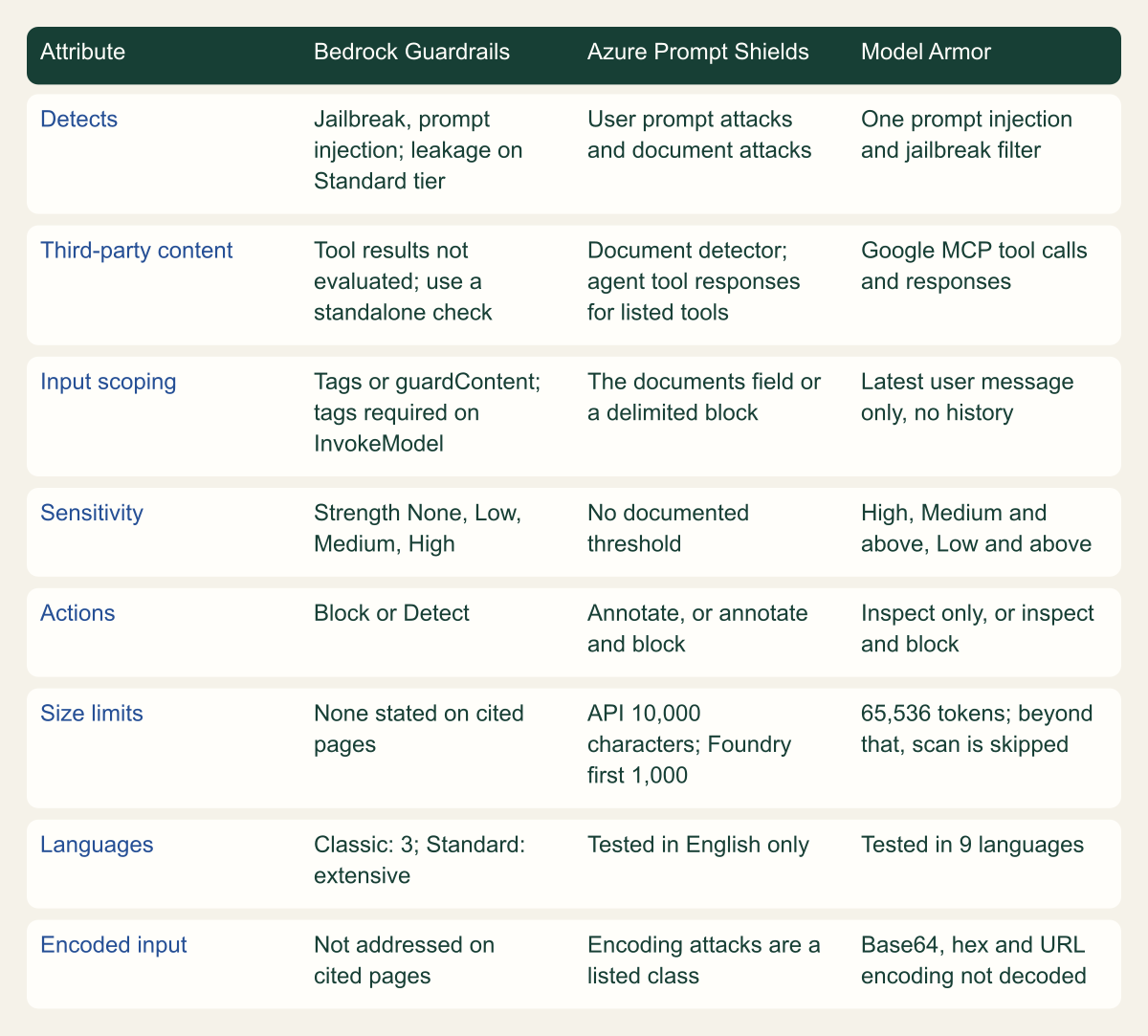
Documented scope, modes and limits
The services differ most in what content reaches the classifier, not in what they claim to detect. [1][8][15]

Source. Source-derived from AWS, Microsoft and Google documentation reviewed October 7, 2026. [1][2][3][4][8][9][10][11][12][15][16][19]
Method. Each cell condenses a documented statement from the cited pages; no accuracy or performance data is implied. Blank or unstated items are marked as not stated rather than inferred.
Accessible table and figure data
| Attribute | Bedrock Guardrails | Azure Prompt Shields | Model Armor |
|---|---|---|---|
| Detects | Jailbreak, prompt injection; leakage on Standard tier | User prompt attacks and document attacks | One prompt injection and jailbreak filter |
| Third-party content | Tool results not evaluated; use a standalone check | Document detector; agent tool responses for listed tools | Google MCP tool calls and responses |
| Input scoping | Tags or guardContent; tags required on InvokeModel | The documents field or a delimited block | Latest user message only, no history |
| Sensitivity | Strength None, Low, Medium, High | No documented threshold | High, Medium and above, Low and above |
| Actions | Block or Detect | Annotate, or annotate and block | Inspect only, or inspect and block |
| Size limits | None stated on cited pages | API 10,000 characters; Foundry first 1,000 | 65,536 tokens; beyond that, scan is skipped |
| Languages | Classic: 3; Standard: extensive | Tested in English only | Tested in 9 languages |
| Encoded input | Not addressed on cited pages | Encoding attacks are a listed class | Base64, hex and URL encoding not decoded |
| Attribute | Bedrock Guardrails | Azure Prompt Shields | Model Armor |
|---|---|---|---|
| Detects | Jailbreak, prompt injection; leakage on Standard tier | User prompt attacks and document attacks | One prompt injection and jailbreak filter |
| Third-party content | Tool results not evaluated; use a standalone check | Document detector; agent tool responses for listed tools | Google MCP tool calls and responses |
| Input scoping | Tags or guardContent; tags required on InvokeModel | The documents field or a delimited block | Latest user message only, no history |
| Sensitivity | Strength None, Low, Medium, High | No documented threshold | High, Medium and above, Low and above |
| Actions | Block or Detect | Annotate, or annotate and block | Inspect only, or inspect and block |
| Size limits | None stated on cited pages | API 10,000 characters; Foundry first 1,000 | 65,536 tokens; beyond that, scan is skipped |
| Languages | Classic: 3; Standard: extensive | Tested in English only | Tested in 9 languages |
| Encoded input | Not addressed on cited pages | Encoding attacks are a listed class | Base64, hex and URL encoding not decoded |
What a classifier cannot cover
Each service is a learned classifier deciding whether text looks like an attack, and that approach has known weaknesses. In a 2025 study, Hackett and colleagues evaded six prompt injection and jailbreak detectors, including Azure Prompt Shield, with character injection and adversarial machine learning techniques, reporting up to 100% evasion success in some instances while the attack still worked. Those results describe the versions tested then, not today's classifiers, but the mechanism carries over: a detector that recognizes patterns can be pushed outside them. OWASP's 2025 entry lists input and output filtering as one of seven mitigations and says it is unclear whether fool-proof prevention exists. [22][21]
Three gaps remain whichever service you pick. The first is actions: a filter scores text, but harm in an agent comes from a tool call with attacker-chosen arguments, and Bedrock documents that it does not evaluate generated tool arguments at all. The second is outputs: an injected instruction can make the model emit a link, query or command that an input filter never sees. The third is data access: a filter cannot tell whether the caller was entitled to the document that carried the attack. Each gap needs its own control. [3]
Test a filter before you trust it
Start every filter in its non-blocking mode: Detect in Bedrock, annotate in Foundry, or INSPECT_ONLY in Model Armor. Run it on a sample of real traffic and on attack cases written for your application, then read the traces. The numbers that matter are your own: how often benign traffic is flagged at each threshold, how many seeded attacks pass, and the added latency at your tail percentiles. [1][10][15]
Write cases that probe placement as well as wording. The table lists cases that follow from the limits documented above; each checks whether the attack reaches the classifier at all, which no vendor benchmark can tell you. Keep the corpus in version control and rerun it whenever the filter changes. Pin Bedrock enforcement to a numbered guardrail version, which AWS describes as immutable, and pin production Model Armor templates to a filter version rather than Latest. [7][20]
Test the benign side too. Users paste stack traces, configuration files and runbooks written for other systems, and support tools see phrases such as "ignore the previous error" constantly. That text resembles injection, and a threshold tuned on generic attack sets may block it. Include such samples so a threshold change shows its cost before users report it.
For agents, add an end-to-end case. As a hypothetical example, plant an instruction in a test document your retriever will return, ask an innocent question that retrieves it, and record where the attack was caught, or confirm that the tool policy stopped the resulting action when nothing did. [3][11]
| Test case | What it probes | Documented behavior to confirm |
|---|---|---|
| Attack in the current user turn | Baseline detection at your threshold | All three screen a user turn that is sent to them |
| Attack only in a tool result | Common indirect injection path | Bedrock skips toolResult; Foundry scans supported tools only |
| Attack inside a retrieved document | RAG and email assistants | Azure judges it as a document only via documents or the delimiter |
| Bedrock InvokeModel call without tags | Silent coverage gap | Prompt attacks are not filtered |
| User text that closes the tag | Static suffix risk | A random suffix per request mitigates this |
| Attack after character 1,000 | Foundry moderation bound | Only the first 1,000 characters are moderated |
| Attack past 65,536 tokens | Model Armor token limit | Returns EXECUTION_SKIPPED, not a pass |
| Base64 or URL-encoded payload | Encoding evasion | Model Armor does not decode; Azure lists encoding attacks |
| Payload split across two turns | Single-turn screening | Model Armor keeps no history |
| Attack in a language you serve | Language coverage | Classic tier: three languages; Prompt Shields tested in English |
| Screening service unavailable | Failure behavior | Agent Platform skips sanitization and continues |
Choosing and placing a filter
Begin with the service your model platform already integrates inline, because central enforcement through Bedrock enforcement policies, Foundry guardrail assignment or Model Armor floor settings is harder for one application team to skip. Then add standalone calls wherever the inline filter cannot see. The example below shows the shape of a Bedrock standalone check on text returned by a tool; the role mapping is an application choice, since the API defines no tool role. [5][6][7][10][17]
Work through the remaining steps in this order:
- List every place untrusted text enters the context: user turns, retrieved documents, tool results, MCP responses, file uploads and stored memory.
- Mark the boundary each filter needs: random-suffix tags or guardContent in Bedrock, the documents field or delimiter in Azure, the latest user message alone in Model Armor.
- Screen third-party content when it arrives, with InvokeGuardrailChecks, shieldPrompt documents or sanitizeUserPrompt, wherever the inline integration does not cover that source.
- Run detect, annotate or inspect-only mode against real traffic and the placement tests, and set thresholds from that data.
- Decide in code what happens when a screening call fails, and log each verdict with the guardrail or filter version that produced it.
- Assume some attacks pass, and keep tool authorization, output validation and document permissions independent of the filter.
{
  "messages": [
    {
      "role": "user",
      "content": [
        {
          "text": "<tool result text returned by the search tool>"
        }
      ]
    }
  ],
  "checks": {
    "promptAttack": {
      "categories": [
        {
          "category": "PROMPT_INJECTION"
        },
        {
          "category": "JAILBREAK"
        }
      ]
    }
  }
}
Method and provenance
Source-led comparison of AWS, Microsoft and Google documentation, the OWASP LLM Top 10 entry and one peer research preprint, with original conceptual figures and explicitly hypothetical test cases. Sources were reviewed on October 7, 2026.
No AWS, Azure or Google Cloud account was used and no filter was run. Scope, modes, limits and feature status are bounded to the cited pages as of the review date; several features are in preview and may change, and no claim is made about detection accuracy.
AI assistance. AI assisted research synthesis, drafting, diagram planning and visual production, with deterministic editorial checks. No personal deployment experience, independent human review or live test is claimed.
Published under the Cloud Security Desk organizational byline. Read the practitioner guide policy.
References
- Detect prompt attacks with Amazon Bedrock Guardrails Amazon Web Services. Accessed .
- Apply tags to user input to filter content Amazon Web Services. Accessed .
- Include a guardrail with the Converse API Amazon Web Services. Accessed .
- Safeguard tiers for guardrails policies Amazon Web Services. Accessed .
- Use the InvokeGuardrailChecks API in your application Amazon Web Services. Accessed .
- InvokeGuardrailChecks concepts: messages, content block types, and checks Amazon Web Services. Accessed .
- Apply cross-account safeguards with Amazon Bedrock Guardrails enforcements Amazon Web Services. Accessed .
- Prompt Shields in Azure AI Content Safety Microsoft. Accessed .
- Document embedding in prompts (Foundry classic) Microsoft. Accessed .
- Guardrails and controls overview in Microsoft Foundry Microsoft. Accessed .
- Intervention points concepts Microsoft. Accessed .
- Region availability and service limits for Azure AI Content Safety Microsoft. Accessed .
- Quickstart: Detect prompt attacks with Prompt Shields Microsoft. Accessed .
- Gemini Enterprise Agent Platform (formerly Vertex AI) Google Cloud. Accessed .
- Model Armor overview Google Cloud. Accessed .
- Model Armor quotas and limits Google Cloud. Accessed .
- Integrate Model Armor with Gemini Enterprise Agent Platform Google Cloud. Accessed .
- Integrate Model Armor with Google and Google Cloud MCP servers Google Cloud. Accessed .
- Sanitize prompts and responses Google Cloud. Accessed .
- Set the filter version Google Cloud. Accessed .
- LLM01:2025 Prompt Injection OWASP GenAI Security Project. Accessed .
- Bypassing LLM Guardrails: An Empirical Analysis of Evasion Attacks against Prompt Injection and Jailbreak Detection Systems Hackett, Birch, Trawicki, Suri and Garraghan (arXiv). Published . Accessed .
- Use the ApplyGuardrail API in your application Amazon Web Services. Accessed .